Analog to Digital Conversion
AD8_Command_Set

Turn Sensors into Actions
Built-in analog inputs let you read switches and 0-5V sensors in real time - and automatically trigger relays, alerts, or automation rules. Monitor data, control outputs, or send notifications using software tools, with no extra hardware required.
The AD8 Command Set
"This isn't just a relay board - it's a control system."
Reading Switches/Variable Resistance Signals
This controller includes eight channels of 8/10-bit Analog-to-Digital Converters capable of reading 0 - 5V DC signals. The ADCs allow you to monitor external sensors or detect contact-closure inputs. Connect temperature sensors, light sensors, current sensors, buttons, switches, or any device that outputs a 0 - 5V signal or simple contact closure.
- With 8-bit resolution, inputs convert 0 - 5V into values from 0 to 255
- With 10-bit resolution, values range from 0 to 1023
A/D Inputs
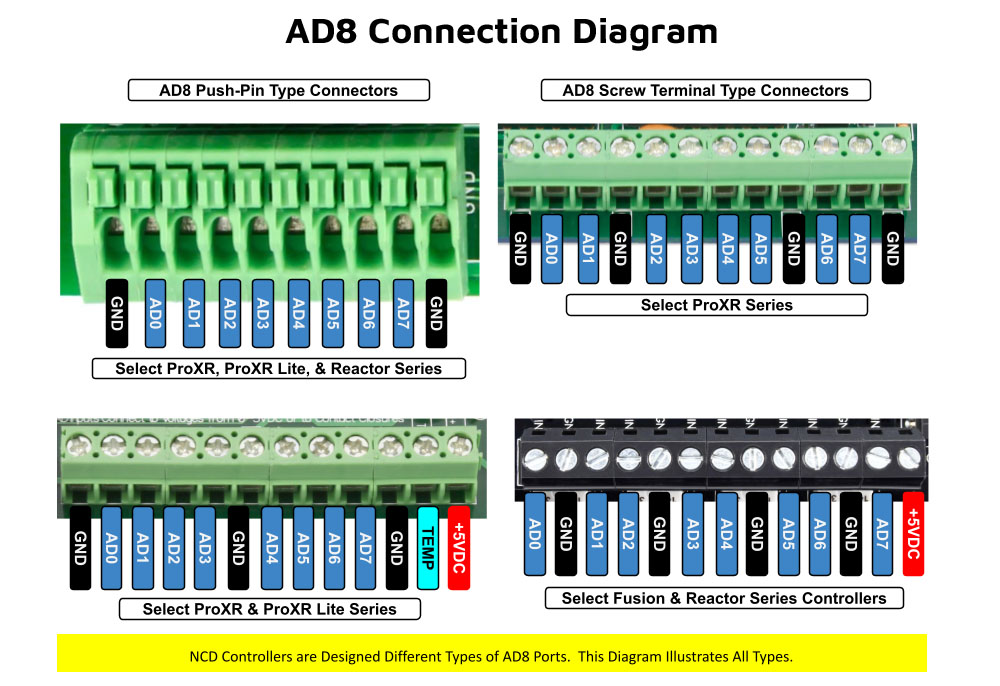 All ProXR Lite boards and ProXR boards that begin with ZADR or ZADSR include an onboard 8-channel Analog-to-Digital converter in addition to relay control. Each channel accepts a 0-5V DC input and converts it into a numeric value for processing.
Using the AD8 Command Set, analog voltages are translated into digital values (8- or 10-bit resolution, depending on configuration), making it easy to monitor and act on sensor data from a wide range of devices.
Each analog input can be configured to turn relays ON or OFF, toggle relay states, flash relays, enable or disable flashing, send push-notification data, and more - all based on live input values read in real time.
As shown in the graphic, ProXR AD8 controllers are available with multiple analog input connector options. One of the connector styles shown corresponds to the specific board you are viewing, allowing you to quickly identify how sensors will physically connect. All analog inputs share a common ground, simplifying wiring and making it easy to connect multiple sensors to a single controller.
Once connected, A/D input values can be used consistently across N-Button and Base Station software for automation, relay control, monitoring, and diagnostics. This unified approach ensures predictable behavior from hardware to software, whether you are building a simple monitoring system or a fully automated control solution.
Analog Inputs Controlling Relays
ProXR AD8 relay controllers allow analog inputs to directly control onboard relays using the same A/D input data used by N-Button and Base Station software (see Relay Activator section below). This makes it easy to monitor sensor values, automate relay behavior, and visualize input data across all supported software tools.Analog to Digital Connections
AD8 controllers are designed for stable sensor and switch monitoring. A/D inputs should never be left floating - each input must connect to a voltage or ground.A built-in 10K pull-up/pull-down resistor (jumper-selectable) ties each input to +5V or ground to prevent floating conditions. While this resistor adds slight loading, the improved stability far outweighs any minor interference.
AD8 Command Set
The AD8 Command Set reads analog voltages using the controller's 8-channel 8/10-bit ADC.- 8-bit mode: Converts 0 - 5V to values from 0 to 255
- 10-bit mode: Converts 0 - 5V to values from 0 to 1023
What a Command Looks Like
At its simplest, an AD8 command is only two bytes:254 150 - Read Input 1
0xFE 0x96 - If you require Hex
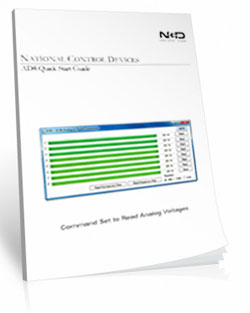
The controller processes the command and returns a value byte Decimal: 0-255, Hex: 0x00-0xFF when the operation completes. For the complete list of commands, download the AD Quick Start Guide.
View A/D Input Data in Real Time
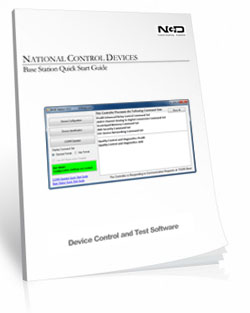
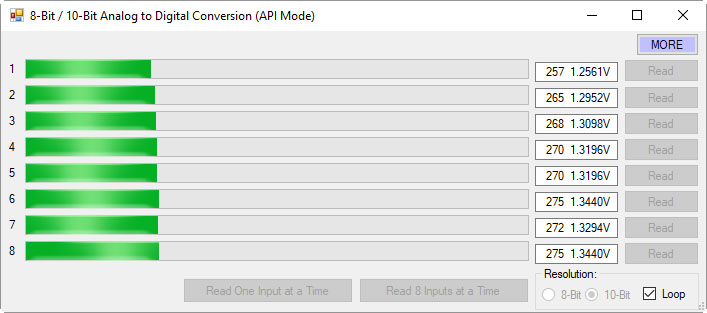 Base Station software allows you to read all analog inputs in real time while clearly displaying the exact command data being sent to and from the controller. In the example shown, all eight A/D input channels are read simultaneously and displayed as live numeric values along with a real-time graph, making it easy to visualize how each input changes over time.
Because Base Station shows the actual commands used to read the A/D inputs, it becomes an invaluable learning and diagnostic tool. You can see precisely how input values are requested, returned, and interpreted by the controller, then copy those commands directly into your own applications or custom software. This dramatically simplifies development, testing, and troubleshooting when integrating A/D inputs into larger systems.
Whether you are validating sensor behavior, monitoring multiple inputs at once, or building your own custom control software, Base Station gives you clear visibility into both the data and the communication behind it.
💡 Relay Pros ProTip:
Base Station can show you the exact command used to read the analog inputs. Click the More button in the upper-right corner of the Base Station window to expand the interface and display the command data being sent to and from the controller.
As you read inputs or monitor channels in real time, the software displays the precise commands used to request the A/D values and the data returned by the controller. This makes Base Station an excellent learning tool for developers - you can watch the commands being generated and then use the same decimal or hexadecimal values directly in your own software.
AD8 Relay Activator
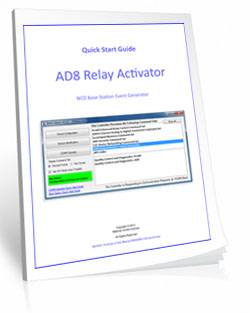
Control relays with a switch or button connected directly to the board for manual control. For full details download the AD8 Relay Activator Quick Start Guide.
Relay Activator
Relay Activator and Analog Inputs
Base Station Software's Relay Activator is ideal for applications that primarily rely on computer control but still require occasional manual operation. By connecting external buttons or switches, you can take direct, hands-on control of any relay without giving up software-based control.This creates true bi-directional control. For example, a relay can be turned ON through the computer interface and later turned OFF using a physical switch - or vice versa. Whether you're testing, troubleshooting, or building a hybrid manual/software-controlled system, Relay Activator keeps everything synchronized and predictable.
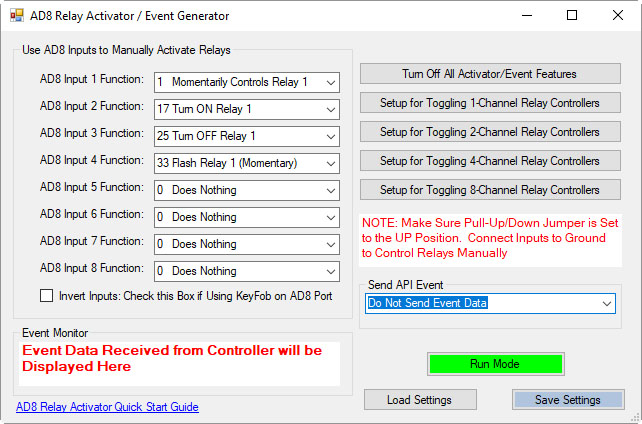 As shown in the example, each input includes a pull-down menu that allows you to select exactly how that input will control a relay. This makes configuration fast and intuitive - simply choose the desired action for each input without writing any code.
Each of the 8 input channels can be configured to control relays 1 through 8, with multiple action types available. This flexibility allows every input to perform exactly the function your application requires.
This level of control makes Relay Activator perfect for operator panels, test benches, safety overrides, and any application where manual interaction and software automation need to work together seamlessly.
AD8 Relay Activator Quick Start Guide.
Available Relay Actions per Input
Each input can be assigned one of the following actions:
- Momentary Control - Activates the relay only while the input is engaged
- Toggle Relay State - Alternates the relay between ON and OFF
- Turn Relay ON - Forces the relay into the ON state
- Turn Relay OFF - Forces the relay into the OFF state
- Flash Relay (Momentary) - Pulses the relay while the input is active
- Flash Relay (Toggle) - Toggles flashing behavior ON and OFF
💡 Relay Pros ProTip
Use the Turn Relay OFF action as a panic-stop or fail-safe control. A single button, switch, or sensor input can immediately force one relay - or multiple relays - into the OFF state. This is ideal for emergency stops on machinery, instantly disabling door locks, or overriding automation logic when a quick shutdown is required.AD8 with N-Button
Using N-Button software, you can control relays, build desktop meters that show real-time readings from the AD8 inputs. You can also create automatic push notifications messages triggered by those sensor values.
N-Button Software
Using A/D Inputs with N-Button
N-Button Lite and Pro support powerful A/D Input Automation rules that allow you to automatically control relays based on analog input levels. Simply define a voltage threshold or range, and N-Button will energize or de-energize relays as conditions change.N-Button also supports Send Email and Text Message actions (Push Notifications), enabling automatic alerts when an A/D input reaches a specific level or falls within a defined range. Relay control and notifications can work together seamlessly, all driven by live A/D input data.
Works Seamlessly with N-Button Software
 Each A/D channel supports industry-standard 0-5V inputs, making it simple to integrate a wide range of sensors without extra hardware. Using N-Button, you can:
- Build desktop meters that show real-time sensor data
- Create dashboards with multiple sensor feeds
- Trigger Push Notification alerts from A/D thresholds
- Control relays based on sensor conditions - no programming required
Using the Input Information
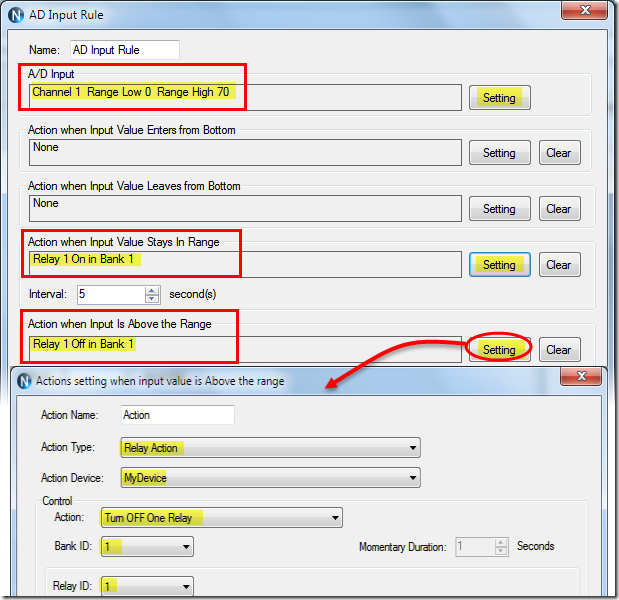 N-Button allows you to use A/D input values in multiple ways without writing code. Numeric values or value ranges can be used to:
- Trigger text or email alerts when thresholds are exceeded
- Control individual relays or banks of relays
- Display live readings on customizable desktop meters
Control Relays with A/D Inputs
N-Button Lite/Pro software makes it incredibly easy to automate relay control using A/D input levels from this board. Simply create an Automation rule that links any A/D input channel to any relay channel. When the input voltage reaches the threshold you define, the relay energizes (turns on). When the input drops below that threshold, the relay de-energizes (turns off). No programming required.Precision + Performance
High-resolution readings ensure accurate measurements, even in demanding environments. Stream live data or automate actions based on your input thresholds.Create Desktop Meters
 N-Button software lets you build live desktop meters that display real-time readings from the AD8 inputs, giving you constant visibility of your sensor data right on your screen. In the example shown, a "Live Soil Moisture Reading" meter provides instant feedback on soil conditions. Right below the meter, Relay 1 and Relay 2 buttons allow you to manually control relays directly from your desktop, or see their current status at a glance - the buttons change color to indicate whether a relay is on or off, giving you a complete view of your system in real time.
Each meter can be individually labeled, like the "Soil Moisture" label shown, making it easy to identify each sensor at a glance. Meter increments are fully customizable - the "Customizable Increments" callout shows how you can adjust the scale to match your application, whether you need fine-grained precision or a broader overview.
N-Button also allows you to arrange multiple meters on your desktop, creating a personalized dashboard that updates in real time. This makes it simple to compare different sensors side by side, spot trends, and react quickly if readings go outside expected ranges (unless you have the relays set automatically). Whether you're monitoring a single sensor or a full set of eight, N-Button makes live data monitoring intuitive and actionable.
Push Notification
N-Button software also includes a powerful point-and-click messaging system that sends alerts to the recipients you choose. Because N-Button runs on your PC, it can automatically deliver text messages and/or emails directly from your computer.Send SMS and email alerts when voltage levels are reached. Customize the subject and message to identify exactly what triggered the alert. You can even set repeat notifications at a defined interval until the input level returns to normal.
Visit our N-Button Page