1-Channel Relay Timer Software
RELAYTIMER_R1X$49.00

1-Channel Relay Timer Software
Relay Timer R1X is a programmable timer software to control relays according to a time schedule. The software can be installed on a computer or server and will get it's time from there. For applications where the time schedule must match the computer's time this is a perfect choice. Shift changes, school bells and such can match a time clock installed on the same computer.
Relay Timer R1X at a Glance
- Controls 1 Relay
- Use any ProXR or ProXR Lite Board - Control Relay with Time Schedule
- Easily Set Time Schedule
- Multiple Schedule Settings
- Settings for Reoccurring Times
- Save Schedule for later loading - Manually Take Control of Relays
- Rapid Button to Control Relay Directly
- Override Schedule at any Time
- Turn Relay On/Off Manually
- Automatically Switch Back to Auto Mode - Includes Time Travel Software
- Changes Speed of Computer's Clock
- Great for Bench Testing
Create Time Schedules
This timer software makes it easy to turn relays on and off automatically at times you choose. Create repeating schedules - daily, weekly, monthly, or on specific days - and connect using USB, serial, or your network.
Time Control Software
Time Schedule Control
Relay Timer software works with all ProXR and ProXR Lite relay controllers and supports every available interface - USB, wired, wireless, and network. No matter how your board is connected, Relay Timer communicates seamlessly to deliver reliable, scheduled relay control.Precision Scheduling Using Your Computer's Clock
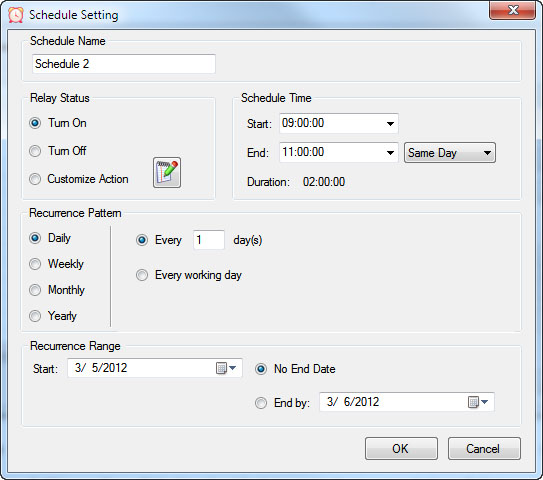 Relay Timer uses the computer's system clock to maintain accurate, drift-free timing. This ensures relay actions stay perfectly synchronized with other applications running on the same machine, such as time clocks or automation software.
A high-resolution timing engine - similar to those used in multimedia applications - provides timing accuracy down to 5 - 10 milliseconds, making Relay Timer well suited for real-time and precision-based control tasks.
High-Speed, Multi-Relay Control
Relay Timer can update up to eight relays simultaneously using the ProXR and ProXR Lite communication protocol. When speed matters, all eight relays can be updated in approximately 30 milliseconds.In multi-relay applications, Relay Timer calculates the state of all relays together, even though each relay operates independently. This ensures fast, coordinated, and predictable behavior across complex schedules.
Take Manual Control
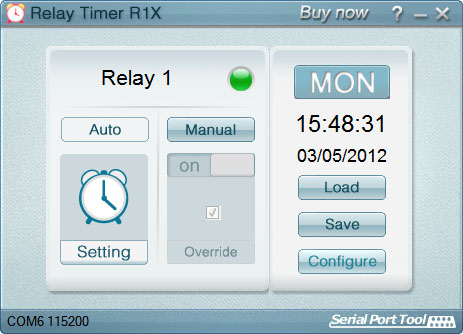 At any time, you can manually take control of a relay to interrupt the active schedule. Resume automatic operation instantly or set a specific time for the software to return to scheduled control - ideal for maintenance, testing, or temporary overrides such as school bells for assemblies.
Designed for Real-World Reliability
Relay Timer was built to handle real-world conditions, not just ideal scenarios. Hardware control software must be resilient to connection interruptions, power failures, and system crashes.Instead of failing silently, Relay Timer detects abnormal conditions, reports them clearly, and is designed to recover automatically with minimal user intervention once the issue is resolved.
Automatic Recovery After Power or Connection Loss
If a power failure occurs, communication is lost, or a board becomes unresponsive, Relay Timer immediately reports the issue while continuing to track relay states internally.- Once communication is restored, the software automatically:
- Reconnects to the board
- Determines where it is in the schedule
- Restores each relay to its correct state

Relay Timer Videos
Time Travel
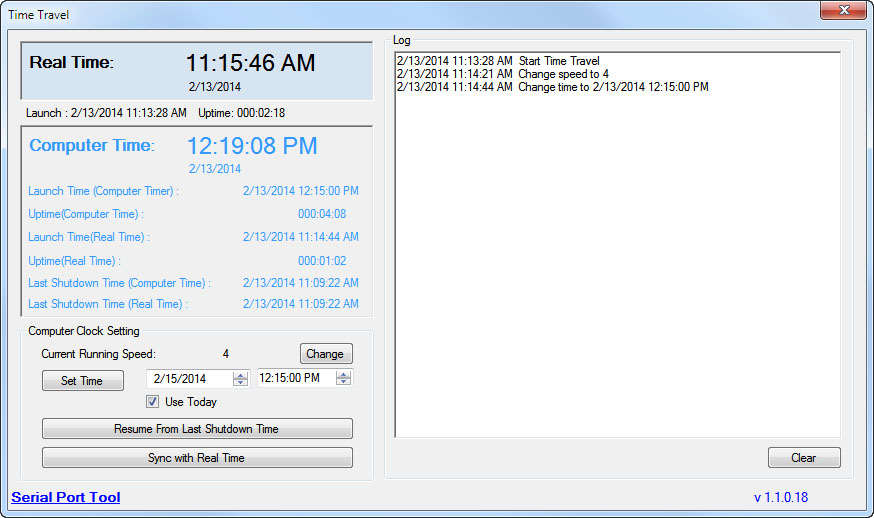 Time Travel software solves the age old question of time travel (at least for your PC)! The software is free and is included is all versions of Relay Timer, Quick Timer and N-Button software sold. Time Travel is also offered as a free download on this site. Time Travel allows you to test the time settings you have set in Relay Timer for example. You can set your time configuration and wait in real time for the relays to trigger or you can speed up your computer's clock and test quickly using Time Travel! Save time and frustration by making changes quicker than real time!
Make Time Run Faster
Time Travel can override the current computer clock with any time value! It can change the running speed of the computer clock. If the speed is set as 3600 times, a day will pass just in 24 seconds!Great for Bench Testing
Time Travel is a handy tool for testing applications based on the computer's clock, like timer software, schedule software, or automation software. Time Travel provides you a very fast way to test the Relay Timer, Quick Timer and N-Button Software we offer.Preset configurations
Time Travel has a load preset function, where a list of configurations can be loaded into the program for the convenience of the user. Users can also create a preset within the program and export the list for future uses. Time Travel will remember the settings from the previous run time and load it upon its start. The program does not need to be configured each time it is being used. Time Travel will also automatically reset the system time back to the current local time after exiting the program. It will only affect the system time during its run time, and it will not change time setting after exiting the program.How to Use
 Time Travel is really pretty simple! Just download Time Travel, unzip it and run TimeTravel.exe directly. It needs to be run as administrator. (Right-click the TimeTravel.exe file & Run as Administrator)
- Current Running Speed will change the running speed of the computer clock
- Set Time button will change the computer clock to the specified time
- Resume From Last Shutdown Time button will restart from the last shut down time. It is the computer time, not real time. In case the computer shutdown accidentally, it will remember the last running computer time
- Sync with Real Time button will change the computer clock to the Real Time. Only if Current Running Speed is 1, the computer clock will run the same speed as the Real Time
Time Travel Video
Time Travel Software
Time Travel can override the current computer clock with any time value! It can change the running speed of the computer clock. If the speed is
set as 3600 times, a day will pass just in 24 seconds! Speed up your computer's clock and test quickly using Time Travel! Save time and
frustration by making changes quicker than real time! Time Travel is included with Relay Timer!
Click Here for More
Quick Start Guides
Below is the Software Tutorial for the Relay Timer R1X.