

Relay Timer Software at a Glance...
- Relay Timer
- Use any ProXR or ProXR Lite Board
- Control Relay with Time Schedule
- Easily Set Time Schedule
- Multiple Schedule Settings
- Save Schedule for later loading - Quick Timer
- Use any ProXR or ProXR Lite Board
- Control Relay in Time Intervals
- Easily Set Active Duration
- Multiple Intervals per Duration
- Save Schedule to Computer - Time Travel
- Change Running Speed for the Computer Clock
- Track Current Time After Clock Change
- Computer Clock Returns to current time on exit
Create Time Schedules
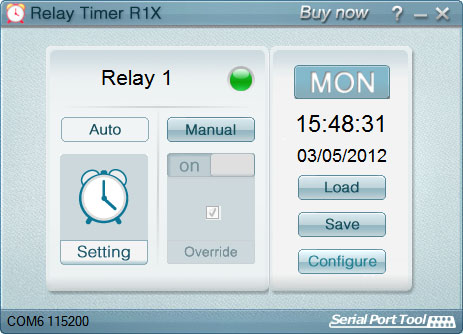
Timer software makes it easy to turn relays on and off automatically at times you choose. Create repeating schedules - daily, weekly, monthly, or on specific days - and connect using USB, serial, or your network.
Time Control Software
Relay Timer
Time Schedule Control
Relay Timer software works with all ProXR and ProXR Lite relay controllers and supports every available interface - USB, wired, wireless, and network. No matter how your board is connected, Relay Timer communicates seamlessly to deliver reliable, scheduled relay control.Precision Scheduling Using Your Computer's Clock
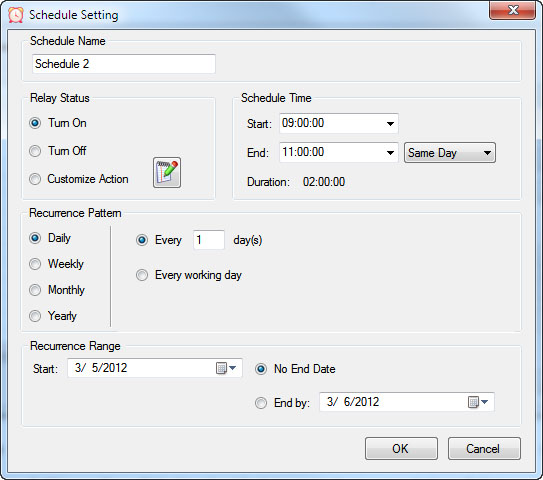 Relay Timer uses the computer's system clock to maintain accurate, drift-free timing. This ensures relay actions stay perfectly synchronized with other applications running on the same machine, such as time clocks or automation software.
A high-resolution timing engine - similar to those used in multimedia applications - provides timing accuracy down to 5 - 10 milliseconds, making Relay Timer well suited for real-time and precision-based control tasks.
High-Speed, Multi-Relay Control
Relay Timer can update up to eight relays simultaneously using the ProXR and ProXR Lite communication protocol. When speed matters, all eight relays can be updated in approximately 30 milliseconds.In multi-relay applications, Relay Timer calculates the state of all relays together, even though each relay operates independently. This ensures fast, coordinated, and predictable behavior across complex schedules.
Create Time Schedules
QuickTimer lets you turn relays on or off for a set amount of time - just like setting a timer on an oven or microwave. Once the timer starts, the software handles everything automatically.
Quick Timer Software
Compatible with ProXR & ProXR Lite Boards
Quick Timer software works with all ProXR and ProXR Lite relay controllers and supports every available interface, including USB, wired, wireless, and network connections. The software automatically communicates with your board regardless of how it's connected, making setup quick and straightforward. Designed for responsive, duration-based control, Quick Timer delivers fast, reliable relay operation for timed sequences, test cycles, and repeatable automation tasks.Duration-Based Relay Control (Not Time-of-Day Scheduling)
Quick Timer is designed for applications where how long a relay is energized matters more than what time of day it activates. Instead of using the computer's clock, Quick Timer runs sequences based on a defined time duration.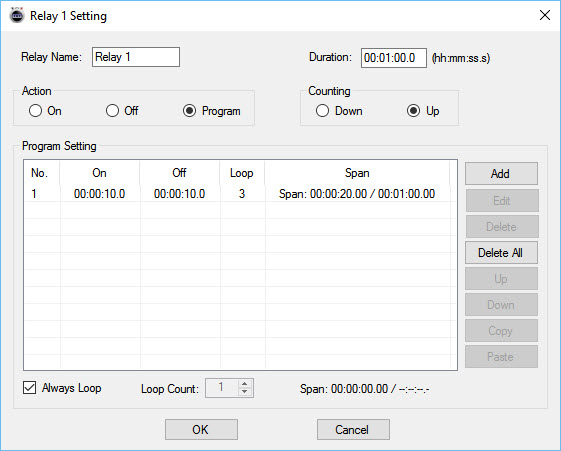
A sequence is manually started and can:
- Run once and stop automatically, or
- Loop continuously until manually stopped
Flexible Time Sequences Within a Single Duration
Quick Timer allows you to define a total run duration first. Within that duration, each relay can follow its own independent on/off timing pattern.Example: 30-Second Sequence
- Relay 1 turns on for 5 seconds, then off for 5 seconds
- Relay 2 turns off for 5 seconds, then on for 5 seconds
- Relay 3 turns on for the first 10 seconds, then off for 20 seconds
- Relay 4 remains off for 10 seconds, then turns on for 20 seconds
Time Travel
 Time Travel software solves the age old question of time travel (at least for your PC)! The software is free and is included is all versions of Relay Timer, Quick Timer and N-Button software sold. Time Travel is also offered as a free download on this site. Time Travel allows you to test the time settings you have set in Relay Timer for example. You can set your time configuration and wait in real time for the relays to trigger or you can speed up your computer's clock and test quickly using Time Travel! Save time and frustration by making changes quicker than real time!
 Control By Time Schedule
 Control By Time Interval
 Travel In Time Software