Wireless Contact Closure Relay 4-Channel 30-Amp
MIRCR430
Contact Closure Without Running Wire
The MirCR430 is perfect for replacing an existing wired setup or installing control where running cable would be expensive or flat-out impossible. These boards let you control a relay wirelessly using a simple dry contact input.Close the contact → Relay Energizes (Turns On)
Open the contact → Relay Turns Off
Reliable Remote Relay Control - Wirelessly!
Switch in Another Location
Flip a switch over here and trigger a pump, gate, door lock, irrigation system - anything - over there. Send a clean dry-contact output across long distances without trenching, conduit, or cable runs.If wires can't go there, the MirC series probably can.
Reliable Wireless Communication
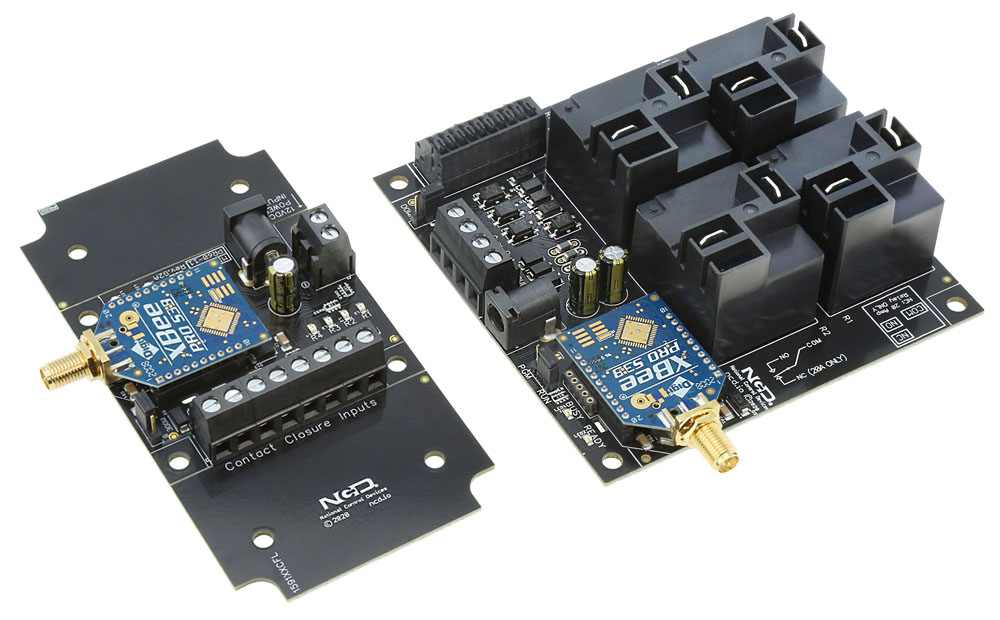
MirC boards communicate with a line-of-sight range of up to 2 miles (3.2 km). The MirCR430 models are equipped with 900HP 900MHz modules, paired together using the unique serial numbers of the installed radios for rock-solid one-to-one communication.
Wireless Contact Closure Relay
- 4 30-Amp Relay Installed
- Single Pole Single Throw (SPST) Relays
- Wire to Normally Open Position Only
- Wire Using 1/4" Quick Disconnect Terminal
- Temperature Rating -40° C to 85° C - Sender Board Controls the Receiver Board
- Dry Contact Inputs on the Sender Board
- Relay Outputs on the Receiver Board
- Perfect for Extending a Contact Closure - Onboard 900MHz Wireless Interface
- Reliable 900 MHz Radios Installed
- Line of Sight Operation
- 2-Mile Range
- Multiple Pairs will not Interfere with Each Other
- For Use in North America (US, Canada, Mexico) - Works Together Right Out of the Box!
- No Computer, No Programming, No Set-Up!
)
Reliable Wireless Range
For the best wireless performance, give the antennas a clear line of sight. Obstacles like walls, buildings, trees, and especially metal can weaken or block the signal. If possible, position the antennas so they can "see" each other without anything in the way.
MirC Wireless Contact Closure
"If your alternative involves drilling under a road...
it might be time to go wireless."
Replace Old Wires with the Wireless MirC
MIRCR430 boards are sold as a paired set, including both the Transmitter and Receiver boards. This system provides wireless relay control using a simple dry contact input - no voltage required.
The dry contact input on the Transmitter board directly controls the relay on the Receiver board. When the contact on the transmitter side is closed, the relay on the receiver side energizes (turns ON). When the contact opens, the relay turns OFF.
 Stop Running Wires
Use MirC boards anywhere you need to send a contact closure to a remote location without installing long cable runs. Common applications include gate control, door locks, pumps, lighting - or any situation where extending wiring is difficult or costly.
All pricing listed on our website reflects the cost for the complete paired set (Transmitter and Receiver).
900MHz Wireless Module
Reliable Wireless Communication
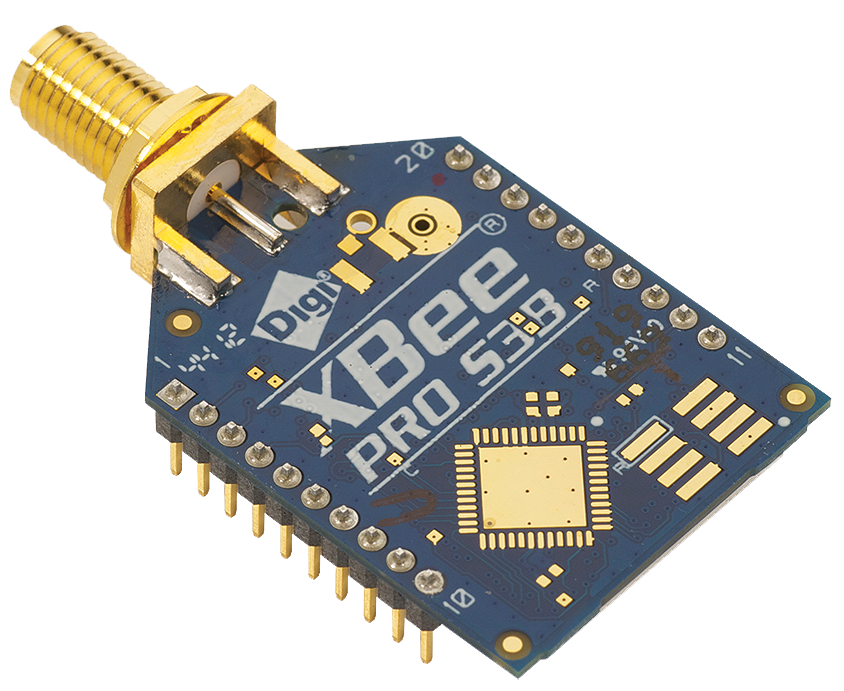 The MIRCR430 boards ship with 900HP wireless modules that are pre-paired using the unique serial numbers of each radio. These XBee-PRO 900 modules are built for low-latency, low-power, point-to-point communication - and they pack a punch. With up to 250mW of selectable transmit power, they can reach up to 15 miles line-of-sight when paired with the right antenna.
As always with wireless gear, every range test we quote is in clear line-of-sight. We can't accurately predict your real-world range - buildings, terrain, and local interference can all impact performance. Because of that, we can't estimate range from Google Maps images or guarantee results inside structures.
Standard Range Antenna
Every MirC controller includes the 900HP Standard Range Antenna, tested at 2 miles line-of-sight with excellent results. It's a 6" whip antenna with an RP-SMA threaded connector - just screw it right onto the wireless module and you're set.The manufacturer rates these modules for up to 28 miles with specialized antennas, but our testing focuses on real-world, practical setups. Same story here: line-of-sight testing only, since we can't predict range in obstructed environments or calculated from maps.
💡 Relay Pros ProTip:
Wireless isn't just for long distances. Even a short 25 ft run between gates, buildings, or control points can be faster and easier to solve without trenching or running conduit.
Installation & Environment
It worked on my bench... why not through two buildings and a metal wall??
MirC wireless range is based on clear line-of-sight between the antennas. While these 900 MHz radios support up to a 2-mile line-of-sight range, walls, buildings, trees, terrain, and especially metal can significantly reduce - or completely block - wireless communication.Upgrading to a higher-power radio will not magically punch through obstructions.
Clear line-of-sight always wins.
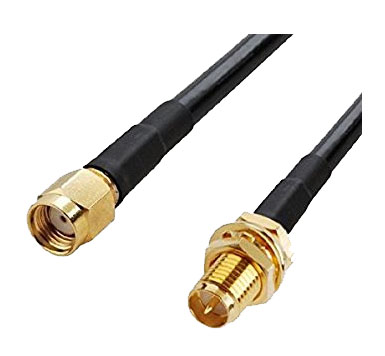
The good news is that in many real-world installations, you can usually find a reliable "sweet spot" by using antenna extension cables to relocate one or both antennas. Even small changes in antenna placement or height can make a big difference when the radios can better "see" each other.
Flexible Installation
Need better signal positioning? An optional extension cable (up to 20 ft / 6 m) allows you to relocate the antenna for improved line-of-sight. Uses standard RP-SMA (Reverse Polarity SMA) connections.What Happens When Communication is Lost
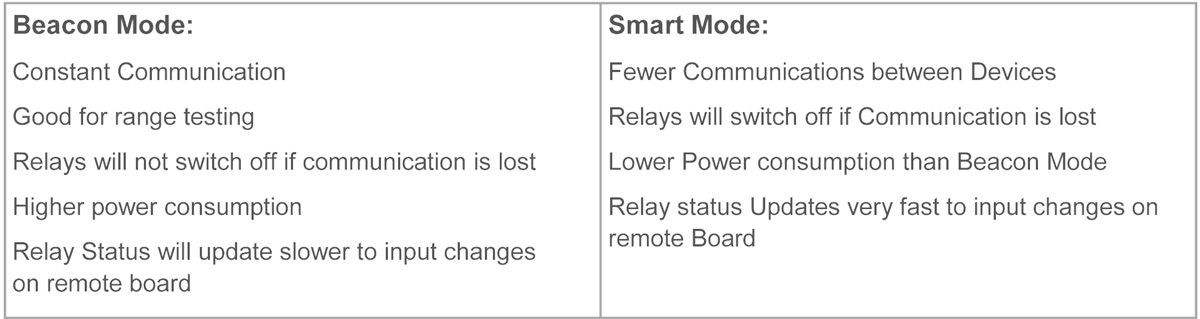
If a relay is energized and the connection drops between the two boards, you get to choose what happens next:- The relay can stay energized until communication returns (Beacon Mode) or
- The relay can turn off automatically (Smart Mode)
💡 Relay Pros ProTip:
Think about what should happen if communication between boards is interrupted.
For example, in an irrigation system, you'd likely want the relay to turn off if communication is lost - preventing a valve from staying open and flooding a field while you troubleshoot the connection. In other applications, you may want the relay to stay energized until communication is restored.
MirC controllers give you the flexibility to choose the behavior that fits your application - so you stay in control, even when communication isn't.
Multiple MirC Pairs, No Cross-Talk
Yep - multiple MirC pairs can operate within range of each other. Each pair is matched by the serial numbers of their wireless modules, so they won't step on each other's signals.However, if a large number of devices all share the same channel, you may see interference or dropped communications. There are several ways to manage that, so if you're planning a large deployment, reach out - we're happy to help with best-practices.
💡 Relay Pros ProTip:
Getting unreliable wireless performance in high-interference areas?
Large crowds, cell phones, and nearby radio systems can reduce range and reliability. In one installation at a racetrack, we improved signal performance by placing a simple reflector behind the antenna - just a small bowl lined with aluminum foil - aimed toward the transmitting device.
This creates a basic directional "dish" that helps focus the signal toward the receiver. It's a quick, low-cost way to improve reliability when you can maintain line-of-sight between devices.
Step-by-Step Connection Guide
- Connect Your Device:
- Wire the contact closure output of your device to the input terminals on the Sender Board
- Power Both Boards:
- Apply 12VDC Power to both the Sender and Receiver Boards
- Wireless Linking:
- The 900HP wireless modules automatically establish the communication link (no configuration required in standard MirC wireless systems)
- Use the Relay Output:
- Wire the relay contacts on the Receiver Board to the circuit or equipment you want to control at the remote location. Wiring examples can be found in the Relay Logic tab.
- Trigger the Closure:
- When the contact closure activates at the Sender Board, the Receiver Board's relay mirrors that state almost instantly
💡 Protect Your Dry Contact Inputs
It's tempting to start testing the connections as soon as you power up your new board, but keep the Power Input terminals completely separate from the Dry Contact Input terminals.The Dry Contact inputs are designed for a voltage-free contact closure. Once the board is powered, the Power Input terminals are live. Accidentally connecting power to a Dry Contact Input can damage the Sender Board immediately.
Power goes to Power. Dry Contact goes to Input. Keep them separate.
Works with Simple Contact Closures
MirC inputs are designed for clean, dry-contact signals - making them compatible with switches, relays, sensors, and more. No voltage required, just a simple contact closure to get reliable control.
MirC Board Features
"Reliable Remote Relay Control - No Matter How You Connect"
Switch From One Location - Control Another
MirC boards come in married pairs, letting you control a relay using a simple dry contact - no voltage input. That contact can come from a switch, a sensor, another relay - anything that can close a dry contact circuit.
When the input contact is closed, the relay stays energized. When the contact opens, the relay turns off. So the relay will follow either momentary or toggle-style inputs depending on what you wire into it.
Each MirC pair is built to handle tough environments - heat, cold, vibration - you name it. These boards are workhorses, and they're designed to stay that way.
Sender Board
"The board that gathers information."
Board with Inputs
The MirC sender board is the control point of the system. Inputs on the sender board wirelessly control matching relays on the receiver board.For example:
Input 1 controls Relay 1 on receiver board
Input 2 controls Relay 2 on receiver board
This allows each relay to be individually controlled from a single switch, sensor, or control output.
No Voltage Inputs
MirC boards are designed to work with dry contact inputs such as:- Pushbuttons
- Toggle switches
- Float switches
- Relay outputs
- Sensors and other contact closure devices
Inputs on MirC Sender Boards accept dry contact only - absolutely no voltage should ever be applied. Applying voltage to an input will damage the board, so keep it clean and simple: contact closure only.
Receiver Board
"The board that controls your equipment."
Board with Relays
Receiver Board wirelessly receive commands from the sender board and activate relays at remote locations. Systems can communicate up to 2 miles (3.2 km) line-of-sight with proper antenna placement.The receiver boards communicates from a single sender board, making MirC ideal wireless control across parking lots, gates, equipment areas, or large properties.
Relay Outputs
MirC relays act as dry-contact switches. They don't output voltage - they simply open or close the circuit feeding your device.Each relay is rated for 240 VAC or 24 VDC. For full electrical specifications and relay models, check out the Data Sheets tab above.
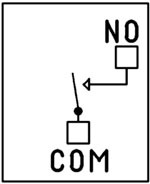
SPST Relay Installed
This MirC model is equipped with an SPST (Single Pole, Single Throw) relay. SPST relays do one thing and do it well - they simply connect or disconnect two wires.When the relay is energized, the Common (COM) contact connects to the Normally Open (NO) contact, completing the circuit. When the relay is off, the circuit is open.
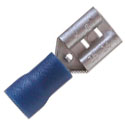
Wiring is done to the Common and Normally Open positions directly to the relay using standard 1/4" quick-disconnect terminals. (A matching connector is shown at right.)
Board Features
"What sets MirC apart."
Status of Remote Relays
Both boards include LEDs that show the real-time status of the relay on the remote board. Thanks to true 2-way wireless communication, status indicators stay accurate.If communication drops, the status LED turns off so you know immediately. Every MirC controller also includes a Busy/Ready LED:
- A flashing Busy LED means the remote board received and accepted your input.
- If the Busy LED doesn't flash, the other board is out of range or unable to respond.
2 Million+ Cycles
MirC relays are built for longevity - expect years of reliable operation and millions of mechanical cycles. Every board ships with a 5-year warranty and 30-day money-back guarantee.
RoHS Compliant & Lead-Free
All MirC controllers are built with RoHS-compliant components and lead-free solder.Power & Protection
"Reliable Power = Reliable Switching"
Essential Power Requirements
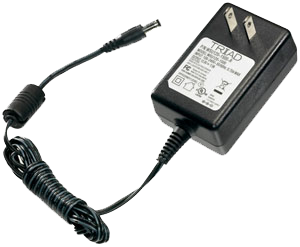 Clean, regulated power is critical.
A stable 12VDC supply ensures both the relay coils and onboard firmware operate correctly. Unstable or noisy power can cause improper switching or communication issues.
We recommend the PWR12-US (120VAC → 12VDC @ 1.25A) or our international supply with interchangeable adapters.
Learn More
Induction Suppression
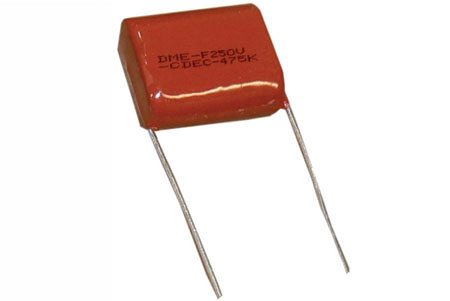 One of the most important parts of relay control - yet the most commonly overlooked - is inductive load protection.
Anything with a magnetic coil (motors, solenoids, transformers, etc.) generates high-voltage "kickback" when switched. Without a suppression capacitor, that spike can:
- Shorten relay lifespan
- Cause electrical noise that disrupts the microcontroller
- Trigger unexpected shutdowns
- Require power cycling to restore communication
Support & Ownership
"5-year warranty & no monthly subscriptions."
5-Year Warranty & Guarantee
Every MirC controller is covered by:- 5-Year Functional Warranty
- 30-Day Money-Back Guarantee
- No Monthly Subscriptions
Shipping
All boards ship directly from our Missouri facility. Each unit is built and tested at the time of order - please allow 3 - 5 days for production. We ship primarily through UPS, but we're happy to use FedEx or DHL for international orders when you provide your account number. Questions? Call us at 800-960-4287 or email sales@relaypros.com.Building a Power Budget
Get reliable performance every time! Use these real-world specs to build accurate power budgets, protect your board, and ensure every relay and module runs smoothly under any conditions.
Power & More
"Reliable Power = Reliable Switching"
20/30 Amp Board Performance Ratings
This tab brings together the essential performance ratings you'll want to know for NCD 20/30 Amp Relay Controllers and their supported communication modules. You'll find practical electrical requirements, power consumption estimates, operating limits, relay timing details, and more-all based on typical 12VDC operation at 70°F (21°C). Think of it as a reliable snapshot of how our hardware behaves under real-world conditions. Because every installation is unique, some values are estimates and may evolve as designs and testing continue. Use this information as a planning tool to help you choose the right controller, build an accurate power budget, and understand the capabilities built into every NCD 20/30 Amp relay board.20-Amp Relay Amperage Rating
Please Note: The 20-amp Relay is rated for 20 amps on the Normally Open (NO) contact and 10 amps on the Normally Closed (NC) contact.⚠️ Best Practice:
For high-current loads, always use the Normally Open (NO) contact.
The Normally Closed (NC) contact is limited to 10 amps and should only be used for lower-current applications.
Powering from a Battery or Solar Panel?
NCD relay controllers are well-suited for battery-powered and solar-charged applications when operated within the recommended 10 - 15VDC range. This makes them ideal for remote, mobile, and off-grid installations using common 12V battery systems with solar charging. The power consumption data on this page helps you estimate runtime, size your battery, and avoid over-discharge. Staying within the voltage limits ensures stable, reliable operation in long-term battery and solar-powered setups.💡 Relay Pros Pro Tip:
When powering a controller from a battery or solar power, keep voltage between 10-15VDC for reliable operation. Falling outside this range can cause unstable behavior or unexpected resets.
| Specs of NCD SPDT Relay Boards | Minimum | Nominal | Maximum | Notes |
| Operational Voltages | 10VDC | 12VDC | 15VDC | |
| Standby Power Consumption | 35mA | 100mA | 200mA | No Active Relays, No Com Module |
| Relay Power Consumption | 28mA | 35mA | 60mA | Consumption of Each Activated Relay |
| Operational Temperature Range | -40°F (-40°C) | 70°F (21°C) | 185°F (85°C) | Theoretical Component Limits Shown |
| Storage Temperature Range | -67°F (-55°C) | 70°F (21°C) | 185°F (85°C) |
Theoretical Component Limits Shown |
| Operational Ambient Air Humidity | 0% | 50% | 70% | Non-Condensing Humidity Values Shown |
| Relay Activation Time | 15ms | Needs Further Validation | ||
| Relay Deactivation Time | 10mS | Needs Further Validation | ||
| Operational Life Mechanical | 10,000,000 | Component Operation Rating | ||
| Operational Life Electrical | 100,000 | Component Rating at Maximum Load |
Communication Modules
Communication Module Specifications
This table provides a quick, clear overview of all NCD Communication Modules. While each module operates at 3.3VDC, the values shown here reflect the impact on a 12VDC master controller at 70°F (21°C). Use the maximum ratings for power-budget planning - they represent short-term peak consumption and may include estimated values that are updated as modules evolve.| Specs of NCD Communication Modules | Minimum | Nominal | Maximum | Notes |
| Operational Temperature Range | -40°F (-40°C) | 70°F (21°C) | 185°F (85°C) | Theoretical Component Limits Shown |
| Storage Temperature Range | -67°F (-55°C) | 70°F (21°C) | 185°F (85°C) | Theoretical Component Limits Shown |
| Operational Ambient Air Humidity | 0% | 50% | 70% | Non-Condensing Humidity Values Shown |
| USB Module Power Consumption | N/A | N/A | N/A |
USB Modules are Powered by the USB Port Do Not Consume Device Current |
| RS-232 Module Power Consumption | 10mA | 20mA |
|
|
| Ethernet Module Power Consumption | 58mA | 82mA | 100mA | |
| WiFi Bluetooth USB Module Power Consumption | 37mA | 50mA | 100mA | Up to 300 Foot Indoor Wireless Range, Unobstructed. Up to 50 Foot Range Through Walls |
| 900MHz Wireless Module Power Consumption | 13mA | 30mA | 50mA | Up to 1,000 Foot Indoor Wireless Range, up to 2 Mile Outdoor Wireless Range using Included Antennas. Up to 28 Miles Outdoor Wireless Range using High-Gain Antennas. |
| KFX Wireless Key Fob | 11mA | 15mA | 25mA | Up to 200 Feet Outdoor Wireless Range using 1, 2, 3, 4, or 5 Button Key Fobs. Up to 700 Feet Outdoor Wireless Range using 8-Button Remotes |
A/D Inputs
AD8 Analog Input Usage Notice
Analog inputs should never have voltage applied when the controller is powered down. If your application requires voltage to remain on an input, add a 220-ohm current-limiting resistor to each channel to protect the controller from damage. Keep all analog inputs within the 0 - 5VDC range - exceeding this limit can permanently damage the on-board CPU. Most inputs include a 10K pull-up or pull-down resistor to keep the line stable when unused, but note that this resistor may introduce a slight bias in readings for certain sensors.Accessories
Power Supply Available
 The PWR12 is regulated power supply providing clean power necessary for
the performance of these boards. The PWR12 US power supply is a 120VAC to 12VDC 1.25A 60Hz regulated
power supply and it plugs into the barrel connector on the board. The output connector is a 2.1mm I.D. x 5.5mm
O.D. x 9.5mm R/A barrel connector.
The PWR12 is regulated power supply providing clean power necessary for
the performance of these boards. The PWR12 US power supply is a 120VAC to 12VDC 1.25A 60Hz regulated
power supply and it plugs into the barrel connector on the board. The output connector is a 2.1mm I.D. x 5.5mm
O.D. x 9.5mm R/A barrel connector.
Click Here for More
Extension Cable
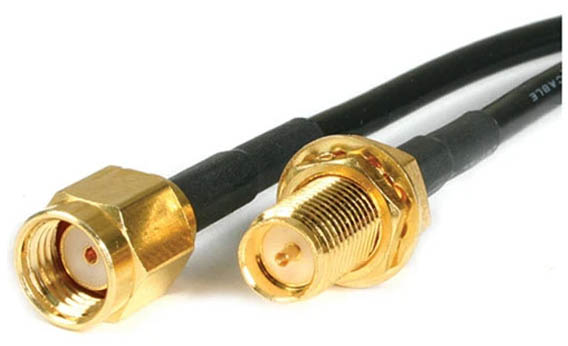 An extension cable can be used to position the antenna if needed for beter line-of-sight. We reccommend the cable
should be no longer than 20' (6m) to prevent signal loss. The screw terminal on the module is an RP-SMA
connection or Reverse Polarity SMA connector. We offer a 10' (3m) cable at checkout or you can source your own.
An extension cable can be used to position the antenna if needed for beter line-of-sight. We reccommend the cable
should be no longer than 20' (6m) to prevent signal loss. The screw terminal on the module is an RP-SMA
connection or Reverse Polarity SMA connector. We offer a 10' (3m) cable at checkout or you can source your own.
Quick Disconnect Terminal
 Wiring is done directly to the Relay terminals using a common 1/4" quick disconnect terminal. These quick-disconnect
insulated spade wire terminals offer the fastest way to connect and disconnect wires to the relay. Easy to Apply:
Crimp with pliers after inserting the wire, no soldering required, making electrical maintenance and wiring work easier
and more efficient.
Wiring is done directly to the Relay terminals using a common 1/4" quick disconnect terminal. These quick-disconnect
insulated spade wire terminals offer the fastest way to connect and disconnect wires to the relay. Easy to Apply:
Crimp with pliers after inserting the wire, no soldering required, making electrical maintenance and wiring work easier
and more efficient.
Induction Suppression
Controlling
an inductive load using our relay controllers requires the use of induction suppression capacitors. The purpose of this capacitor
is to absorb the high voltages generated by inductive loads, blocking them from the contacts of the relay. Without this capacitor,
the lifespan of the relay will be greatly reduced. Induction can be so severe that it electrically interferes with the microprocessor
logic of our controllers, causing relay banks to shut themselves down unexpectedly.
Click Here for More
Relay Wiring Made Simple
From simple on/off switching to advanced AND/OR logic, these examples show exactly how to connect your relays for real-world applications. Learn the tricks to control lights, motors, sensors, and more with confidence.
Get a printout of this page
Relay Logic
"Using a light as an example load, let's wire to the board"
Relay Wiring Samples
This page provides simple examples showing how to wire a single relay - or multiple relays - for common switching applications. We use a light as the example load, but you can substitute a gate controller, security panel input, dry contact device, motor trigger, or most other switched loads. These wiring samples demonstrate different ways to connect relays to achieve the switching behavior you need.Relay Types
SPDT Relay
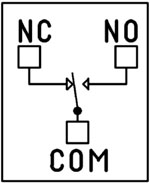 SPDT (Single Pole Double Throw) relays include three terminals: Common (COM), Normally Open (NO), and Normally Closed (NC).
- When the relay is off, COM is connected to NC.
- When the relay is energized, COM switches to NO.
Your load can be wired to either the NO or NC terminal depending on whether you want the device to turn on when the relay activates or when it releases. Examples below demonstrate both wiring methods. The SPDT relays offered on this site are 5-Amp, 10-Amp and 20-Amp models.
SPST Relay
SPST (Single Pole Single Throw) relays provide two terminals: Common (COM) and Normally Open (NO).
When the relay coil is energized, COM connects to NO to power the load. The only SPST relays offered on this site are our 30-Amp models. All SPDT examples shown on this page apply to these relays as long as the example does not require a Normally Closed terminal.
DPDT Relay
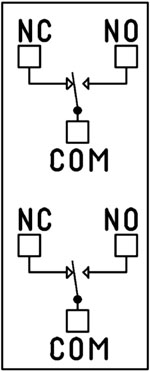
A DPDT (Double Pole Double Throw) relay contains two SPDT switches that operate together.
- Each side includes its own COM, NO, and NC terminals.
- Both internal switches change state at the same time.
This allows you to control two independent circuits with one relay. Wiring for each side of a DPDT relay follows the same rules as an SPDT relay, so the examples on this page apply directly. We offer the DPDT relays in 1-Amp, 3-Amp and 5-Amp models on ProXR boards starting at 8 relays.
Relay Grouping
Relay Grouping in the ProXR Command Set lets you combine individual relays to function like a DPDT relay using separate channels. This is ideal when you need to control multiple relays simultaneously or exceed the 5-Amp switching limit of our standard DPDT relays.Relay Logic Examples
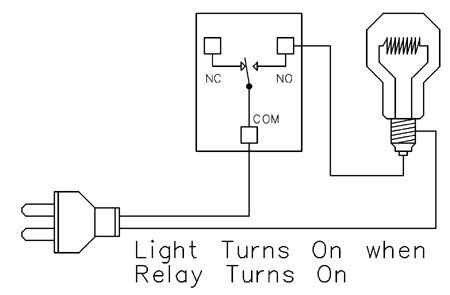
Example 1 - Simple Off/On Control
This example shows the most basic way to use a relay to switch a device such as a light. When the relay energizes, its NO (Normally Open) contact closes to COM (Common), completing the circuit and turning the light on.Only a single power wire is switched in this setup, making it the simplest method for controlling a light - or any device - using a relay.
Use this example for switching a light or any device you want to power only when the relay is on.
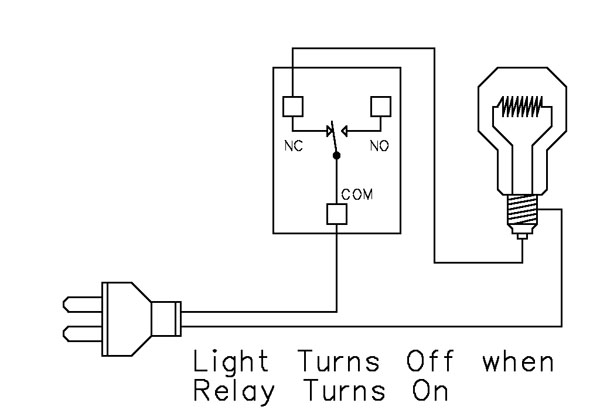
Example 2 - Simple On/Off (Using NC Contact)
This wiring method keeps the light on by default. The relay switches a single power wire through the COM (Common) and NC (Normally Closed) terminals.When the relay is not energized, the NC contact is closed to COM and the light remains on.
When the relay energizes, the NC contact opens, interrupting power and turning the light off.
This approach is ideal for devices that stay on most of the time, reducing relay wear since it doesn't need to remain energized to keep the device powered. It's also a useful method for power-cycling equipment - energizing the relay momentarily will turn the device off.
💡 Relay Pros ProTip:
For devices that stay on most of the time, use the NC contact. This reduces relay wear and extends the life of both the relay and your power supply.
Example 3 - AND Logic Using Two Relays
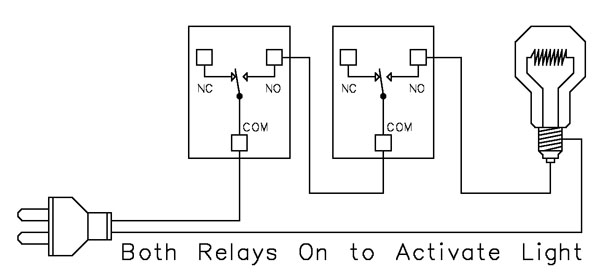 This example shows how two relays can work together so a light turns on only when both relays are energized. This creates an AND Logic condition:
Relay 1 AND Relay 2 must be on for the light to receive power.
A single power wire is switched, but it must pass through both relay contacts before reaching the light. This setup is ideal when two conditions must be met at the same time - such as requiring input from multiple sensors or system parameters.
MirC/MirX/MirM Users:
This wiring requires two contact closure inputs on the sender board before the receiver's relay activates. Use this approach when two independent outputs must close before turning on the light.For example, a light could turn on only when:
1. A light sensor detects it's dark AND
2. A motion sensor detects activity in the room
Example 4 - AND Logic Using Three Relays
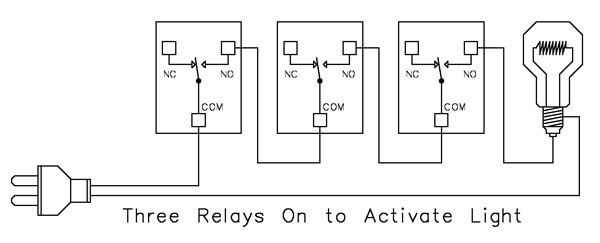 This example expands on the previous AND Logic concept. Here, the light will turn on only when all three relays are energized:
Relay 1 AND Relay 2 AND Relay 3 must be on for power to reach the light.
A single power wire is routed through all three relay contacts. Wiring from the NO (Normally Open) of Relay 1 to the COM (Common) of Relay 2, then from the NO of Relay 2 to the COM of Relay 3, creates a series path that requires every relay to energize before the light can activate.
This method can be scaled easily - just continue wiring NO of each relay to the COM of the next relay. Add as many relays as needed to meet your logic or safety requirements.
Example 5 - AND/OR Logic with Override
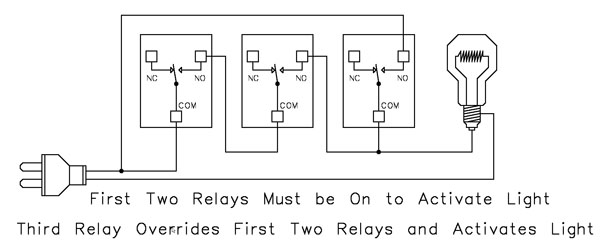 This example demonstrates a combined AND/OR logic setup. The light will turn on when:
- Relay 1 AND Relay 2 are both energized OR Relay 3 is energized (override)
- For example:
- Relay 1 = night/day sensor
- Relay 2 = motion sensor
- Relay 3 = manual override (local switch)
A/D Board Users:
The Relay Activator function on any A/D board or ProXR Lite board lets you connect a button or switch to any A/D input. This input can then control the override relay, giving you a convenient local button to manually override the first two relays.MirC/MirX/MirM Users:
Add a manual button or switch to trigger the third relay when you need direct control instead of sensor-driven control.Reactor Users:
A local button or switch can be wired to the third relay input to provide a manual override for sensor-based logic.Example 6 - OR Logic (Either Relay Activates)
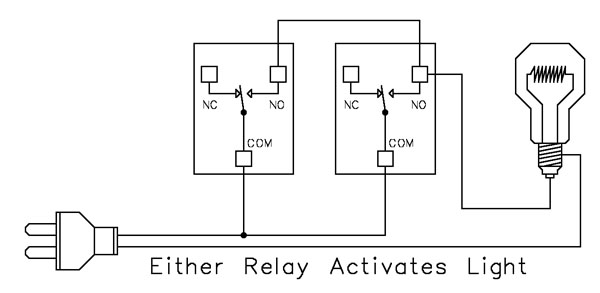 This example demonstrates OR Logic - the light will turn on when either relay is energized. Only one power wire is switched, but it can pass through Relay 1 or Relay 2 to reach the light.
- If Relay 1 activates, the light turns on
- If Relay 2 activates, the light turns on
- If both activate, the light remains on
- A timer controlling one relay, with a manual or secondary control for the other.
- Two sensors where either condition (motion detected or low light, for example) should activate the light.
A/D Board Users:
The Relay Activator function on any A/D board or ProXR Lite board lets you connect a button or switch to any A/D input. This input can then be used as a manual control of the relay.MirC/MirX Users:
Wire two contact closure inputs into the sender board - either input can trigger the receiver relay to control the light.Reactor Users:
Configure one relay for automatic sensor control and a second relay for manual push-button operation. Wire both relay outputs using OR Logic so either control method can activate the same light.Example 7 - 3-Way Switch (Relay-Based 3-Way Control)
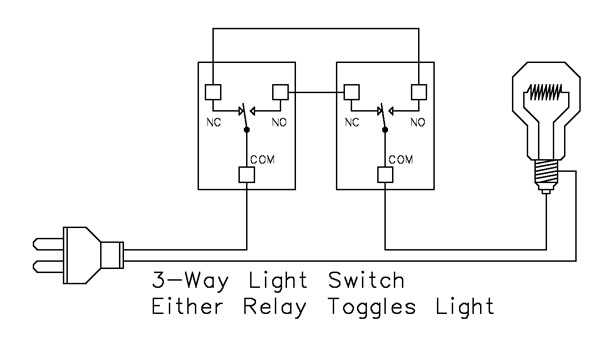 This example shows how to create a 3-way light switch setup using relays. A traditional 3-way circuit allows two switches to control the same light from different locations. In this wiring sample, each physical switch is replaced by a relay - but the operation is the same.
Only one power wire is switched, and the relays toggle the light depending on their current state.
- Activating either relay will toggle the light
- Activating both relays at the same time has the same effect as flipping both switches at once
Example 8 - DC Motor Direction Control
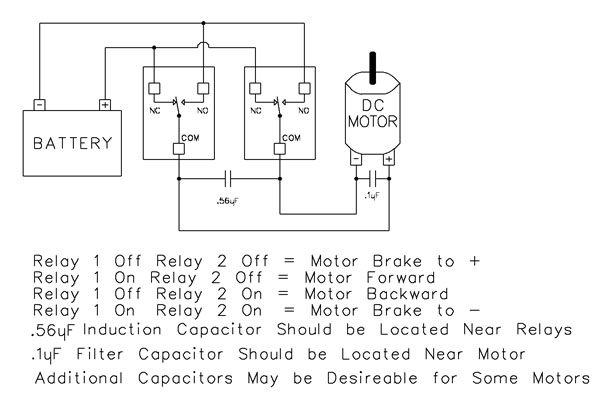 This example demonstrates how to control the direction of a DC motor using two relays. By changing how the motor's leads connect to power, you can run the motor forward, reverse, or place it in a brake state. Braking is achieved by tying both motor terminals to the same power connection, which stops rotation through Faraday's Law.
- Relay Operation Summary
- Relay 1 Off / Relay 2 Off → Motor Brake to +
- Relay 1 On / Relay 2 Off → Motor Forward
- Relay 1 Off / Relay 2 On → Motor Reverse
- Relay 1 On / Relay 2 On → Motor Brake to -
- The induction suppression capacitor prevents the relay from shutting off due to motor back-EMF
- The 0.1µF filter capacitor reduces electrical noise, especially useful when powering sensitive electronics such as radios or amplifiers.
- Capacitor Placement
- Place the induction suppression capacitor near the relays
- Place the filter capacitor near the motor
- Additional capacitors may be needed for certain motors
Motors draw significantly more current at startup than during continuous operation - often 2-3 times their rated running current. For example, a motor rated at 5A (125VAC) may require 10-15A to begin turning. Always select a relay that exceeds the motor's initial inrush current, not just its running current. In this case, a 20-30A relay provides optimal performance and longevity.
💡 Relay Pros ProTip:
Motors and inductive loads often draw 2-3x their rated current at startup. Always choose a relay that exceeds the motor's inrush current, not just its running current.
Protect Against Inductive Spikes
Motors, solenoids, contactors and other inductive loads can generate voltage spikes every time they switch on. For just a few dollars, suppression capacitors can help protect relay contacts and extend the life of your control system.
Simple to install and highly recommended for inductive loads, capacitors are one of the easiest ways to improve long-term system reliability.
Induction Suppression
Handling Inductive Loads (Why It Matters)
Inductive loads are anything with a magnetic coil - motors, solenoids, transformers, mag locks, door strikes, etc. These devices generate dangerous voltage spikes when switched on and off.Those spikes can:
- Destroy relay contacts prematurely
- Cause unexpected controller resets
- Knock USB devices offline
- Damage the board's power regulation circuitry
💡 Relay Pros ProTip:
Many customers skip suppression because it seems complicated. In reality, adding a suppression capacitor typically requires only two connection points and can dramatically reduce relay contact wear when switching motors, solenoids and contactors.Why You Need a Capacitor
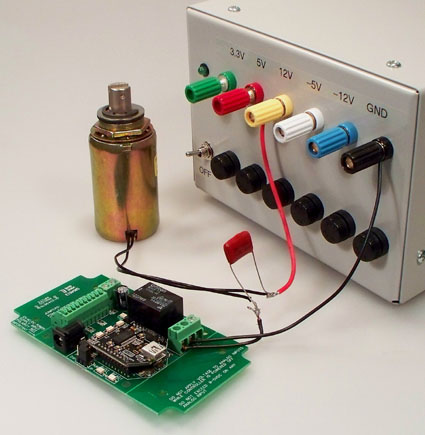 Every time an inductive device switches on, it releases a burst of high-voltage energy.
A suppression capacitor:
- Absorbs these spikes before they reach your relay
- Protects relay contacts from arcing
- Prevents interference with the microcontroller logic
- Helps maintain stable USB or serial communication
Resistive Loads Don't Need Suppression
If you're switching a purely resistive device, such as:- Incandescent/LED lighting
- Heating elements without fans
- Basic resistive appliances
- Using Relay as Dry Contact Output
Choosing the Right Capacitor
 It's simple:
Choose a capacitor with a voltage rating equal to or higher than the voltage of the device you're switching.
Example:
- Switching a 120VAC motor → Use a capacitor rated for 120VAC or higher
- Switching a 24VDC solenoid → Use a capacitor rated for 24VDC or higher
Suppression capacitors can retain a charge for a short period after power is removed. Always discharge capacitors safely before handling.
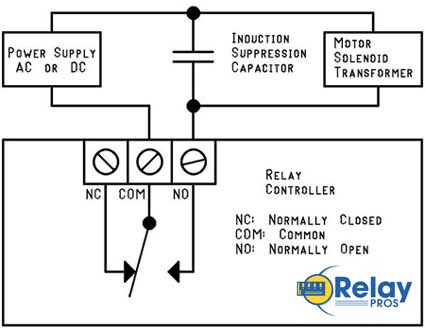
Easy Installation
Installing a suppression capacitor is straightforward:- Mount it as close to the relay as possible
- Connect it in parallel with the inductive load
- Polarity doesn't matter - capacitors used for suppression are not polarized
- Works with both AC and DC loads
Don't Share Power Supplies with Inductive Loads
Your controller must be powered by a clean, regulated power supply.Do not share the same power supply with:
- DC motors
- High-power solenoids
- Any heavy inductive device
The only exception: battery-powered systems (like automotive) where the battery naturally absorbs induction spikes.
Important Note for USB Users
USB is extremely sensitive to electrical noise. An inductive spike can cause the PC's motherboard to drop the USB port entirely.That means:
- Your controller disappears from the OS
- Your application loses communication
- You must unplug and reconnect the board