Time Relay 1-Channel 10-Amp with Wi-Fi Interface
TLR110_WIFI
Time Control Without a Computer
The TLR110_WIFI Time Activated Relay includes an onboard real-time clock, so it always knows the current day and time. Just connect it to your WiFi network, build your schedule using the free Base Station Software, and upload it to the board. Once your schedule is stored, the computer is no longer needed - your schedules will run automatically.Use it to ring bells throughout the school day, control gates at set times, manage security lighting, or run shift-change alerts. You can also save multiple schedules on your computer and upload them anytime you need to switch between them.
Schedule All the Events You Need
The TLR110_WIFI can store up to 1,000 timed events, giving you far more capacity than most built-in bell or shift-timer systems. If your current controller only supports a handful of events per day, this board is a huge upgrade.Create as many schedules as you want - daily, weekly, seasonal, summer/winter, or special-event schedules - and upload them to the board whenever your routine changes.

- OVERVIEW
- WiFi Interface
- Board Features
- Taralist Setup
- XR Expansion Port
- Power & More
- Relay Logic
- ACCESSORIES
- Data Sheets
Time Activated Relay at a Glance
- 1 10-Amp Relay Installed
- Single Pole Double Throw (SPDT) Relay
- Wire to Normally Open or Normally Closed Position
- 12 Guage Solid Core Wire Capacity
- Temperature Rating -40° C to 85° C
- Expandable up to 256 Relays - Embedded WiFi over 802.11b/g
- 2.4GHz WiFi Communications IEEE 802.11 b/g/nr
- Supports DHCP or Static IP
- Security: WPA/WPA2/WPA2-Enterprise and WPS
- Soft AP Web Interface for Configuration - Integrated Real-Time Clock
- Board always knows the current day and time
- Run relays automatically based on your schedule - Custom Time Schedules
- Create and upload your own timing schedule
- Runs independently - no computer required after setup
- Relays activate exactly when you define
)
How WiFi is Used
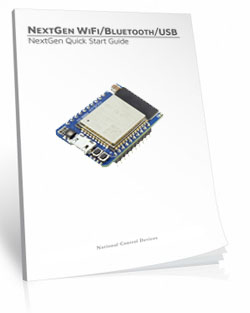
To configure a Taralist controller, you'll create your schedule using the free Base Station Software and upload it to the board over WiFi. Once the schedule is stored, the Taralist runs independently and can optionally connect to your WiFi network for convenient monitoring, relay control, and daily automatic time synchronization. br/>
WiFi Setup Note: Connecting the board to your network requires entering WiFi credentials and following the steps carefully. It's more involved than USB or Ethernet, but once connected, the board stays online reliably for easy access.
Taralist WiFi Configuration
"Upload your schedule once. The Taralist handles the timing forever."
Create and Upload Schedules
A computer is required to build and upload schedules. Using the free Base Station Software, you'll create all your time-based events and transfer them directly to the controller over a WiFi network.Once your schedule is uploaded, the Taralist runs autonomously from onboard memory. WiFi is optional for ongoing access, but not required for day-to-day operation.
Daily Automatic Time Sync
When connected to your WiFi network, Taralist controllers can automatically sync their internal clock every 24 hours using NTP.This keeps your schedules accurate long-term without drift, adjustments, or maintenance - perfect for applications that depend on precise event timing.
Once Configured
After your schedule is uploaded, the Taralist checks every second for matches between the current time and your stored events. When it finds one, it executes instantly.ll events run directly from the board's internal memory, ensuring dependable stand-alone performance.
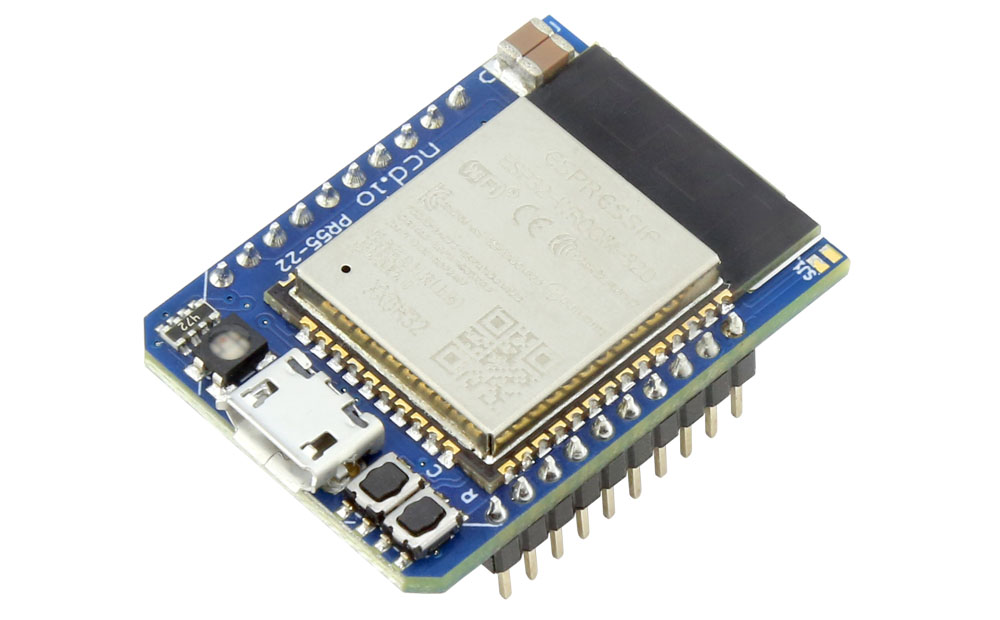
Connect Over WiFi (Optional)
The built-in WiFi module lets your Taralist join your wireless network so you can:- View relay status in real time
- Manually trigger relays from Base Station
- Upload updated schedules
- Enable daily NTP time syncing
Take Manual Control of Taralist
A connected computer may take temporary control of individual relays or the entire board via WiFi. When PC control is active, Taralist logic pauses switching for those relays until control is returned.You can reconnect over WiFi any time to make changes, monitor activity, or update schedules without touching the hardware.
💡 Relay Pros ProTip:
Keep the board connected to WiFi. This gives you instant manual control, friction-free schedule updates, and automatic daily time sync - all without walking over to the controller.
Controlling Relays
Taralist relays can operate in two ways:- Standalone Mode: Relays follow the uploaded schedule with no computer or network required.
- WiFi PC-Controlled Mode: A computer on the same network can temporarily control any relay.
Who's Qualified to Use the Taralist Series?
No programming is required - schedule creation is handled entirely through Base Station Software.Simple schedules are easy even for beginners. Advanced event sequences may take a bit more time and comfort with the setup steps, especially when configuring WiFi, but most users find the process very approachable.
Base Station Taralist Setup
"Run relays automatically based on your schedule"
Taralist Setup Overview
Taralist controllers are powerful, flexible, and incredibly reliable once your schedule is loaded - but setting them up is not a plug-and-play process. If you're comfortable with basic PC software, COM ports, and following on-screen prompts, you'll be fine. If not, this may not be the right product for you.This page gives you a big-picture look at what's involved so you know what to expect before you purchase.

1. Setup Requires a Windows PC + Base Station Software
All Taralist controllers must be configured using NCD's free Base Station Software.You'll create your schedule on your computer, upload it to the board, and the board runs that schedule on its own after that.
No coding is required, but you will be interacting with a configuration tool.
2. You'll Need to Establish a Connection (USB, Ethernet, or WiFi)
To configure a Taralist controller, you must connect it to your PC through one of the supported communication methods:- USB
- Board appears as a virtual COM port
- Easiest, most reliable setup path
- Required for recovering misconfigured controllers
- Ethernet
- The board connects to your router or network switch
- Base Station communicates over the network
- You'll need the board's IP address
- Static IP is ideal, but DHCP works fine for setup
- WiFi
- Requires joining the board to your WiFi network first
- Can be trickier than USB or Ethernet
- Once connected, Base Station communicates wirelessly
- Taralist WiFi models can also use daily NTP time sync
- Open Base Station
- Select the correct COM port or network device
- Load the board's current configuration
- Begin building your schedule
3. Creating Your Schedule (Up to 1000 Events)
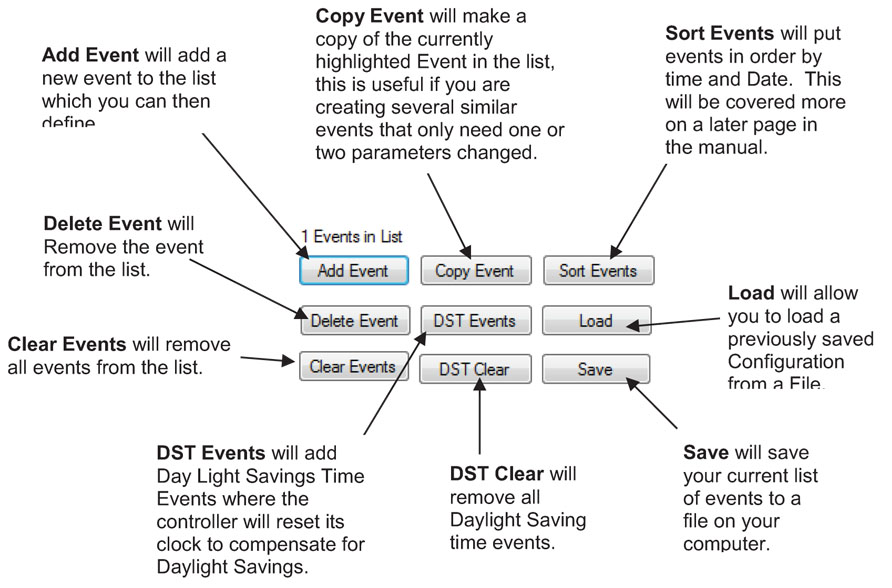
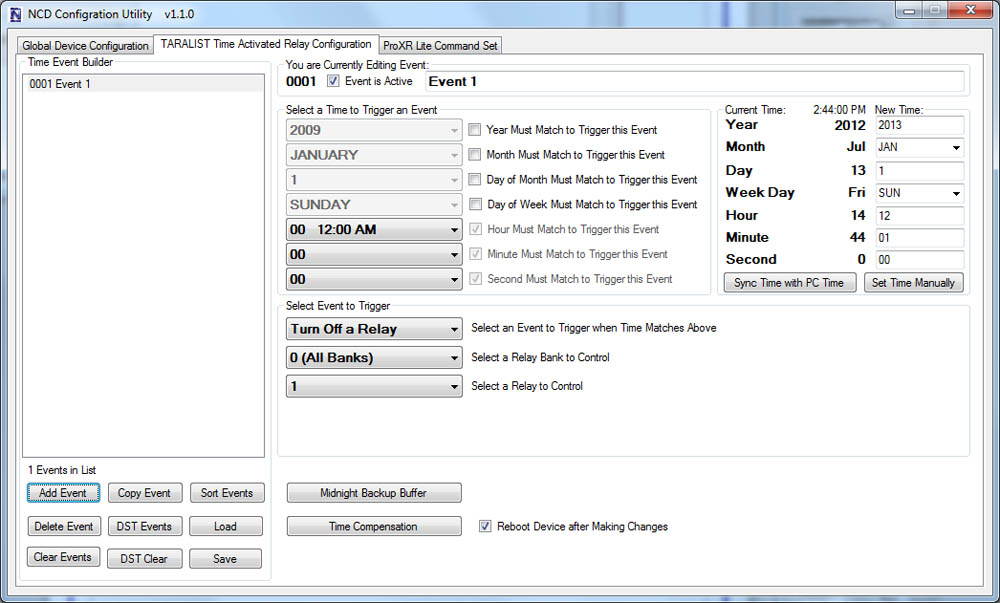
Inside Base Station, you'll build your event list.Each event can specify:
- Exact time (year, month, date, day of week, hour, minute, second)
- Which relay(s) to turn on or off
- Priority (events at the bottom of the list override events above)
4. Setting the Clock
Before uploading your schedule, you'll set the Taralist's internal clock:- Sync to your PC's system time (most common), or
- Manually enter the date and time
5. Midnight Backup Buffer (VERY Important)
Every night at midnight, the controller stores all relay states.This prevents your logic from falling apart after a power outage.
You don't have to configure this feature, but you should understand that it exists - it's core to how Taralist keeps long-term schedules stable.
6. Uploading Your Schedule
Once your schedule is ready:- Switch the jumper to PROGRAM mode
- Upload your schedule to the board
- Switch back to RUN mode
- The board now runs autonomously
Keep Your Master File Handy. "Save your .tlt schedule files somewhere predictable." If you ever swap controllers, clone a schedule, or just need to adjust next season's timing, you'll thank yourself. The Taralist uses the same format across the line - so one file can travel.
Optional: Manually Control Relays from Your PC
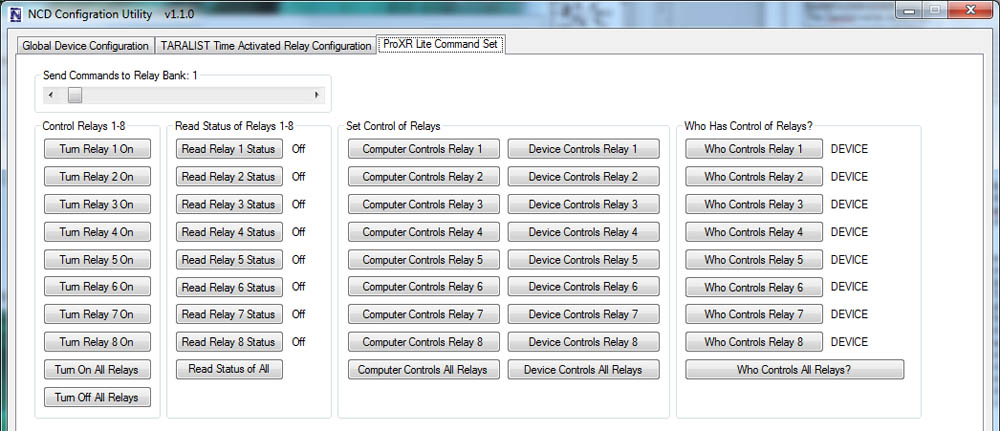 Base Station also lets you:
- Test relay states
- Override relays
- See which system (PC or Taralist logic) currently "owns" each relay
- Return control to Taralist logic afterward
Who Is This For?
We recommend Taralist controllers for users who are:- ✔ Comfortable on Windows
- ✔ Okay with basic COM port configuration
- ✔ Willing to follow a guided setup process
- ✔ Need recurring automation without software running 24/7
Understanding Clock Drift
All real-time clocks drift a little over time - even high-quality ones. Taralist controllers are typically very stable, but the onboard clock can naturally drift up to about 1 second per day.Temperature can also have a small influence:
- Cold environments: the clock may run slightly slower
- Warm environments: the clock may run slightly faster
Taralist includes a Time Compensation feature that lets you counteract drift so your schedule stays accurate long-term.
💡 Relay Pros ProTip:
Keep Your Timing Tight!
If ultra-precise timing matters (school bells, synchronized lighting, access events, etc.), here's the trick:
Use the Time Compensation tool to fine-tune drift.
It takes just a moment, and once dialed in, your Taralist can stay extremely accurate over long stretches.
For WiFi Taralist models, you get an even easier option:
Daily Automatic Time Sync
Your controller fetches the correct time from the internet once a day - meaning drift basically disappears.
Bottom Line
Taralist controllers are incredibly reliable, deeply configurable, and ideal for long-term autonomous scheduling - but setup is hands-on, technical, and requires a PC.If you're comfortable with that, you'll love what Taralist can do.
If not, no hard feelings - but this isn't the product you want.
Scale Your System Your Way
Create as many schedules as you need - up to 1,000 timing events - and update them anytime. Need more hardware muscle? Taralist controllers are part of our ProXR ecosystem, so you can expand up to 256 relays as your project grows. Once your schedule is uploaded, the controller keeps time and runs entirely on its own - no computer required.
Taralist Board Features
"Engineered for Reliability. Built to Scale."
Time Activated Relay Controllers (Taralist Series)
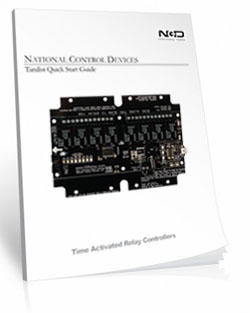
Taralist Time Activated Relay Controllers make scheduling easy. Each board includes an integrated real-time clock, so your relays can follow a precise schedule - day, hour, minute, second - without needing a computer connected 24/7.Once you create your schedule in Base Station Software and upload it to the board, you're done. The controller handles the rest automatically.
 These boards are ideal for lighting control, security systems, HVAC, bells, timed access, automation sequences, and any project that needs relays triggered on a repeating schedule.
But! Keep this in mind:
- The onboard clock can drift over time. Most users won't notice, but if your application requires precise long-term accuracy (bells, synchronized events, access timing, etc.), this may not be ideal.
- You can correct drift manually, but it takes periodic maintenance.
- If you need perfect time accuracy, consider using Relay Timer Software with a ProXR board, which uses your PC-s system time.
The Output Side
"Where the board controls your equipment."
SPDT Relay Installed
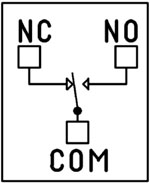 SPDT (Single Pole Double Throw) relays include three terminals: Common (COM), Normally Open (NO), and Normally Closed (NC)
- When the relay is off, COM is connected to NC.
- When the relay is energized, COM switches to NO.
2 Million+ Cycles
ProXR relays are rated for long service life - expect years of dependable operation and millions of mechanical cycles.Every controller includes a 5-Year Warranty and 30-Day Money-Back Guarantee.
Board Features
"What sets ProXR apart."
Add Relays as Your System Grows
Every Taralist controller includes an onboard XR Expansion Port, allowing you to add relay expansion boards at any time.Start with the number of relays you need today and expand incrementally - up to 256 total relays - without replacing your controller or rewriting your software.
Expansion boards share the same schedule structure and can mix relay types and amperages to match evolving system requirements.
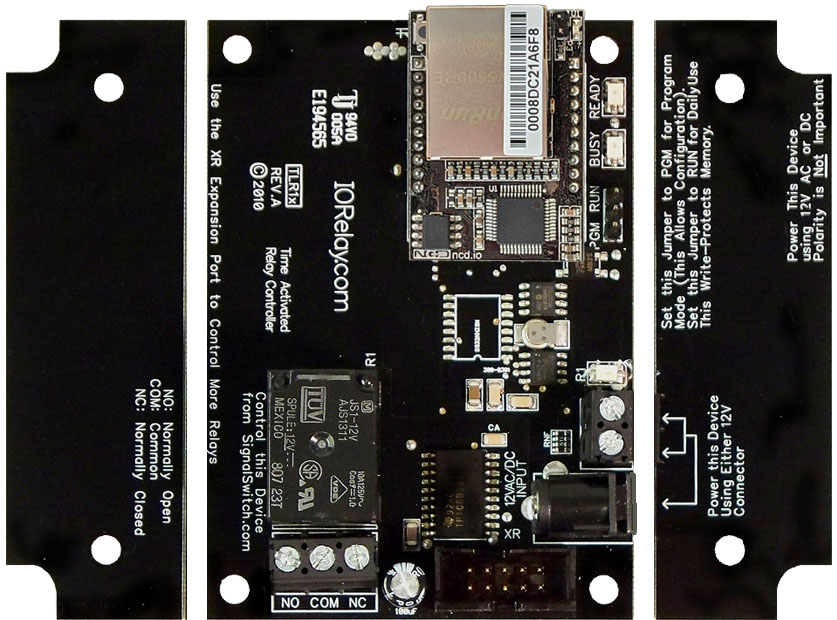
Break-A-Way Tabs for a Smaller Design
Need a smaller footprint? The Taralist PCB includes Break-A-Way Tabs, allowing the board to fit into optional undrilled enclosures or tight-space installations.
RoHS Compliant & Lead-Free
All Taralist controllers are built with RoHS-compliant components and lead-free solder.Power & Protection
"Reliable Power = Reliable Switching"
Essential Power Requirements
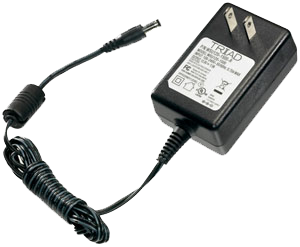 Clean, regulated power is critical.
A stable 12VDC supply ensures both the relay coils and onboard firmware operate correctly. Unstable or noisy power can cause improper switching or communication issues.
We recommend the PWR12-US (120VAC → 12VDC @ 1.25A) or our international supply with interchangeable adapters.
Learn More
Induction Suppression
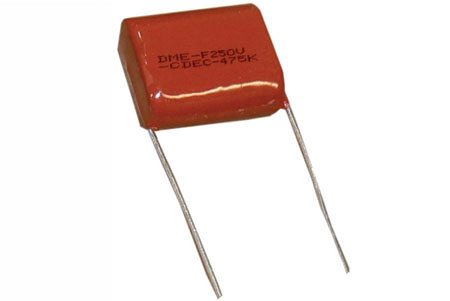 One of the most important parts of relay control - yet the most commonly overlooked - is inductive load protection.
Anything with a magnetic coil (motors, solenoids, transformers, etc.) generates high-voltage "kickback" when switched. Without a suppression capacitor, that spike can:
- Shorten relay lifespan
- Cause electrical noise that disrupts the microcontroller
- Trigger unexpected shutdowns
- Require power cycling to restore communication
Support & Ownership
"5-year warranty & no monthly subscriptions."
5-Year Warranty & Guarantee
Every Taralist controller is covered by:- 5-Year Functional Warranty
- 30-Day Money-Back Guarantee
- No Monthly Subscriptions
Shipping
All boards ship directly from our Missouri facility. Each unit is built and tested at the time of order - please allow 3 - 5 days for production. We ship primarily through UPS, but we're happy to use FedEx or DHL for international orders when you provide your account number. Questions? Call us at 800-960-4287 or email sales@relaypros.com.ProXR Expansion Board
Expansion Boards plug into the XR Expansion Port on any ProXR, Taralist or Potentiometer Board to add more relays. Expansion boards can be daisy chained together to add up to 256 relays as needed.
The XR Expansion Port
"Running out of relays? Just plug in more!"
Add Relays as Your Needs Grow
ProXR Controllers were built with relay expansion in mind. The XR Expansion Port lets you add banks of external relays to any ProXR or Taralist board equipped with an XR Expansion port. Expansion boards can be added at any time as your system grows, up to a maximum of 256 total relays.As expansion boards are added, additional relay banks become available automatically. Simply add another expansion board whenever you need more relays.
Relay Banks - How Large Systems Stay Simple
 ProXR and ProXR Lite controllers organize relays into groups of eight called banks.
Each bank contains:
- Relay 1 through Relay 8
For example:
- An 8-relay controller uses one bank
- A 32-relay controller uses four banks
- A 64-relay setup uses eight banks
- Select a bank
- Send simple relay commands within that bank
Linking XR Expansion Boards Together
XR Expansion Boards include both an XR Input and XR Output connector. Connect the XR Output on your ProXR controller to the XR Input on the first expansion board. To add more relays, connect the XR Output of one expansion board to the XR Input of the next board in the chain.You can mix and match different relay types on expansion boards to match your application. A 6" expansion cable is included with each expansion board.
For best reliability, keep all expansion cabling as short as possible. Maximum expansion length and total relay count depend on your installation, electrical noise, and overall cable length. For best compatibility, the combined length of the controller, expansion boards, and cables should not exceed 1-2 meters.
Mix & Match
Expansion boards do not need to match the relay type or amperage of the main controller or other expansion boards. Mix and match expansion boards to get the exact relay types and current ratings your application requires.💡 Relay Pros Pro Tip:
You can mix and match relay types and amperages to dial in exactly what your application requires - for example, adding a bank of DPDT relays when all the other boards have SPDT relays. This gives you ultimate flexibility as your system grows.
Will Not Operate Independently
This Expansion Board gets it's commands from the main ProXR, Taralist or Potentiometer board and will not operate independently. This board MUST be plugged into a ProXR or Taralist board to operate and will not function on it's own.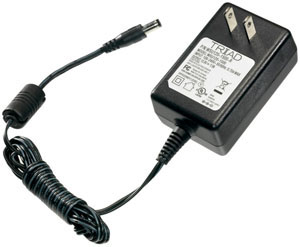
Essential Power Requirements
All XR expansion boards require their own 12 VDC power source. A regulated 12 VDC supply must be connected directly to each expansion board for proper operation.We offer a compatible wall-plug power supply at checkout, or you may use your own regulated 12 VDC supply. Learn More
Maximum Relay Rating Notes
ProXR is capable of expanding to an absolute maximum of 256 Relays. In some cases, it may not be possible to control all 256 relays, particularly in applications where high noise levels may be involved. Experimentation may be required, as it is not possible for us to guarantee all users will be able to utilize all 256 relays in every application. Noise tends to accumulate when several expansions are connected together. For best results, the XR expansion cables must be as short as possible.
RoHS Compliant
Expansion boards are led free and RoHS Compliant. If your requirements are for RoHS compliant parts every expansion board is manufactured with RoHS compliant led free parts and solder.2-Million Cycles
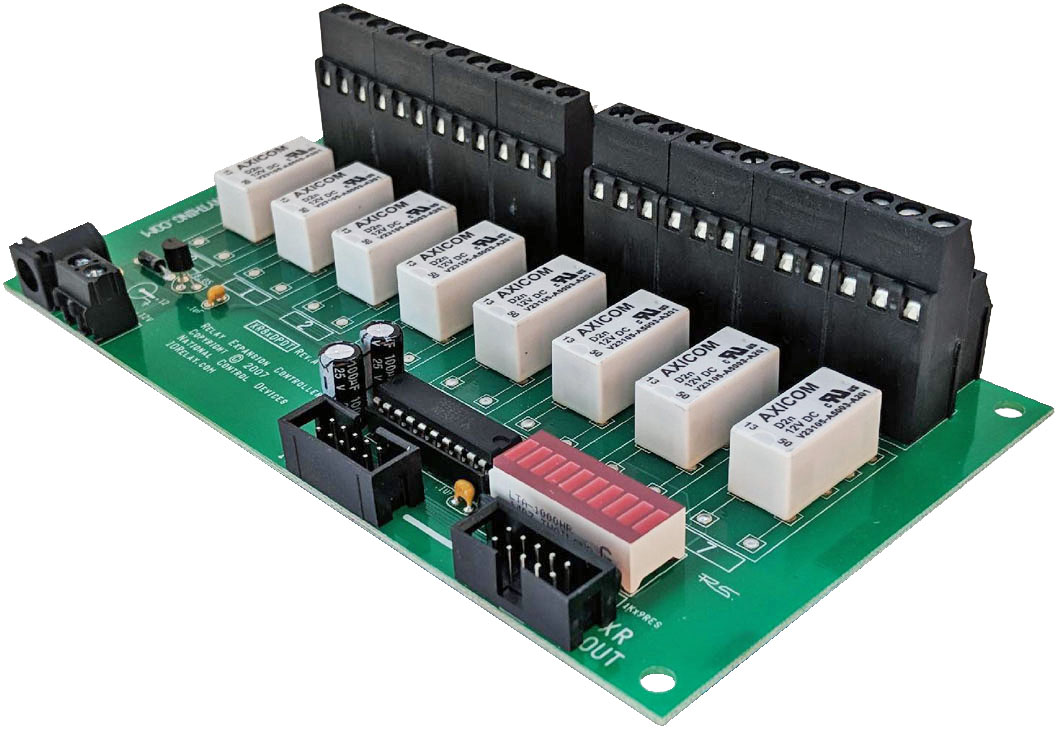 XR Expansion Boards are designed for long life just as the ProXR boards, you should expect to get years of service from expansion board and literally 2-million cycles from the relays on board. With a 5-year warranty and a money back guarantee add more relays anytime the need arises!
 Relay Expansion Videos
Plan Your Power with Confidence
Get reliable performance every time! Use these real-world specs to build accurate power budgets, protect your board, and ensure every relay and module runs smoothly under any conditions.
Power & More
"Reliable Power = Reliable Switching"
Board Performance Ratings
This tab brings together the essential performance ratings you'll want to know for NCD SPDT Relay Controllers and their supported communication modules. You'll find practical electrical requirements, power consumption estimates, operating limits, relay timing details, and more-all based on typical 12VDC operation at 70°F (21°C). Think of it as a reliable snapshot of how our hardware behaves under real-world conditions. Because every installation is unique, some values are estimates and may evolve as designs and testing continue. Use this information as a planning tool to help you choose the right controller, build an accurate power budget, and understand the capabilities built into every NCD SPDT relay board.Powering from a Battery or Solar Panel?
NCD relay controllers are well-suited for battery-powered and solar-charged applications when operated within the recommended 10 - 15VDC range. This makes them ideal for remote, mobile, and off-grid installations using common 12V battery systems with solar charging. The power consumption data on this page helps you estimate runtime, size your battery, and avoid over-discharge. Staying within the voltage limits ensures stable, reliable operation in long-term battery and solar-powered setups.💡 Relay ProTip:
When powering a controller from a battery or solar power, keep voltage between 10-15VDC for reliable operation. Falling outside this range can cause unstable behavior or unexpected resets.
The SPDT Relay
SPDT (Single Pole Double Throw) relays include three terminals: Common (COM), Normally Open (NO), and Normally Closed (NC)
- When the relay is off, COM is connected to NC.
- When the relay is energized, COM switches to NO.
2 Million+ Cycles
ProXR relays are built for longevity - expect years of reliable operation. The SPDT relay is rated for millions of mechanical cycles. Every board ships with a 5-year warranty and 30-day money-back guarantee.SPDT Relay Board
SPDT Relay Controller Specifications
This table outlines key performance ratings for all NCD SPDT Relay Controllers, based on 12VDC operation at 70°F (21°C). Many values are estimated and may be updated over time. Some ratings reflect standard, out-of-the-box settings without performance optimizations applied.Processing times can vary depending on background services and the commands you use. Standby power values assume no communication module is installed and no relays are active. For a more accurate power estimate, be sure to include the consumption of any installed communications module and any energized relays.
| Specs of NCD SPDT Relay Boards | Minimum | Nominal | Maximum | Notes |
| Operational Voltages | 10VDC | 12VDC | 15VDC | |
| Standby Power Consumption | 35mA | 100mA | 200mA | No Active Relays, No Com Module |
| Relay Power Consumption | 28mA | 35mA | 60mA | Consumption of Each Activated Relay |
| Operational Temperature Range | -40°F (-40°C) | 70°F (21°C) | 185°F (85°C) | Theoretical Component Limits Shown |
| Storage Temperature Range | -67°F (-55°C) | 70°F (21°C) | 185°F (85°C) |
Theoretical Component Limits Shown |
| Operational Ambient Air Humidity | 0% | 50% | 70% | Non-Condensing Humidity Values Shown |
| Relay Activation Time | 4ms | 5ms | 10ms | Needs Further Validation |
| Relay Deactivation Time | 5mS | 10mS | 15mS | Needs Further Validation |
Communication Modules
Communication Module Specifications
This table provides a quick, clear overview of all NCD Communication Modules. While each module operates at 3.3VDC, the values shown here reflect the impact on a 12VDC master controller at 70°F (21°C). Use the maximum ratings for power-budget planning - they represent short-term peak consumption and may include estimated values that are updated as modules evolve.| Specs of NCD Communication Modules | Minimum | Nominal | Maximum | Notes |
| Operational Temperature Range | -40°F (-40°C) | 70°F (21°C) | 185°F (85°C) | Theoretical Component Limits Shown |
| Storage Temperature Range | -67°F (-55°C) | 70°F (21°C) | 185°F (85°C) | Theoretical Component Limits Shown |
| Operational Ambient Air Humidity | 0% | 50% | 70% | Non-Condensing Humidity Values Shown |
| USB Module Power Consumption | N/A | N/A | N/A |
USB Modules are Powered by the USB Port Do Not Consume Device Current |
| RS-232 Module Power Consumption | 10mA | 20mA |
|
|
| Ethernet Module Power Consumption | 58mA | 82mA | 100mA | |
| WiFi Bluetooth USB Module Power Consumption | 37mA | 50mA | 100mA | Up to 300 Foot Indoor Wireless Range, Unobstructed. Up to 50 Foot Range Through Walls |
| 900MHz Wireless Module Power Consumption | 13mA | 30mA | 50mA | Up to 1,000 Foot Indoor Wireless Range, up to 2 Mile Outdoor Wireless Range using Included Antennas. Up to 28 Miles Outdoor Wireless Range using High-Gain Antennas. |
| KFX Wireless Key Fob | 11mA | 15mA | 25mA | Up to 200 Feet Outdoor Wireless Range using 1, 2, 3, 4, or 5 Button Key Fobs. Up to 700 Feet Outdoor Wireless Range using 8-Button Remotes |
A/D Inputs
AD8 Analog Input Usage Notice
Analog inputs should never have voltage applied when the controller is powered down. If your application requires voltage to remain on an input, add a 220-ohm current-limiting resistor to each channel to protect the controller from damage. Keep all analog inputs within the 0 - 5VDC range - exceeding this limit can permanently damage the on-board CPU. Most inputs include a 10K pull-up or pull-down resistor to keep the line stable when unused, but note that this resistor may introduce a slight bias in readings for certain sensors.Accessories
Power Supply Available
 The PWR12 is regulated power supply providing clean power necessary for
the performance of these boards. The PWR12 US power supply is a 120VAC to 12VDC 1.25A 60Hz regulated
power supply and it plugs into the barrel connector on the board. The output connector is a 2.1mm I.D. x 5.5mm
O.D. x 9.5mm R/A barrel connector.
The PWR12 is regulated power supply providing clean power necessary for
the performance of these boards. The PWR12 US power supply is a 120VAC to 12VDC 1.25A 60Hz regulated
power supply and it plugs into the barrel connector on the board. The output connector is a 2.1mm I.D. x 5.5mm
O.D. x 9.5mm R/A barrel connector.
Click Here for More
Enclosure Available
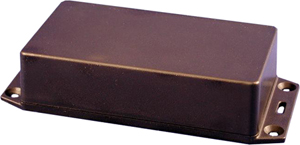 The GFL Enclosure is an undrilled, non-waterproof enclosure and is available at checkout for this controller.
GFL Spec Sheet
CAD Drawing: GFL CAD Drawing
3D Model: GFL_3D
Induction Suppression
Controlling
an inductive load using our relay controllers requires the use of induction suppression capacitors. The purpose of this capacitor
is to absorb the high voltages generated by inductive loads, blocking them from the contacts of the relay. Without this capacitor,
the lifespan of the relay will be greatly reduced. Induction can be so severe that it electrically interferes with the microprocessor
logic of our controllers, causing relay banks to shut themselves down unexpectedly.
Click Here for More
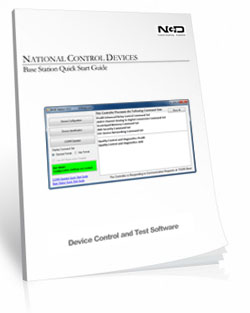
Base Station
 Taralist
boards are configured using the Free Base Station Software. The GUI interface makes it easy to
configure time schedules with a point and click interface! Base Station can also be used to take
manual control of the relays to override the time schedules.
Taralist
boards are configured using the Free Base Station Software. The GUI interface makes it easy to
configure time schedules with a point and click interface! Base Station can also be used to take
manual control of the relays to override the time schedules.Click for more on Base Station.
Relay Wiring Made Simple
From simple on/off switching to advanced AND/OR logic, these examples show exactly how to connect your relays for real-world applications. Learn the tricks to control lights, motors, sensors, and more with confidence.
Get a printout of this page
Relay Logic
"Using a light as an example load, let's wire to the board"
Relay Wiring Samples
This page provides simple examples showing how to wire a single relay - or multiple relays - for common switching applications. We use a light as the example load, but you can substitute a gate controller, security panel input, dry contact device, motor trigger, or most other switched loads. These wiring samples demonstrate different ways to connect relays to achieve the switching behavior you need.Relay Types
SPDT Relay
SPDT (Single Pole Double Throw) relays include three terminals: Common (COM), Normally Open (NO), and Normally Closed (NC).
- When the relay is off, COM is connected to NC.
- When the relay is energized, COM switches to NO.
Your load can be wired to either the NO or NC terminal depending on whether you want the device to turn on when the relay activates or when it releases. Examples below demonstrate both wiring methods. The SPDT relays offered on this site are 5-Amp, 10-Amp and 20-Amp models.
SPST Relay
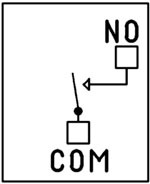
SPST (Single Pole Single Throw) relays provide two terminals: Common (COM) and Normally Open (NO).
When the relay coil is energized, COM connects to NO to power the load. The only SPST relays offered on this site are our 30-Amp models. All SPDT examples shown on this page apply to these relays as long as the example does not require a Normally Closed terminal.
DPDT Relay
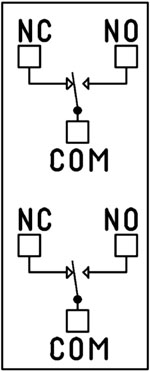
A DPDT (Double Pole Double Throw) relay contains two SPDT switches that operate together.
- Each side includes its own COM, NO, and NC terminals.
- Both internal switches change state at the same time.
This allows you to control two independent circuits with one relay. Wiring for each side of a DPDT relay follows the same rules as an SPDT relay, so the examples on this page apply directly. We offer the DPDT relays in 1-Amp, 3-Amp and 5-Amp models on ProXR boards starting at 8 relays.
Relay Grouping
Relay Grouping in the ProXR Command Set lets you combine individual relays to function like a DPDT relay using separate channels. This is ideal when you need to control multiple relays simultaneously or exceed the 5-Amp switching limit of our standard DPDT relays.Relay Logic Examples
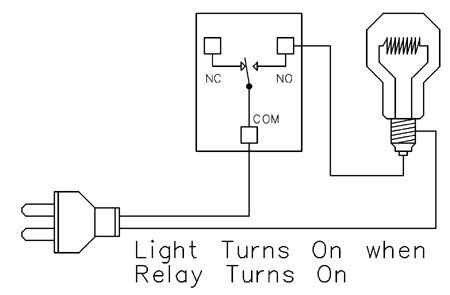
Example 1 - Simple Off/On Control
This example shows the most basic way to use a relay to switch a device such as a light. When the relay energizes, its NO (Normally Open) contact closes to COM (Common), completing the circuit and turning the light on.Only a single power wire is switched in this setup, making it the simplest method for controlling a light - or any device - using a relay.
Use this example for switching a light or any device you want to power only when the relay is on.
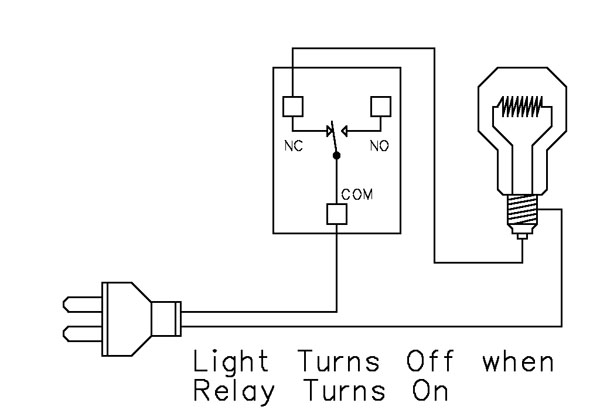
Example 2 - Simple On/Off (Using NC Contact)
This wiring method keeps the light on by default. The relay switches a single power wire through the COM (Common) and NC (Normally Closed) terminals.When the relay is not energized, the NC contact is closed to COM and the light remains on.
When the relay energizes, the NC contact opens, interrupting power and turning the light off.
This approach is ideal for devices that stay on most of the time, reducing relay wear since it doesn't need to remain energized to keep the device powered. It's also a useful method for power-cycling equipment - energizing the relay momentarily will turn the device off.
💡 Relay Pros ProTip:
For devices that stay on most of the time, use the NC contact. This reduces relay wear and extends the life of both the relay and your power supply.
Example 3 - AND Logic Using Two Relays
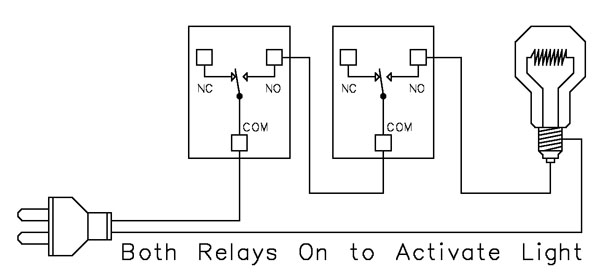 This example shows how two relays can work together so a light turns on only when both relays are energized. This creates an AND Logic condition:
Relay 1 AND Relay 2 must be on for the light to receive power.
A single power wire is switched, but it must pass through both relay contacts before reaching the light. This setup is ideal when two conditions must be met at the same time - such as requiring input from multiple sensors or system parameters.
MirC/MirX/MirM Users:
This wiring requires two contact closure inputs on the sender board before the receiver's relay activates. Use this approach when two independent outputs must close before turning on the light.For example, a light could turn on only when:
1. A light sensor detects it's dark AND
2. A motion sensor detects activity in the room
Example 4 - AND Logic Using Three Relays
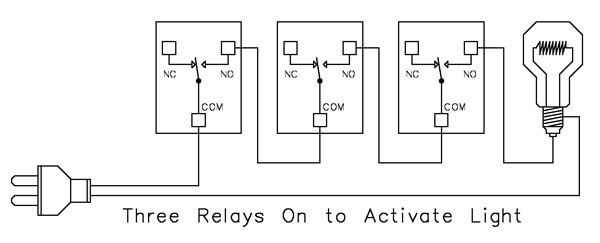 This example expands on the previous AND Logic concept. Here, the light will turn on only when all three relays are energized:
Relay 1 AND Relay 2 AND Relay 3 must be on for power to reach the light.
A single power wire is routed through all three relay contacts. Wiring from the NO (Normally Open) of Relay 1 to the COM (Common) of Relay 2, then from the NO of Relay 2 to the COM of Relay 3, creates a series path that requires every relay to energize before the light can activate.
This method can be scaled easily - just continue wiring NO of each relay to the COM of the next relay. Add as many relays as needed to meet your logic or safety requirements.
Example 5 - AND/OR Logic with Override
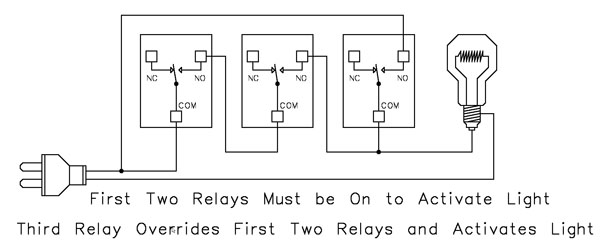 This example demonstrates a combined AND/OR logic setup. The light will turn on when:
- Relay 1 AND Relay 2 are both energized OR Relay 3 is energized (override)
- For example:
- Relay 1 = night/day sensor
- Relay 2 = motion sensor
- Relay 3 = manual override (local switch)
A/D Board Users:
The Relay Activator function on any A/D board or ProXR Lite board lets you connect a button or switch to any A/D input. This input can then control the override relay, giving you a convenient local button to manually override the first two relays.MirC/MirX/MirM Users:
Add a manual button or switch to trigger the third relay when you need direct control instead of sensor-driven control.Reactor Users:
A local button or switch can be wired to the third relay input to provide a manual override for sensor-based logic.Example 6 - OR Logic (Either Relay Activates)
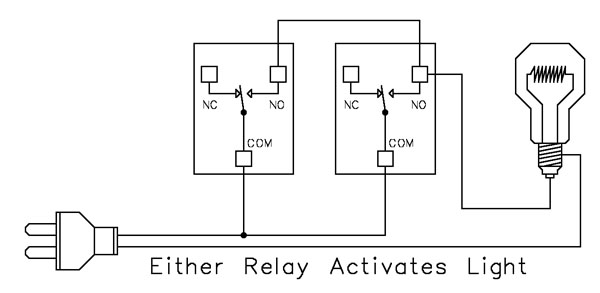 This example demonstrates OR Logic - the light will turn on when either relay is energized. Only one power wire is switched, but it can pass through Relay 1 or Relay 2 to reach the light.
- If Relay 1 activates, the light turns on
- If Relay 2 activates, the light turns on
- If both activate, the light remains on
- A timer controlling one relay, with a manual or secondary control for the other.
- Two sensors where either condition (motion detected or low light, for example) should activate the light.
A/D Board Users:
The Relay Activator function on any A/D board or ProXR Lite board lets you connect a button or switch to any A/D input. This input can then be used as a manual control of the relay.MirC/MirX Users:
Wire two contact closure inputs into the sender board - either input can trigger the receiver relay to control the light.Reactor Users:
Configure one relay for automatic sensor control and a second relay for manual push-button operation. Wire both relay outputs using OR Logic so either control method can activate the same light.Example 7 - 3-Way Switch (Relay-Based 3-Way Control)
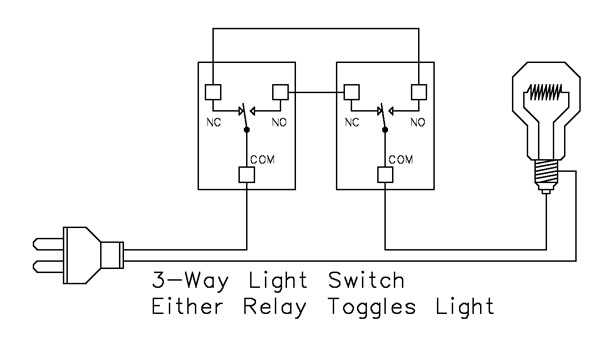 This example shows how to create a 3-way light switch setup using relays. A traditional 3-way circuit allows two switches to control the same light from different locations. In this wiring sample, each physical switch is replaced by a relay - but the operation is the same.
Only one power wire is switched, and the relays toggle the light depending on their current state.
- Activating either relay will toggle the light
- Activating both relays at the same time has the same effect as flipping both switches at once
Example 8 - DC Motor Direction Control
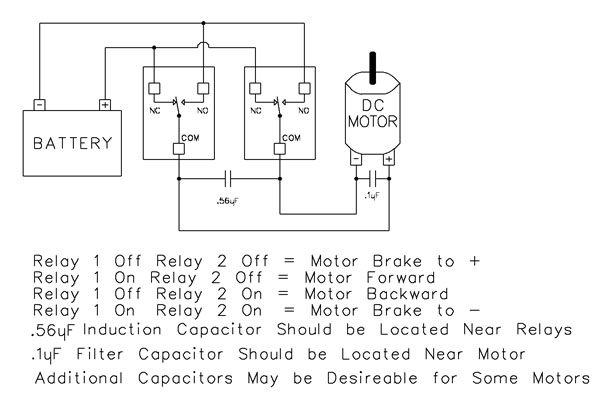 This example demonstrates how to control the direction of a DC motor using two relays. By changing how the motor's leads connect to power, you can run the motor forward, reverse, or place it in a brake state. Braking is achieved by tying both motor terminals to the same power connection, which stops rotation through Faraday's Law.
- Relay Operation Summary
- Relay 1 Off / Relay 2 Off → Motor Brake to +
- Relay 1 On / Relay 2 Off → Motor Forward
- Relay 1 Off / Relay 2 On → Motor Reverse
- Relay 1 On / Relay 2 On → Motor Brake to -
- The induction suppression capacitor prevents the relay from shutting off due to motor back-EMF
- The 0.1µF filter capacitor reduces electrical noise, especially useful when powering sensitive electronics such as radios or amplifiers.
- Capacitor Placement
- Place the induction suppression capacitor near the relays
- Place the filter capacitor near the motor
- Additional capacitors may be needed for certain motors
Motors draw significantly more current at startup than during continuous operation - often 2-3 times their rated running current. For example, a motor rated at 5A (125VAC) may require 10-15A to begin turning. Always select a relay that exceeds the motor's initial inrush current, not just its running current. In this case, a 20-30A relay provides optimal performance and longevity.
💡 Relay Pros ProTip:
Motors and inductive loads often draw 2-3x their rated current at startup. Always choose a relay that exceeds the motor's inrush current, not just its running current.