Key Fob Relay 8-Channel 3-AMP DPDT
ZADR83DPDTPROXR_KEYFOB
Key Fob Relay
The ZADR83DPDTPROXR_KEYFOB Key Fob Relay makes controlling your relays as simple as pressing a button. Use it for basic on/off functions or configure each button for advanced actions - timers, group control, momentary operation, and more.Key Fob Pairing
Pair up to 40 key fobs to a single KFX receiver, giving multiple users access to the system. KFX modules offer an impressive 750-foot line-of-sight range, providing reliable long-distance control.Each key fob pairs directly to a specific module or board. Even if several boards are within range, the fob communicates only with its paired board. Need broader control? A single key fob can be paired with multiple boards - press a button and every paired board within range will activate.
You Configure the Action
When you press a button, the KFX Receiver sends a command to the controller - and you decide what that command is. Configure anything from a simple toggle to complex timed sequences. Momentary actions are easy too: press to energize the relay, release to turn it off. Click Here for MoreCommon Commands
- Toggle and Momentary Commands
- Turn Off All Relays Then Turn On a Specific Relay
- Relay Timers: Relay Energized for a Specific Time
- Relay Grouping: Controlling Multiple Relays Together
- Relay Flashing Commands
- Press & Release Commands

- OVERVIEW
- KFX Interface
- Key Fob Setup
- Board Features
- Key Fobs
- Relay Logic
- Induction
- ACCESSORIES
- Data Sheets
Key Fob Relay at a Glance
- 8 5-Amp Relays Installed
- Double Pole Double Throw (DPDT) Relay
- Wire to Normally Open or Normally Closed Positions
- 12 Guage Solid Core Wire Capacity
- Temperature Rating -40° C to 85° C
- Expandable up to 256 Relays - Programmable Key Fob
- Distance 750 to 1000 Feet
- Pairing Module to Key Fob
- Pair up to 40 Key Fobs Per Board
- Pair Key Fob to Multiple Boards - Many Button Commands Available
- Toggle Command, Push On - Push Off
- Momentary Command, Active Only When Pushed
- Add Delay for Auto Shut-Off Function
)
Supports Up to 40 Key Fobs
A single KFX receiver can support up to 40 paired key fobs, allowing multiple users to control the same system without additional hardware.
All paired key fobs operate using the same receiver configuration, ensuring reliable and consistent operation across the entire installation.
The Key Fob Interface
"Looking for a reliable key fob relay? Push-Button Control Made Simple!"
Easy Key Fob Control
If your application needs wireless relay control, our Key Fob Relay Series delivers the most powerful and flexible solution on the market. These are not simple "one-function" remotes - our Key Fob boards are designed for advanced control.Configure each button to operate relays in almost any way you can imagine.
Our 1-button key fobs are currently out of stock, and remaining stock of other models is limited.
Key fobs are now purchased directly through Mouser Electronics. Be sure to select the MS version for compatibility with our controllers.
We continue to supply the compatible controller boards and modules here at Relay Pros.
Find MS Key Fobs at Mouser
Key Fob Functions
 A single button press can do far more than basic on/off control. Most users configure buttons for toggle or momentary actions:
- Toggle: Press once to energize the relay, press again to turn it off.
- Momentary (Press & Release): Relay energizes while the button is held, and turns off when released.
- Relay Timer: Control for a duration of time, turns off after predetermined time
Need more? The Key Fob system supports relay grouping, timed events, flashing commands, and other advanced actions. One button can control multiple relays or energize a relay for a preset duration. We can preconfigure advanced functions as well but reccommend purchasing a Configuration Kit to make any adjustments in-house without sending the board back to us.
💡 Relay Pros ProTip:
Controlling gates, doors, lights, or access systems? We can program your remotes before shipment so installation is faster and easier when it arrives.Key Fob Range
MS-Series Key Fobs offer a rated range of 750 ft (228 m).The MS 8-Button Key Fob with external antenna extends the range to 1,000 ft (304 m).
Range varies by environment - maximum distances are achieved outdoors with clear line-of-sight and minimal interference.
ZigMo Configuration Kit
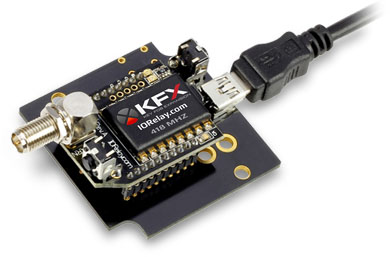 KFX Receiver Modules are configured through Base Station Software and must be plugged into a ZIGMO Configuration Board during setup. The KFX Module is only installed in the Configuration Kit during setup - after that, it goes right back into your board. Only one ZIGMO is required no matter how many receivers you use.
The ZIGMO provides the connection between your computer and the KFX Module, allowing you to set Baud Rate, define Data Bytes, and customize the actions for each button press.
The ZIGMO is included in the KFX Integration Kit and available during checkout.
Easy Configuration
Your board includes a KFX Communications Module, enabling full key fob control.Setup is done through Base Station Software - a free, point-and-click configuration tool. Assign the exact command you want each button to send using a simple numeric command structure.
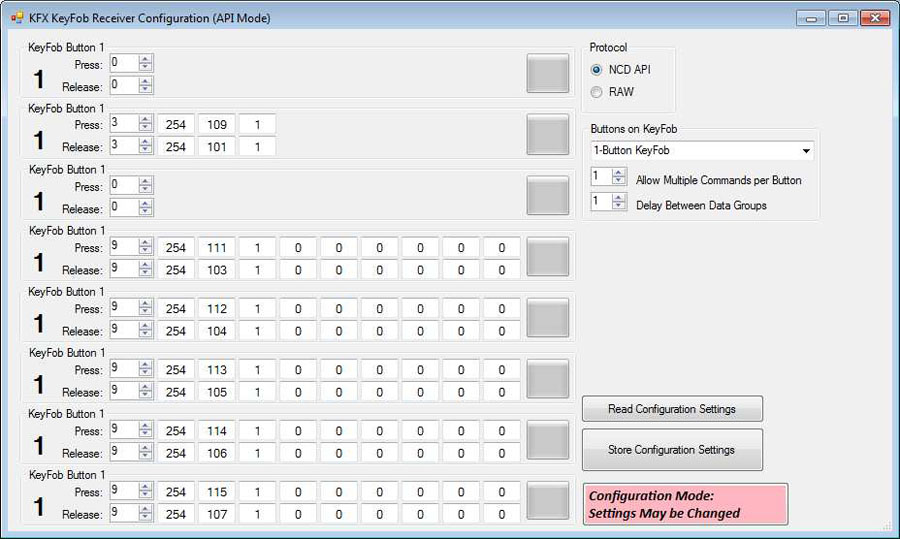 Prefer us to handle it? Just choose toggle or momentary at checkout and we'll configure it before shipping.
Key Fob Configuration
Common Commands
Here are some of the most frequently used Key Fob actions:- Toggle and Momentary Commands
- Turn Off All Relays Then Turn On a Specific Relay
- Relay Timers: Relay Energized for a Specific Time
- Relay Pulse Commands
- Relay Grouping: Controlling Multiple Relays Together
- Relay Flashing Commands
Pair Up to 40 Key Fobs
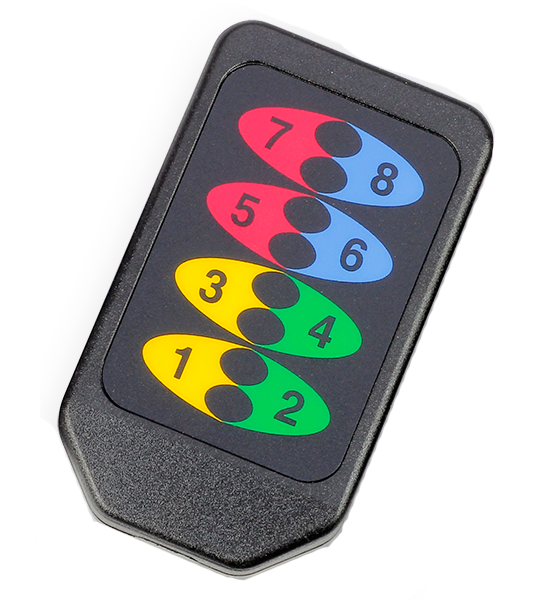
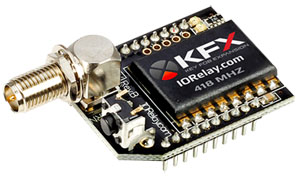 Each KFX Receiver can pair with up to 40 key fobs (1, 2, 4, and 8-button models available at checkout).
All paired key fobs perform the same actions. Individual button functions cannot be uniquely assigned per remote - every paired key fob mirrors the same command structure.
Who’s Qualified to Use the Key Fob Series?
You don't need programming experience - just basic computer skills.Simple functions are easy to configure, while advanced sequences may require a little patience and understanding of how the commands operate.
Buttons are Fully Configurable
Assign each button to a different relay, control the same relay with multiple buttons or create dedicated ON and OFF buttons for equipment that requires predictable operation.
This flexibility allows the system to be tailored to your application rather than forcing your application to fit a fixed button layout.
Base Station Key Fob Configuration
"Want it ready to go? We can pre-program your board before it ships."
Key Fob Configuration
The FX Receiver Module is configured using Base Station Software (free download). During setup, the module simply plugs into the ZIGMO Configuration Board. One ZIGMO is all you eed - no matter how many KFX Receivers you plan to configure.The ZIGMO serves as the communication bridge between your computer and the KFX Module, allowing you to set Baud Rate and define the Data Bytes sent for each key fob button press. The ZIGMO is included with the KFX Configuration Kit and is available at checkout.

Free Setup Software
Your board can ship preconfigured with toggle or momentary operation, Timers or grouping at no charge.For custom commands, use the Key Fob Configuration Kit and Base Station Software to program the KFX Module. After configuration, the module is placed back into your board and is ready to transmit your programmed commands each time a button is pressed.
💡 Relay Pros ProTip:
Key Fob Relay boards can be configured for timed relay operation, allowing relays to automatically turn off after a preset interval. We can preconfigure these settings before shipment, but purchasing a ZigMo Configuration Kit gives you the flexibility to make timing adjustments yourself whenever application requirements change.
ZigMo Configuration Kit
KFX Receiver Modules are configured through Base Station Software and must be plugged into a ZIGMO Configuration Board during setup. The KFX Module is only installed in the Configuration Kit during setup - after that, it goes right back into your board. Only one ZIGMO is required no matter how many receivers you use.
The ZIGMO provides the connection between your computer and the KFX Module, allowing you to set Baud Rate, define Data Bytes, and customize the actions for each button press.
The ZIGMO is included in the KFX Integration Kit and available during checkout.
Configuring the Buttons
When you program a button, you're configuring the command the KFX Module will send to the board when that button is pressed. Using Base Station Software, you can assign simple toggle actions or advanced commands with delays, pulse patterns, or timed operations.The KFX Module supports both button-press and button-release events for even greater flexibility.
Common Commands
Here's a brief list of some of the more common commands used when a button is pushed on the key fob.- Toggle and Momentary Commands
- Turn Off All Relays Then Turn On a Specific Relay
- Relay Timers: Relay Energized for a Specific Time
- Relay Pulse Commands
- Relay Grouping: Controlling Multiple Relays Together
- Relay Flashing Commands
KFX Module
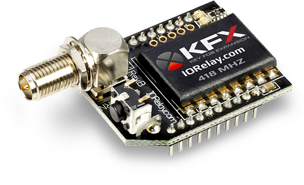 Every Key Fob Relay board is equipped with a KFX Communications Module, adding full wireless key fob capabilities. The module is powered directly from the board.
The board itself requires 12VDC, which can be hardwired or supplied using an optional wall-wart power supply available at checkout.
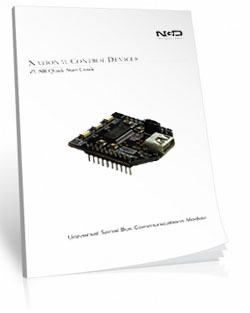
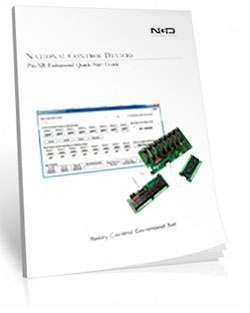
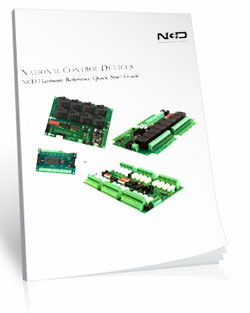
Data Sheets & Quick Start Guides

Built on Proven ProXR Technology
Key Fob Relay boards are powered by the same ProXR firmware used throughout the Relay Pros product line, providing reliable and flexible relay control for virtually any switching application.
Relays can be configured for momentary, latching, toggle or timed operation, allowing the system to adapt to your application rather than requiring custom hardware.
Key Fob Board Features
"Built for Reliability. Engineered for Simplicity"
Key Fob Relay
This tab highlights the design and build quality of the Key Fob ProXR Lite Series. Each controller is machine-manufactured for precision, durability, and long-term reliability. Every board is fully tested before it leaves the production facility, ensuring it can handle tough environments - heat, cold, vibration, and continuous daily use.Our best proof? Thousands of these boards are operating in real-world applications all over the globe. These controllers are built to last.
Full ProXR Enhanced Firmware Installed
 This board includes the full ProXR Firmware, giving you access to the complete ProXR Command Set - just without expansion capability. These commands let you assign each key fob button to a specific relay and define exactly how each button behaves.
Configure simple actions like:
- Toggle: Press once to turn a relay on, press again to turn it off
- Momentary: Relay energizes while the button is held
- Relay Timer: Control for a duration of time, turns off after predetermined time
Or program more advanced behaviors such as relay grouping, relay flashing, press-and-release actions, and other custom sequences. The ProXR firmware gives you full control over how your key fob operates the board.
DPDT Relays Installed
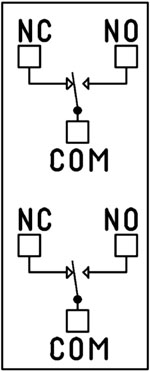 DPDT (Double Pole Double Throw) relays are essentially two SPDT switches in one relay. Each relay controls two independent circuits, but both circuits always switch at the exact same time.
- Each relay contains two sets of COM, NO, and NC terminals.
- When the relay is off, each COM terminal is connected to its NC terminal.
- When the relay is energized, each COM switches to its corresponding NO terminal.
- Switch two circuits together in perfect sync
- Control two different voltage levels at the same time
- Reverse polarity (H-bridge style) using one relay
Relay Grouping
Relay Grouping in the ProXR Command Set lets you combine individual relays to function like a DPDT relay using separate channels. This is ideal when you need to control multiple relays simultaneously or exceed the 5-Amp switching limit of our standard DPDT relays.2 Million+ Cycles
ProXR relays are built for longevity - expect years of reliable operation and millions of mechanical cycles. Every board ships with a 5-year warranty and 30-day money-back guarantee.Not Expandable (By Design)
ProXR Lite keeps things simple.Unlike the full ProXR Series, Lite boards do not support relay expansion. While the firmware still reports up to 256 potential relays, only the first 1, 2, 4, or 8 relays in Bank 1 are active depending on the model you choose.

RoHS Compliant & Lead-Free
All ProXR Lite controllers are built with RoHS-compliant components and lead-free solder.5-Yeary Warranty & Guarantee
Every ProXR Lite controller is covered by:- 5-Year Functional Warranty
- 30-Day Money-Back Guarantee
Essential Power Requirements
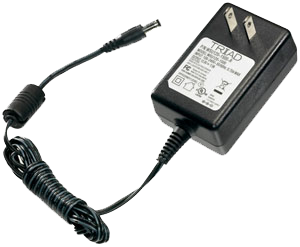 Clean, regulated power is critical.
A stable 12VDC supply ensures both the relay coils and onboard firmware operate correctly. Unstable or noisy power can cause improper switching or communication issues.
We recommend the PWR12-US (120VAC → 12VDC @ 1.25A) or our international supply with interchangeable adapters.
Learn More
Shipping
All boards ship directly from our Missouri facility. Each unit is built and tested at the time of order - please allow 2 - 3 days for production. We ship primarily through UPS, but we're happy to use FedEx or DHL for international orders when you provide your account number. Questions? Call us at 800-960-4287 or email sales@relaypros.com.Induction Suppression
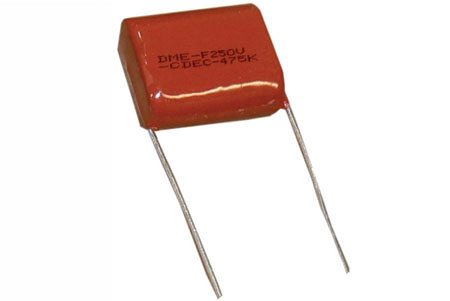 Inductive loads - motors, solenoids, transformers - generate high-voltage spikes.
Each relay controlling an inductive load must use an induction-suppression capacitor. Without it:
- Relay life is significantly reduced
- High-voltage feedback can disrupt logic and shut down relay banks
Key Fob Relay Is Here!
A more streamlined manufacturing process brings a more durable, reliable and better relay board to the market. Here's a lists of great features:
- User Friendly Board Design
- Surface mount allows for a smaller more reliable board
- Break-A-Way Tabs lets you decide the board's size
- Screw terminal or direct relay connections makes connecting to the board easy
- Board Powered by Barrel Connector or Screw Terminal
- Key Fob Features
- 40 Key Fobs can be paired to a single board
- Each Key Fob can be paired to multiple boards
- 750' (228 Meter) or 1000' (300 Meter) Range
One Key Fob, Multiple Boards
A key fob can be paired to a specific receiver module, ensuring it communicates only with the boards you choose, even when multiple boards are operating nearby.
Need to control more than one board? A single key fob can also be paired with multiple boards. When the button is pressed, all paired boards within range will respond simultaneously.
Key Fobs Available
"Add fobs (up to 40) as you need them."
Wireless Key Fob Control
A variety of wireless key fobs are available for use with Key Fob Relay boards. Each key fob can be paired directly to the receiver module, providing reliable wireless control without the need for WiFi, Internet access or additional software.Up to 40 key fobs can be paired with a single receiver module, making these systems ideal for applications that require multiple users, operators or access points.
Because key fobs are manually paired, they only communicate with the boards they are assigned to. This prevents interference from nearby systems and allows a single key fob to be paired with multiple boards when needed.
Simple Pairing Process
Adding a new key fob takes only a few seconds. Simply place the receiver module into pairing mode, press the buttons on the key fob and save the pairing to memory.Need to start over? Holding the receiver's pairing button for approximately 10 seconds will clear all stored key fobs and return the module to an unpaired state.
The key fob uses a standard user-replaceable CR2032 coin-cell battery, making long-term maintenance simple without the need for proprietary replacement parts.
1-Button Key Fob
OTX-418-HH-KF1-MS
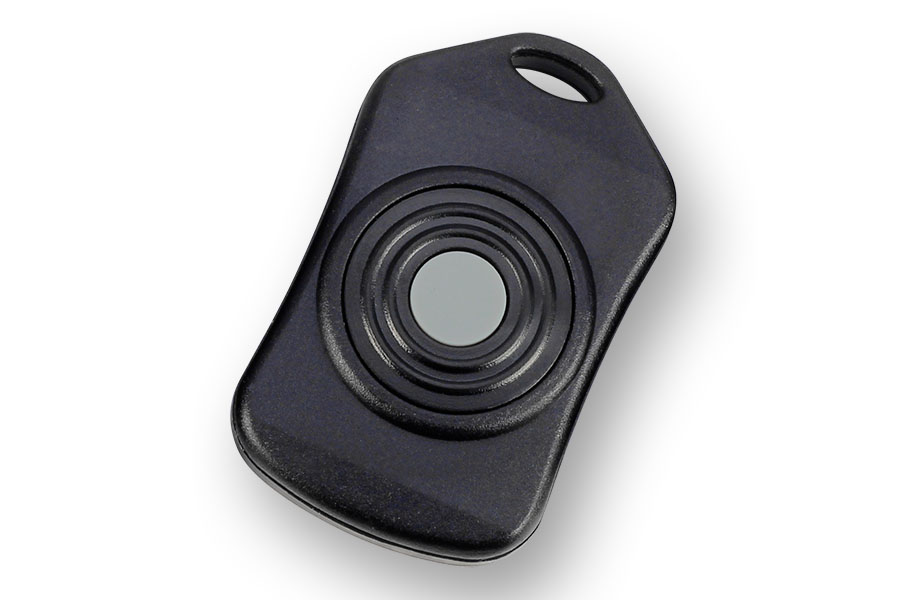
- 750' Range
- Compatible with KFX Modules
- Programmable Button
- Momentary or Toggle Configurations
2-Button Key Fob
OTX-418-HH-KF2-MS
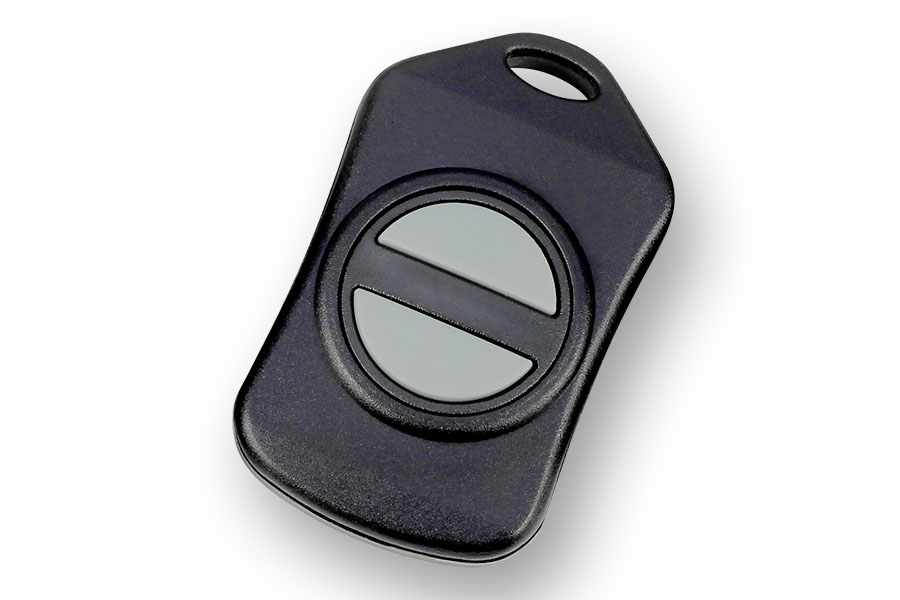
- 750' Range
- Programmable Button
- Momentary or Toggle Configurations
4-Button Key Fob
OTX-418-HH-KF4-MS
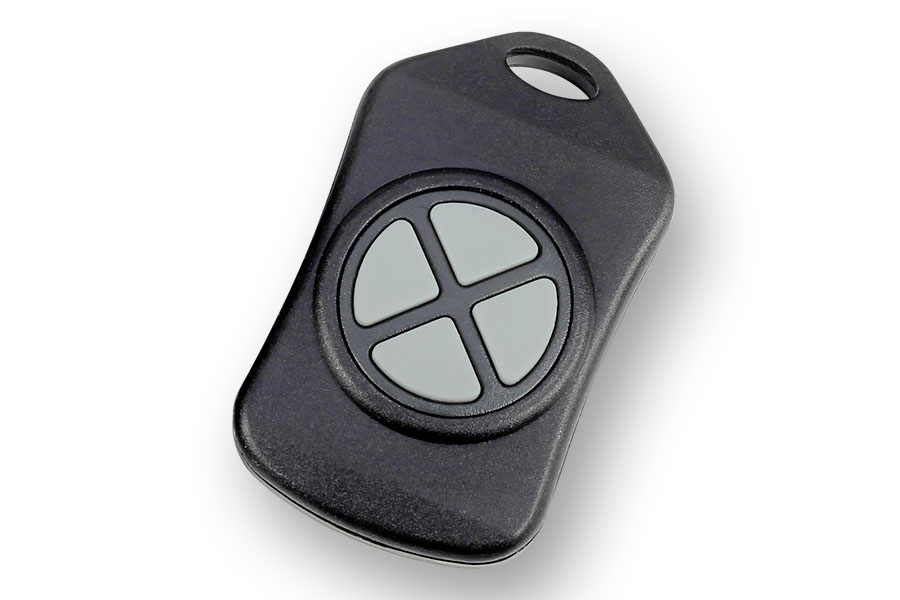
- 750' Range
- Programmable Buttons
- Program Each Independently
- Control Different Relays
- Control One Relay Differently
8-Button Key Fob
OTX-418-HH-CP8-MS
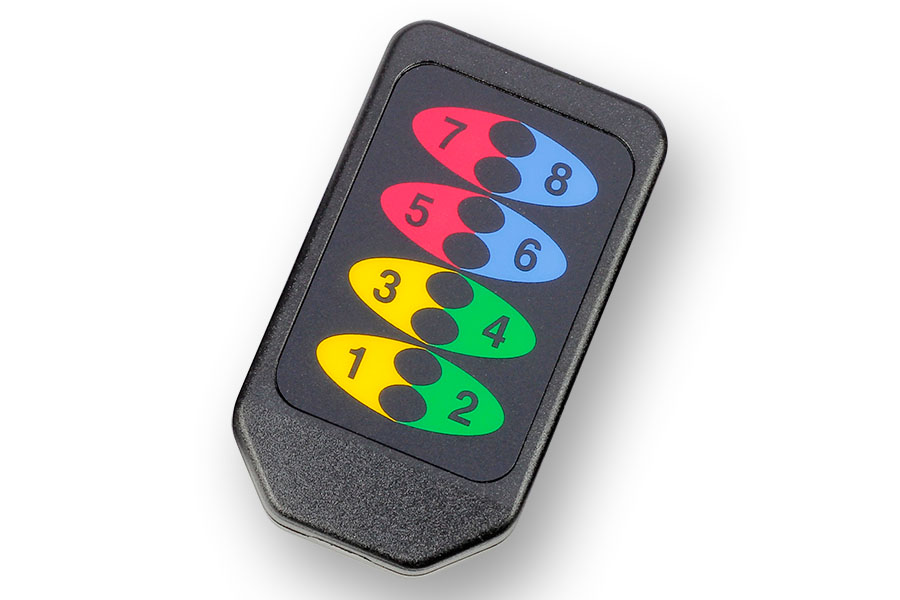
- 750' Range
- Program Buttons Independently
- Great for 4-Relay applications
- One Button On
- One Button Off
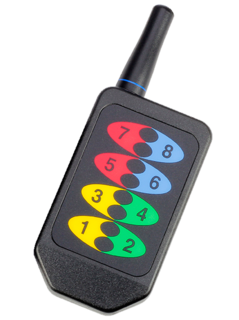
8-Button w/Antenna
OTX-418-HH-LR8-MS
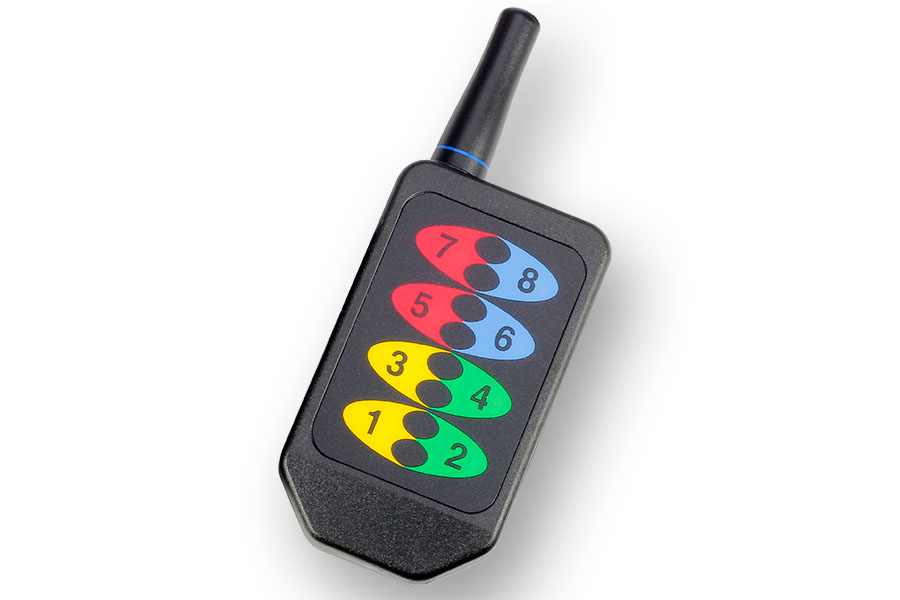
- Longer 1000' Range
- Small External Antenna
- Great for 4-Relay applications
- One Button On
- One Button Off
5-Packs & 10-Packs
OTX-418-HH-KF4-MS
Key Fobs are available in money saving
5-packs and 10-packs. Look for them
at Checking out.
Power Supply Available
 The PWR12 is regulated power supply providing clean power necessary for
the performance of these boards. The PWR12 US power supply is a 120VAC to 12VDC 1.25A 60Hz regulated
power supply and it plugs into the barrel connector on the board. The output connector is a 2.1mm I.D. x 5.5mm
O.D. x 9.5mm R/A barrel connector.
The PWR12 is regulated power supply providing clean power necessary for
the performance of these boards. The PWR12 US power supply is a 120VAC to 12VDC 1.25A 60Hz regulated
power supply and it plugs into the barrel connector on the board. The output connector is a 2.1mm I.D. x 5.5mm
O.D. x 9.5mm R/A barrel connector.
Click Here for More
Key Fob Configuration Kit
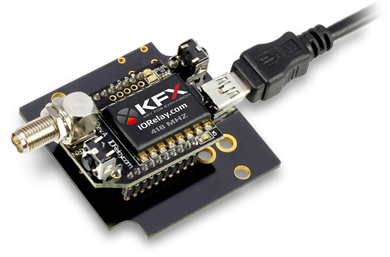 The
Configuration Kit (ZigMo) plugs into the UPS port on your PC and will mount as a COM port. The Key Fob module will
be installed in the ZigMo for configuration using Base Station Software (a free download).
The
Configuration Kit (ZigMo) plugs into the UPS port on your PC and will mount as a COM port. The Key Fob module will
be installed in the ZigMo for configuration using Base Station Software (a free download).
Click Here for More
Additional Key Fobs

Key Fobs can be purchased individually or in money saving 5-packs or 10-packs. Look for them at checkout
Click Here for More
Induction Suppression
Controlling
an inductive load using our relay controllers requires the use of induction suppression capacitors. The purpose of this capacitor
is to absorb the high voltages generated by inductive loads, blocking them from the contacts of the relay. Without this capacitor,
the lifespan of the relay will be greatly reduced. Induction can be so severe that it electrically interferes with the microprocessor
logic of our controllers, causing relay banks to shut themselves down unexpectedly.
Click Here for More
RP-SMA Extension Cable
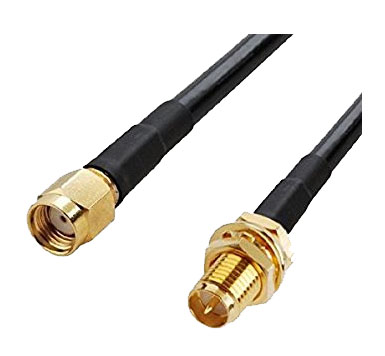 An
extension cable can be used to position the antenna if needed. Line-of-sight from the key fob to antenna greatly increases reliability. The connector
on the KFX module is an RP-SMA or Reverse Polarity SMA connector. The cable we offer is a male to female RP-SMA cable.
An
extension cable can be used to position the antenna if needed. Line-of-sight from the key fob to antenna greatly increases reliability. The connector
on the KFX module is an RP-SMA or Reverse Polarity SMA connector. The cable we offer is a male to female RP-SMA cable.
Relay Wiring Made Simple
From simple on/off switching to advanced AND/OR logic, these examples show exactly how to connect your relays for real-world applications. Learn the tricks to control lights, motors, sensors, and more with confidence.
Get a printout of this page
Relay Logic
"Using a light as an example load, let's wire to the board"
Relay Wiring Samples
This page provides simple examples showing how to wire a single relay - or multiple relays - for common switching applications. We use a light as the example load, but you can substitute a gate controller, security panel input, dry contact device, motor trigger, or most other switched loads. These wiring samples demonstrate different ways to connect relays to achieve the switching behavior you need.Relay Types
SPDT Relay
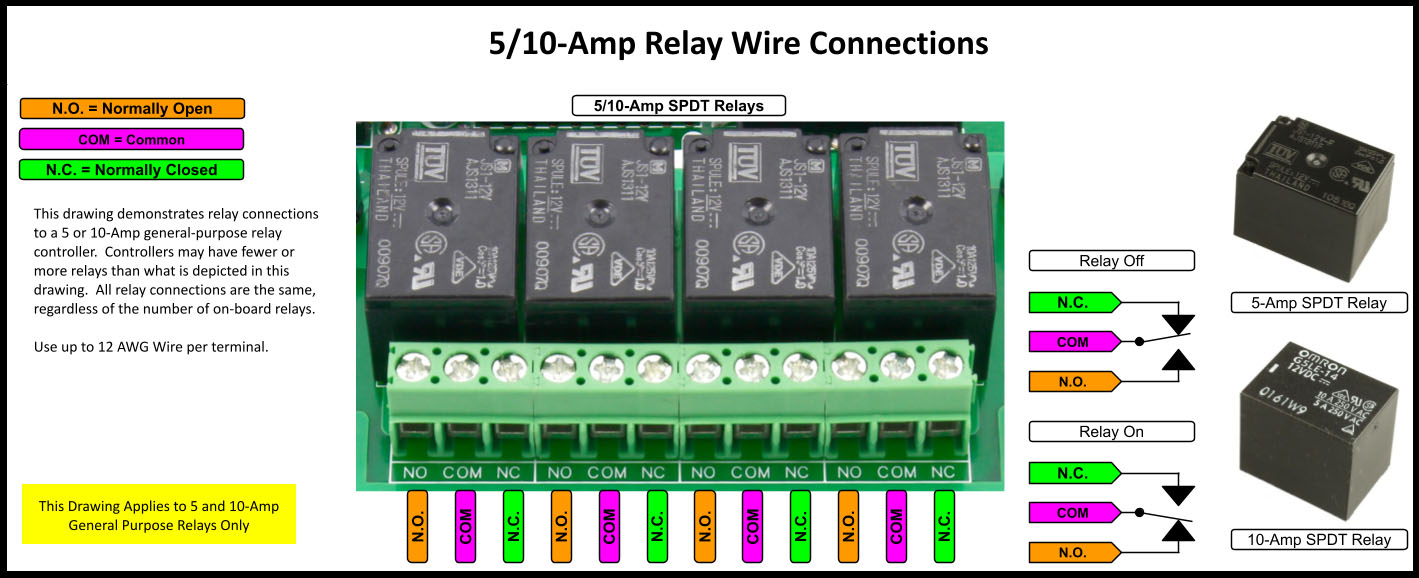
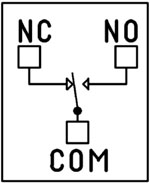 SPDT (Single Pole Double Throw) relays include three terminals: Common (COM), Normally Open (NO), and Normally Closed (NC).
- When the relay is off, COM is connected to NC.
- When the relay is energized, COM switches to NO.
Your load can be wired to either the NO or NC terminal depending on whether you want the device to turn on when the relay activates or when it releases. Examples below demonstrate both wiring methods. The SPDT relays offered on this site are 5-Amp, 10-Amp and 20-Amp models.
SPST Relay
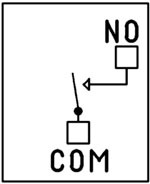
SPST (Single Pole Single Throw) relays provide two terminals: Common (COM) and Normally Open (NO).
When the relay coil is energized, COM connects to NO to power the load. The only SPST relays offered on this site are our 30-Amp models. All SPDT examples shown on this page apply to these relays as long as the example does not require a Normally Closed terminal.
DPDT Relay
A DPDT (Double Pole Double Throw) relay contains two SPDT switches that operate together.
- Each side includes its own COM, NO, and NC terminals.
- Both internal switches change state at the same time.
This allows you to control two independent circuits with one relay. Wiring for each side of a DPDT relay follows the same rules as an SPDT relay, so the examples on this page apply directly. We offer the DPDT relays in 1-Amp, 3-Amp and 5-Amp models on ProXR boards starting at 8 relays.
Relay Grouping
Relay Grouping in the ProXR Command Set lets you combine individual relays to function like a DPDT relay using separate channels. This is ideal when you need to control multiple relays simultaneously or exceed the 5-Amp switching limit of our standard DPDT relays.Relay Logic Examples
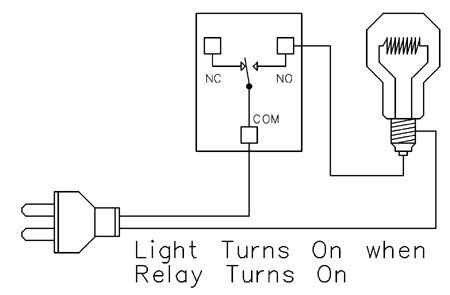
Example 1 - Simple Off/On Control
This example shows the most basic way to use a relay to switch a device such as a light. When the relay energizes, its NO (Normally Open) contact closes to COM (Common), completing the circuit and turning the light on.Only a single power wire is switched in this setup, making it the simplest method for controlling a light - or any device - using a relay.
Use this example for switching a light or any device you want to power only when the relay is on.
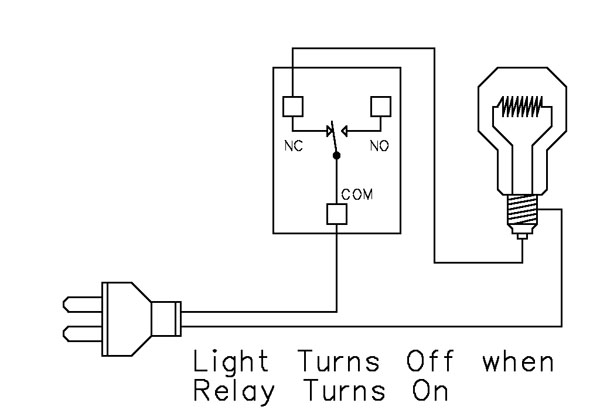
Example 2 - Simple On/Off (Using NC Contact)
This wiring method keeps the light on by default. The relay switches a single power wire through the COM (Common) and NC (Normally Closed) terminals.When the relay is not energized, the NC contact is closed to COM and the light remains on.
When the relay energizes, the NC contact opens, interrupting power and turning the light off.
This approach is ideal for devices that stay on most of the time, reducing relay wear since it doesn't need to remain energized to keep the device powered. It's also a useful method for power-cycling equipment - energizing the relay momentarily will turn the device off.
💡 Relay Pros ProTip:
For devices that stay on most of the time, use the NC contact. This reduces relay wear and extends the life of both the relay and your power supply.
Example 3 - AND Logic Using Two Relays
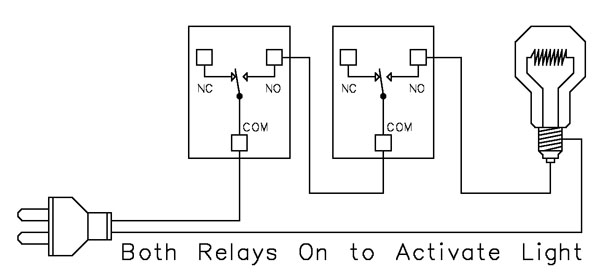 This example shows how two relays can work together so a light turns on only when both relays are energized. This creates an AND Logic condition:
Relay 1 AND Relay 2 must be on for the light to receive power.
A single power wire is switched, but it must pass through both relay contacts before reaching the light. This setup is ideal when two conditions must be met at the same time - such as requiring input from multiple sensors or system parameters.
MirC/MirX/MirM Users:
This wiring requires two contact closure inputs on the sender board before the receiver's relay activates. Use this approach when two independent outputs must close before turning on the light.For example, a light could turn on only when:
1. A light sensor detects it's dark AND
2. A motion sensor detects activity in the room
Example 4 - AND Logic Using Three Relays
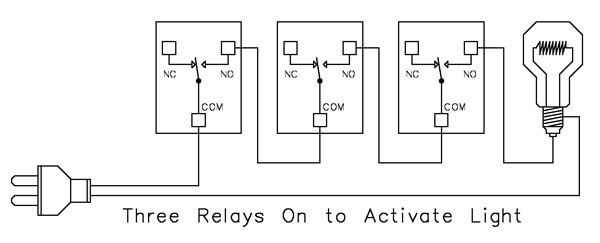 This example expands on the previous AND Logic concept. Here, the light will turn on only when all three relays are energized:
Relay 1 AND Relay 2 AND Relay 3 must be on for power to reach the light.
A single power wire is routed through all three relay contacts. Wiring from the NO (Normally Open) of Relay 1 to the COM (Common) of Relay 2, then from the NO of Relay 2 to the COM of Relay 3, creates a series path that requires every relay to energize before the light can activate.
This method can be scaled easily - just continue wiring NO of each relay to the COM of the next relay. Add as many relays as needed to meet your logic or safety requirements.
Example 5 - AND/OR Logic with Override
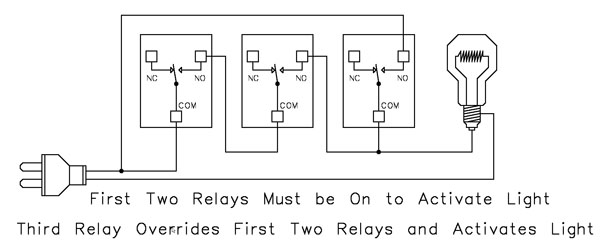 This example demonstrates a combined AND/OR logic setup. The light will turn on when:
- Relay 1 AND Relay 2 are both energized OR Relay 3 is energized (override)
- For example:
- Relay 1 = night/day sensor
- Relay 2 = motion sensor
- Relay 3 = manual override (local switch)
A/D Board Users:
The Relay Activator function on any A/D board or ProXR Lite board lets you connect a button or switch to any A/D input. This input can then control the override relay, giving you a convenient local button to manually override the first two relays.MirC/MirX/MirM Users:
Add a manual button or switch to trigger the third relay when you need direct control instead of sensor-driven control.Reactor Users:
A local button or switch can be wired to the third relay input to provide a manual override for sensor-based logic.Example 6 - OR Logic (Either Relay Activates)
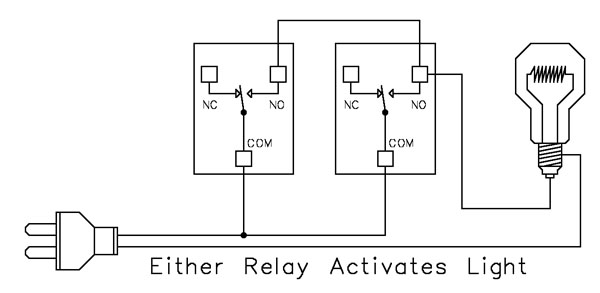 This example demonstrates OR Logic - the light will turn on when either relay is energized. Only one power wire is switched, but it can pass through Relay 1 or Relay 2 to reach the light.
- If Relay 1 activates, the light turns on
- If Relay 2 activates, the light turns on
- If both activate, the light remains on
- A timer controlling one relay, with a manual or secondary control for the other.
- Two sensors where either condition (motion detected or low light, for example) should activate the light.
A/D Board Users:
The Relay Activator function on any A/D board or ProXR Lite board lets you connect a button or switch to any A/D input. This input can then be used as a manual control of the relay.MirC/MirX Users:
Wire two contact closure inputs into the sender board - either input can trigger the receiver relay to control the light.Reactor Users:
Configure one relay for automatic sensor control and a second relay for manual push-button operation. Wire both relay outputs using OR Logic so either control method can activate the same light.Example 7 - 3-Way Switch (Relay-Based 3-Way Control)
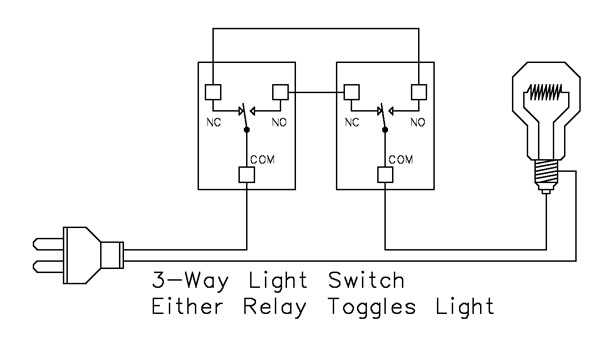 This example shows how to create a 3-way light switch setup using relays. A traditional 3-way circuit allows two switches to control the same light from different locations. In this wiring sample, each physical switch is replaced by a relay - but the operation is the same.
Only one power wire is switched, and the relays toggle the light depending on their current state.
- Activating either relay will toggle the light
- Activating both relays at the same time has the same effect as flipping both switches at once
Example 8 - DC Motor Direction Control
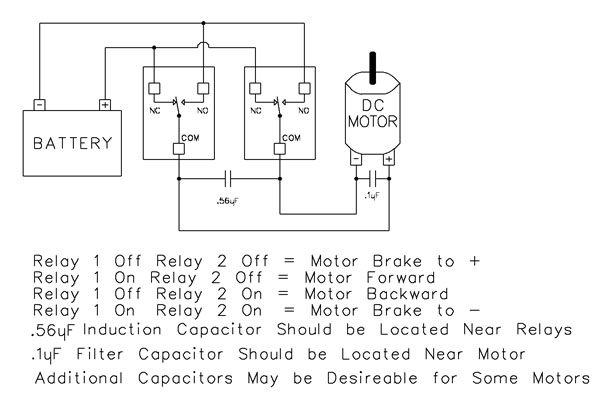 This example demonstrates how to control the direction of a DC motor using two relays. By changing how the motor's leads connect to power, you can run the motor forward, reverse, or place it in a brake state. Braking is achieved by tying both motor terminals to the same power connection, which stops rotation through Faraday's Law.
- Relay Operation Summary
- Relay 1 Off / Relay 2 Off → Motor Brake to +
- Relay 1 On / Relay 2 Off → Motor Forward
- Relay 1 Off / Relay 2 On → Motor Reverse
- Relay 1 On / Relay 2 On → Motor Brake to -
- The induction suppression capacitor prevents the relay from shutting off due to motor back-EMF
- The 0.1µF filter capacitor reduces electrical noise, especially useful when powering sensitive electronics such as radios or amplifiers.
- Capacitor Placement
- Place the induction suppression capacitor near the relays
- Place the filter capacitor near the motor
- Additional capacitors may be needed for certain motors
Motors draw significantly more current at startup than during continuous operation - often 2-3 times their rated running current. For example, a motor rated at 5A (125VAC) may require 10-15A to begin turning. Always select a relay that exceeds the motor's initial inrush current, not just its running current. In this case, a 20-30A relay provides optimal performance and longevity.
💡 Relay Pros ProTip:
Motors and inductive loads often draw 2-3x their rated current at startup. Always choose a relay that exceeds the motor's inrush current, not just its running current.
Protect Against Inductive Spikes
Motors, solenoids, contactors and other inductive loads can generate voltage spikes every time they switch on. For just a few dollars, suppression capacitors can help protect relay contacts and extend the life of your control system.
Simple to install and highly recommended for inductive loads, capacitors are one of the easiest ways to improve long-term system reliability.
Induction Suppression
Handling Inductive Loads (Why It Matters)
Inductive loads are anything with a magnetic coil - motors, solenoids, transformers, mag locks, door strikes, etc. These devices generate dangerous voltage spikes when switched on and off.Those spikes can:
- Destroy relay contacts prematurely
- Cause unexpected controller resets
- Knock USB devices offline
- Damage the board's power regulation circuitry
💡 Relay Pros ProTip:
Many customers skip suppression because it seems complicated. In reality, adding a suppression capacitor typically requires only two connection points and can dramatically reduce relay contact wear when switching motors, solenoids and contactors.Why You Need a Capacitor
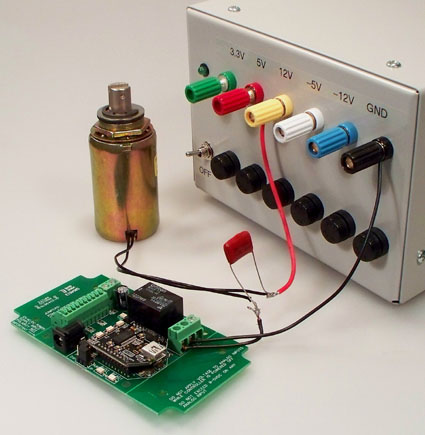 Every time an inductive device switches on, it releases a burst of high-voltage energy.
A suppression capacitor:
- Absorbs these spikes before they reach your relay
- Protects relay contacts from arcing
- Prevents interference with the microcontroller logic
- Helps maintain stable USB or serial communication
Resistive Loads Don't Need Suppression
If you're switching a purely resistive device, such as:- Incandescent/LED lighting
- Heating elements without fans
- Basic resistive appliances
- Using Relay as Dry Contact Output
Choosing the Right Capacitor
 It's simple:
Choose a capacitor with a voltage rating equal to or higher than the voltage of the device you're switching.
Example:
- Switching a 120VAC motor → Use a capacitor rated for 120VAC or higher
- Switching a 24VDC solenoid → Use a capacitor rated for 24VDC or higher
Suppression capacitors can retain a charge for a short period after power is removed. Always discharge capacitors safely before handling.
Easy Installation
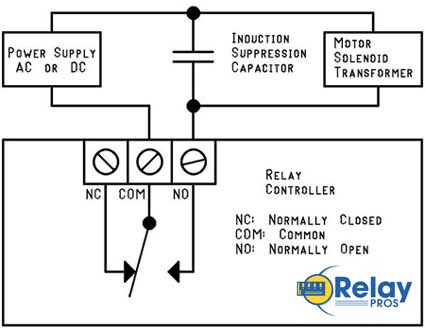
Installing a suppression capacitor is straightforward:- Mount it as close to the relay as possible
- Connect it in parallel with the inductive load
- Polarity doesn't matter - capacitors used for suppression are not polarized
- Works with both AC and DC loads
Don't Share Power Supplies with Inductive Loads
Your controller must be powered by a clean, regulated power supply.Do not share the same power supply with:
- DC motors
- High-power solenoids
- Any heavy inductive device
The only exception: battery-powered systems (like automotive) where the battery naturally absorbs induction spikes.
Important Note for USB Users
USB is extremely sensitive to electrical noise. An inductive spike can cause the PC's motherboard to drop the USB port entirely.That means:
- Your controller disappears from the OS
- Your application loses communication
- You must unplug and reconnect the board