24-Channel 5-AMP Relay Board ProXR
RPBZADSR245PROXRNormally: $299.00

24-Channel 1-Amp DPDT Refurbished Board
The RPBZADSR245PROXR is a refurbished board that is backed by our normal 30-day return policy. Each board has completed the normal testing process before being released to us for sale and are 100% functional in every way and have the current ProXR firmware installed. The boards appear to have a slight discoloration on the underside. This is the only issue we could find with these boards. This is a great opportunity to pick up an 24-channel sPDT board at a great price.Add the Interface of Your Choice
The price listed for the RPBZADSR245PROXR does not include a communication interface. The interface is how you will communicate to the board. There are 3 different interfaces available and you can choose any of these that fit your application for an added cost.
- OVERVIEW
- USB Interface
- Refurbished
- Board Features
- ProXR Command Set
- AD8 Command Set
- Software
- ACCESSORIES
- Data Sheets
USB Relay Controller at a Glance
- 24 5-Amp Relays Installed
- Single Pole Double Throw (SPDT) Relay
- Wire to Normally Open or Normally Closed Position
- 12 Guage Solid Core Wire Capacity
- Temperature Rating -40° C to 85° C
- Expandable up to 256 Relays - Onboard USB Interface Module
- Plugs Directly into USB Port
- Mounts as a Virtual COM Port - Industry Leading Command Set
- Send Specific Commands to Control Relays
- Control Any or All Relays
- Program in Almost any Language
- Read 0 to 5 Volt Sensors
Reliable USB Control
Send ProXR commands directly to your controller through your computer's USB port. The USB interface appears as a standard Virtual COM Port, providing simple, reliable communication with broad software and operating-system compatibility.
USB Interface
The USB interface provides a direct connection between your computer and the NCD controller, allowing your software to send commands directly to the board. Send commands from your software through the USB port, and the USB interface module delivers those commands directly to the controller.The ProXR Command Set handles the actual control. USB simply provides the connection that gets those commands to the board.
Sending Commands
Your software sends a ProXR command through your computer's USB port. The USB interface module receives the command and passes it to the controller, where the command is processed and the requested action is performed.Computer → USB Port → USB Interface Module → ProXR Controller → Relay
Most ProXR commands are compact serial commands, typically just 2 - 6 bytes. After processing a command, the controller can return ASCII code 85 to confirm successful completion.
Simple Serial Commands. Serious Control.
The ProXR family of controllers is driven by a powerful, low-level serial command set. You send a short numeric or Hex command to the board - and the board responds immediately.This design keeps your software fast, reliable, and easy to integrate into almost any platform, from small scripts to full automation systems.
All ProXR controllers operate using a small sequence of bytes sent over a serial connection.
You can send commands as:
- Decimal byte values
- Hex byte values
Look for the ProXR Command Set tab for more.
USB Communication
Virtual COM Port
The USB interface appears to your computer as a standard Virtual COM Port (VCP). This allows the controller to communicate using the same serial-port methods supported by a wide range of programming languages, software, and operating systems.On Windows computers with internet access, the required FTDI drivers typically install automatically when the USB module is connected. The USB module uses a genuine FTDI FT232-RL USB-to-Serial converter for reliable USB communication and broad software compatibility. Drivers are also available for Windows, macOS, Linux, and other operating systems here: FTDI Driver Download.
USB Communication Module
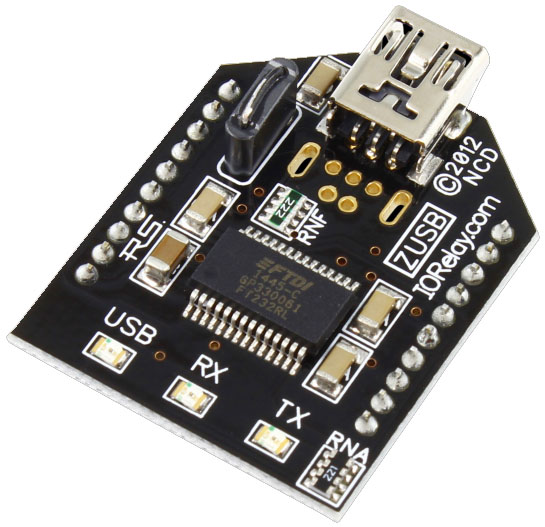 Connect the module to an available USB port, open the assigned COM port at 115.2K baud, and begin communicating with the controller. On-board USB, TX, and RX LEDs provide immediate visual feedback during communication.
The module uses a durable USB Mini connector designed for long-term reliability.
For quick testing and configuration, download and install the latest Base Station Software on a Windows PC. The software automatically detects the available COM port and provides a convenient way to communicate with the controller.
Handling Inductive Loads
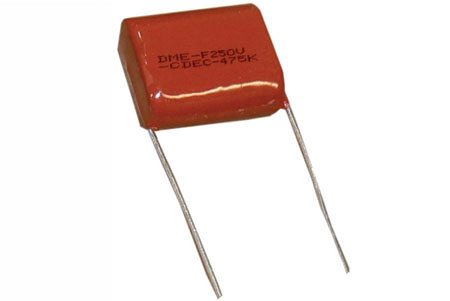 For most applications, installing capacitors provide sufficient electrical noise suppression for reliable communication.
Switching highly inductive loads such as motors can generate significantly higher levels of electrical noise. Motor-control applications should be tested to ensure reliable communication in the installed environment.
If additional noise immunity is required, an RS-232 communication module provides a more noise-resistant communication path. When USB connectivity is still required, a USB-to-RS-232 adapter can be used with the RS-232 module.
For typical relay applications and non-motor loads, standard USB communication generally provides reliable operation.
Look for the Induction Tab for more.
USB Relay Videos
Limited Quantities
There are limited quantities of this sale board. Quantity available should be listed unter the sale price above.
Refurbished Boards
Refurbished boards have the most current firmware and face the same strict testing procedures that all our boards undergo. This B-Stock or Refurbished board is a fully working board that may have slight scratches or blemishes that do not effect the operation of the board. The board may be an overstock or returned from a customer.Where We Get 'Em
The sale boards come to us in various ways, we get them from customer returns that have slight varations where we feel they can't be sold as new (usually the Break-A-Way tabs have been removed). We also get boards directly from National Control Devices to be sold as Refurbished Boards because of those tabs being broken off, missing lights or the boards didn't clean up well after the manufacturing process. All the boards a fully tested before we list them on this page and are covered by our 30-day return policy.Interface Options
This board may not have a communication interface installed and you have the ability to select the interface you would like at checkout. Because of the new power requirements of the Ethernet, Wi-Fi and Bluetooth modules, boards manufacturered before 2020 do not have the ability to have these modules installed. If these modules are not offered as an option then they cannot be used with this board. Look for the gray Interface Options tab above for an overview of each interface available and a quick start guide for each. The interface must be selected of you will not be able to communicate to the board.Scalable, Professional Relay Control
ProXR boards deliver industrial-grade relay control with full expansion capability. Start with the relays you need today and scale up to 256 total relays as your system grows - all using the same powerful ProXR command set.
The ProXR SPDT Relay Board
"Built to Scale - Designed for Long-Term Control"
ProXR Relay Board Design
The ProXR Series is engineered for applications that demand flexibility and future expansion. Each controller is fully tested before shipping and built to operate reliably in challenging environments - including heat, cold, vibration, and continuous-duty operation.ProXR Command Set
 ProXR firmware provides one of the most complete and flexible relay command libraries available.
Control individual relays, relay banks, or entire systems using delays, flashers, duration timers, watchdog functions, and real-time status feedback - all programmable in nearly any language. Prefer no-code? Compatible control software is available.
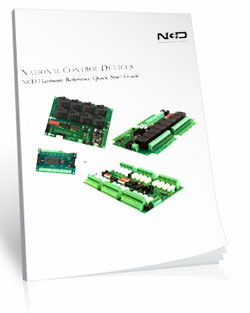
Find the full command set in the ProXR Enhanced Quick Start Guide ProXR Quick Start Guide.
Easy Software Development
Most users write their own control software, and ProXR makes that easy.The controller communicates using simple serial commands and appears as a standard COM port, allowing integration with nearly any programming language or automation platform.
Not a programmer? N-Button provides point-and-click relay control and status monitoring - no code required.
Look for the Gray N-Button Lite or N-Button Pro tab.
The Input Side
"Where the board gathers information."
Read Analog Sensors
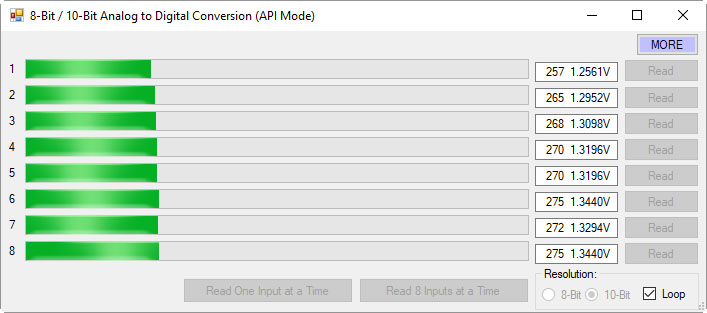 Every ProXR board includes an 8-Channel 8/10-Bit A/D Converter.
Monitor up to eight sensors from 0-5VDC (0V supported via contact closure).
Ideal for:
- Switch and contact monitoring
- Variable resistance sensors
- Closed-loop automation logic
More on A/D conversion can be found in the AD8 Command Set tab.
Relay Activator and Analog Inputs
The Relay Activator control panel lets you use analog inputs to directly control onboard relays. Connect a button or switch to an analog input and assign it a relay control function. Each of the eight inputs can be assigned one of eight functions:- Turn relays ON or OFF
- Toggle relay states
- Flash a relay momentarily
- Toggle the flash function
- Turn all relays ON
- Turn all relays OFF
- Generate push-notification events using N-Button Software
Relay Pros ProTip
Automatic + Manual ControlNeed both automatic and manual control?
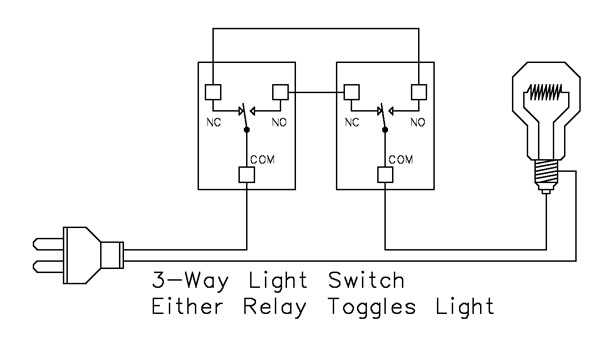
Control the relay using your computer as usual, then connect a standard wall switch to one of the A/D inputs. Using the 3-Way Relay Logic wiring example, the input can be used to control the relay while the computer continues to provide automatic control.
The wall switch does not connect directly to the relay. The switch signals the ProXR firmware through an A/D input, and the 3-Way wiring allows either control method to turn the load ON or OFF.
It's a simple way to combine computer-controlled operation with convenient local control, giving you the best of both worlds.
The Output Side
"Where the board controls your equipment."
SPDT Relay Installed
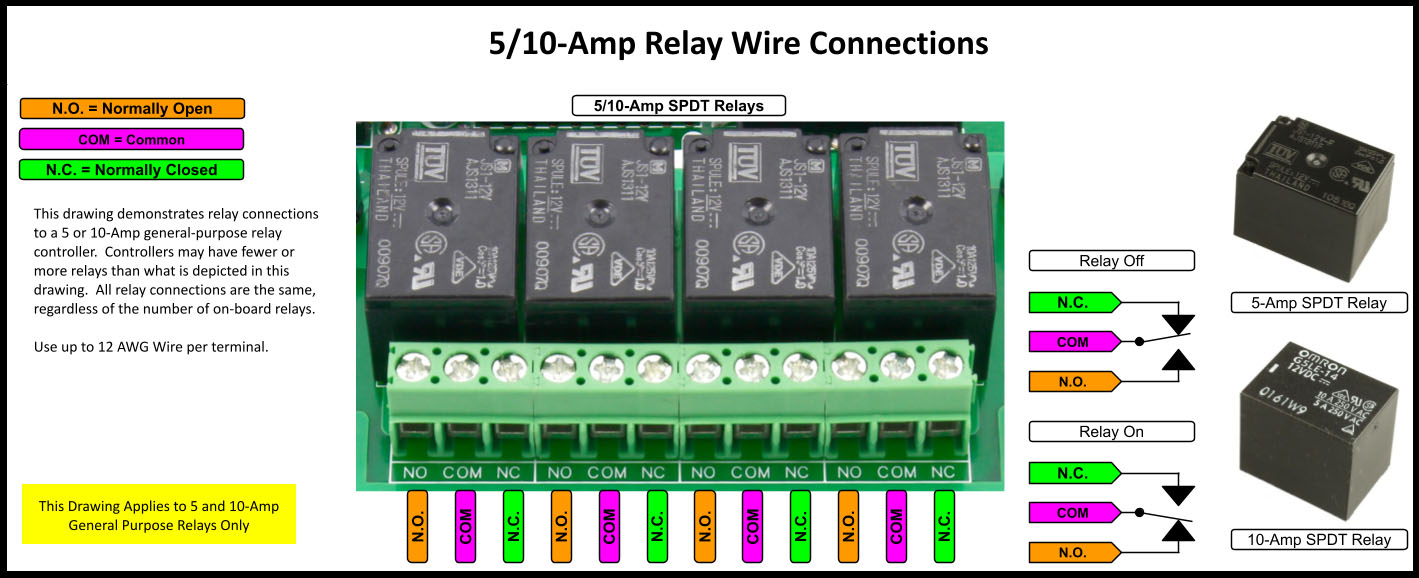
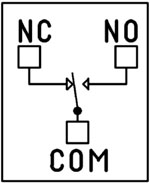 SPDT (Single Pole Double Throw) relays include three terminals: Common (COM), Normally Open (NO), and Normally Closed (NC)
- When the relay is off, COM is connected to NC.
- When the relay is energized, COM switches to NO.
2 Million+ Cycles
ProXR relays are rated for long service life - expect years of dependable operation and millions of mechanical cycles.Every controller includes a 5-Year Warranty and 30-Day Money-Back Guarantee.
Board Features
"What sets ProXR apart."
Add Relays as Your System Grows
Every ProXR controller includes an onboard XR Expansion Port, allowing you to add relay expansion boards at any time.Start with the number of relays you need today and expand incrementally - up to 256 total relays - without replacing your controller or rewriting your software.
Expansion boards share the same command set and can mix relay types and amperages to match evolving system requirements.

RoHS Compliant & Lead-Free
All ProXR controllers are built with RoHS-compliant components and lead-free solder.Power & Protection
"Reliable Power = Reliable Switching"
Essential Power Requirements
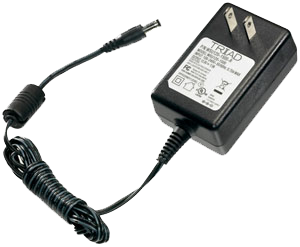 Clean, regulated power is critical.
A stable 12VDC supply ensures both the relay coils and onboard firmware operate correctly. Unstable or noisy power can cause improper switching or communication issues.
We recommend the PWR12-US (120VAC → 12VDC @ 1.25A) or our international supply with interchangeable adapters.
Learn More
Induction Suppression
 One of the most important parts of relay control - yet the most commonly overlooked - is inductive load protection.
Anything with a magnetic coil (motors, solenoids, transformers, etc.) generates high-voltage "kickback" when switched. Without a suppression capacitor, that spike can:
- Shorten relay lifespan
- Cause electrical noise that disrupts the microcontroller
- Trigger unexpected shutdowns
- Require power cycling to restore communication
Support & Ownership
"5-year warranty & no monthly subscriptions."
5-Year Warranty & Guarantee
Every ProXR Lite controller is covered by:- 5-Year Functional Warranty
- 30-Day Money-Back Guarantee
- No Monthly Subscriptions
Shipping
All boards ship directly from our Missouri facility. Each unit is built and tested at the time of order - please allow 3 - 5 days for production. We ship primarily through UPS, but we're happy to use FedEx or DHL for international orders when you provide your account number. Questions? Call us at 800-960-4287 or email sales@relaypros.com.Base Station Software
Base Station is the fastest way to learn and control the ProXR Lite board. Explore every feature through an intuitive GUI while watching live data flow to and from the board.Designed to work seamlessly with the entire family of communication modules, Base Station supports every feature the board offers - far beyond what other manufacturers provide. More on Base Station can be found in the Base Station tab.
Powerful Control, Any Language
The ProXR Command Set gives you precise, reliable control using simple serial commands - compatible with nearly any programming language. Use it directly in your own software or explore every feature using free configuration tools.
The ProXR Command Set
"The industry's most powerful relay command set"
Simple Serial Commands. Serious Control.
The ProXR family of controllers is driven by a powerful, low-level serial command set. You send a short numeric or Hex command to the board - and the board responds immediately.This design keeps your software fast, reliable, and easy to integrate into almost any platform, from small scripts to full automation systems.
How to Send Commands
 All ProXR controllers operate using a small sequence of bytes sent over a serial connection.
You can send commands as:
- Decimal byte values
- Hex byte values
What a Command Looks Like
At its simplest, a relay command is only three bytes:254 108 1 - Turn ON relay 1 in bank 1
0xFE 0x6C 0x01 - If you require Hex
254 100 1 - Turn OFF relay 1 in bank 1
0xFE 0x64 0x01 - If you require Hex
The controller processes the command and returns a confirmation byte 85 (0x55 Hex) when the operation completes.
💡 Relay Pros ProTip:
Let Base Station Show You the Command! Base Station software can show you the exact command being sent to the controller. Click the More button in the upper-right corner of the Base Station window to expand the interface and display the command output. When you control relays using the point-and-click interface - turning relays on or off, toggling outputs, or using timing and flasher functions - Base Station displays the actual command being transmitted to the board.
This is extremely useful for programmers. You can perform the function you want in your application and instantly see the decimal or hexadecimal command - the same command you'll use in your programming.
Relay Banks - How Large Systems Stay Simple
ProXR and ProXR Lite controllers organize relays into groups of eight called banks.Each bank contains:
- Relay 1 through Relay 8
Expandable ProXR boards use the same bank structure, but can add additional banks using XR expansion boards as your system grows.
For example:
- An 8-relay controller uses one bank
- A 32-relay controller uses four banks
- A 64-relay setup uses eight banks
- Select a bank
- Send simple relay commands within that bank
Two Ways to Address Relays
You can control relays in two different (and complementary) ways:- Current Bank Commands - select a bank once, then issue fast relay commands
- Bank-Directed Commands - specify the bank directly inside the command
For larger installations, bank-directed commands make software logic easier and more robust.
What You Can Do With the ProXR Command Set
The ProXR command set is designed to support real automation projects - not just basic relay switching.Common operations include:
- Turn individual relays on or off
- Turn multiple relays on or off in a single command
- Read the on/off status of any relay
- Control relays by bank for large systems
- Read analog sensor values (A/D inputs)
- Assign and control internal timers
- Trigger relay pulses and timed operations
- Use onboard logic features such as the Relay Activator system
Designed for Any Programming Language
Because the ProXR command set is pure byte-based serial communication, you can use it from:- Python, C#, C++, Java, Node, LabVIEW, and PLC environments
- Embedded controllers and microcontrollers
- Industrial automation and building control systems
No-Code and Learning Tools
If you do not want to write software immediately, free tools are available:- Base Station Software - explore every command, watch live data, and test automation logic
- N-Button Software - create buttons and automation actions without writing code
Full Command Reference
This page is intended as a high-level overview of how the ProXR command system works. For the complete command reference, including all relay, bank, timer, and analog input commands, download the official guide:ProXR Enhanced Quick Start Guide
Relay Grouping - Switch Multiple Relays at the Exact Same Time
Control Neighboring Relays
Relay Grouping lets you control multiple neighboring relays as one logical output.Think of it like building your own multi-pole relay:
- 2 relays → act like a DPDT
- 3 relays → act like a 3PDT
- ...
- up to 8 relays at once in the same bank
How it Works
Relay Grouping adds one extra value to a normal relay command called the Neighbor parameter.The Neighbor value simply means: "Also apply this same command to the next 1-7 relays."
So instead of turning on just one relay...
you turn on that relay plus its neighbors in one shot.
Neighbors must stay inside the same relay bank
For example:- Relay 1 can have up to 7 neighbors
- Relay 8 has no neighbors, because the next relay is in the next bank
💡 Relay Pros ProTip:
Relay Grouping is perfect when you need multiple contacts to move together but still want the flexibility of individual relays also. Instead of hunting for odd multi-pole relay hardware, you can build exactly the behavior you need in firmware.
And if your design changes later? You're not locked into a special relay block.
Prevent Overlapping Relay States
Safe Break-Before-Relay Switching
Some applications require more than simply turning a relay on or off. When controlling motors, actuators, gates, shades, and door systems, it's critical that two opposing relays are never active at the same time.The ProXR firmware includes a built-in Break-Before-Relay command that:
- Turns all relays off
- Waits a short, controlled delay
- Then turns only the selected relay on
Break-Before-Relay Command Example
This example performs a safe switch operation and then activates the selected relay.Decimal: 254 46 0 0
Hex: 0xFE 0x2E 0x00 0x00
When the operation completes, the controller returns: 85 (0x55)
💡 Relay Pros ProTip:
This command is a game-changer for motor control. Use it for gate operators, door controllers, window shades, linear actuators, and any system that uses one relay for "forward" and another for "reverse". By forcing all relays off before energizing the next relay, you protect the motor from being driven in two directions at the same time - a common cause of overheating and motor failure.
This safety behavior is handled entirely inside the ProXR firmware, so your software does not need to manage timing or relay interlocks.
Relay Timers
Relay Timers - Built-In Time Control
ProXR controllers include 16 built-in relay timers that let you turn a relay on for a specific amount of time - without your software having to turn it back off.This is perfect for applications such as:
- Door strikes and mag-locks ("buzz someone in")
- Key-card and access control systems
- Gate and barrier controllers
- Lighting and automation events
Two Simple Timer Modes
ProXR relay timers support two easy-to-use modes:- Duration - turns a relay ON for a specified time, then turns it OFF automatically
- Pulse - waits for the timer to expire, then briefly activates a relay
Simple Duration Timer (Most Common Use)
A duration timer turns a relay ON, holds it ON for the programmed time, and then turns it OFF automatically.You can program:
- Hours
- Minutes
- Seconds
Duration Timer Command Example
Send Bytes (Decimal): 254 50 50 0 0 5 0Send Bytes (Hex): 0xFE 0x32 0x32 0x00 0x00 0x05 0x00
This example activates a relay for 5 seconds, then turns it off automatically.
When the command completes, the controller returns: 85 (0x55)
💡 Relay Pros ProTip:
Relay timers are ideal for door strikes and access control. Instead of having your software turn the relay off, simply send a duration timer for 2-10 seconds. The relay releases the lock, lets the person through, and automatically re-locks the door - even if your software is busy or momentarily disconnected.
Timing is handled inside the ProXR firmware, so your application only needs to send a single command to perform the entire operation.
Note: ProXR controllers do not include a real-time clock. Timers are intended for event-based timing (such as opening a door for a few seconds), not for scheduled calendar-based automation.
Relay Flashers
Relay Flashers - Built-In Blinking and Pulse Control
ProXR controllers include a powerful background relay flasher engine. Once a relay is assigned to a flasher, the firmware automatically turns that relay on and off for you - no software timing loops required.This is ideal for:
- Status indicators and stack lights
- Warning beacons and alarms
- Heartbeat and activity indicators
- Simple pulse or attention signals
Set the Flash Rate (All Flashers)
You can set the flash speed for all active relay flashers with a single command. The speed parameter ranges from 0-255, where:- 0 = fastest flash rate
- 255 = slowest flash rate
Decimal: 254 45 0 128
Hex: 0xFE 0x2D 0x00 0x80
When the command is accepted, the controller returns: 85 (0x55)
💡 Relay Pros ProTip:
Flashers are perfect for visual feedback. For example, use a flashing relay to indicate "system running", "waiting for input", or "fault detected" - while your main software continues doing real work.
Flasher commands can also be combined with relay timers and other ProXR features inside Base Station, making it easy to build pulse, blink, and notification behavior without writing custom timing code.
Base Station Software
Device Command Sets
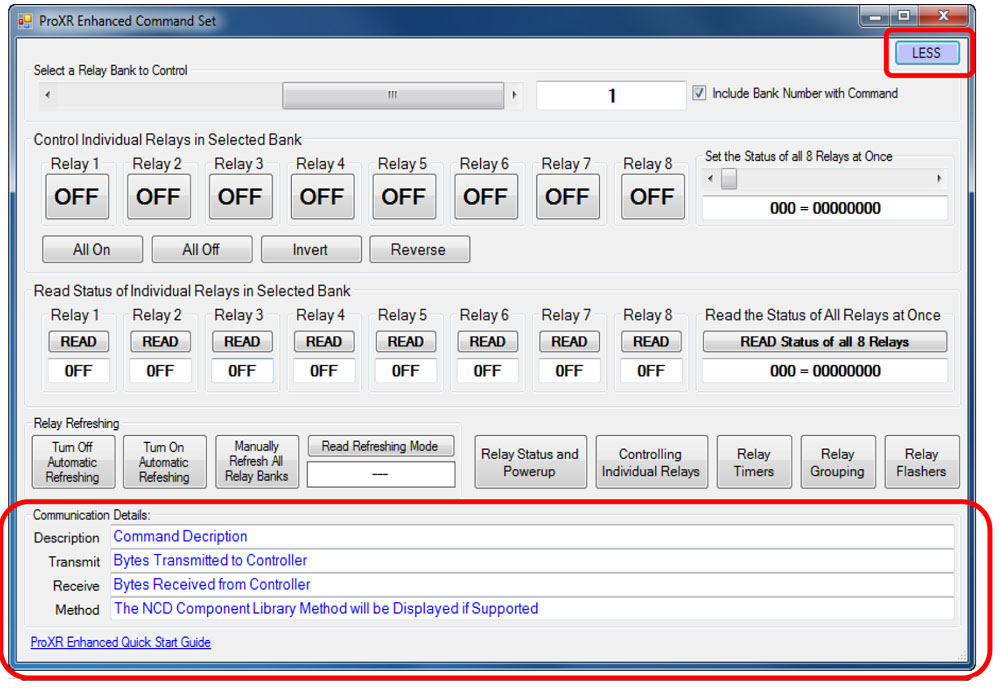 Base Station asks the controller which command sets it supports, then displays them when the software launches. Some devices show more command sets, others fewer - it's always based on the board.
ProXR users can access the entire ProXR Command Set to turn relays on/off and run every available function.
Control All ProXR Functions
Turn relays on or off, read relay status, monitor inputs - Base Station gives full ProXR control through a clean point-and-click interface.For programmers, Base Station also shows every command being sent to the board, making it a great tool for learning and development.
Useful Features
There are some useful features to look for when using Base Station Software to control, test, or configure your device:- Links to Quick Start Guides and documentation
- Discovery of network devices with IP address display
- Command Set Window for viewing raw commands (especially helpful for ProXR users)
- Relay Activator with Analog Inputs
Turn Sensors into Actions
Built-in analog inputs let you read switches and 0-5V sensors in real time - and automatically trigger relays, alerts, or automation rules. Monitor data, control outputs, or send notifications using software tools, with no extra hardware required.
The AD8 Command Set
"This isn't just a relay board - it's a control system."
Reading Switches/Variable Resistance Signals
This controller includes eight channels of 8/10-bit Analog-to-Digital Converters capable of reading 0 - 5V DC signals. The ADCs allow you to monitor external sensors or detect contact-closure inputs. Connect temperature sensors, light sensors, current sensors, buttons, switches, or any device that outputs a 0 - 5V signal or simple contact closure.
- With 8-bit resolution, inputs convert 0 - 5V into values from 0 to 255
- With 10-bit resolution, values range from 0 to 1023
A/D Inputs
 All ProXR Lite boards and ProXR boards that begin with ZADR or ZADSR include an onboard 8-channel Analog-to-Digital converter in addition to relay control. Each channel accepts a 0-5V DC input and converts it into a numeric value for processing.
Using the AD8 Command Set, analog voltages are translated into digital values (8- or 10-bit resolution, depending on configuration), making it easy to monitor and act on sensor data from a wide range of devices.
Each analog input can be configured to turn relays ON or OFF, toggle relay states, flash relays, enable or disable flashing, send push-notification data, and more - all based on live input values read in real time.
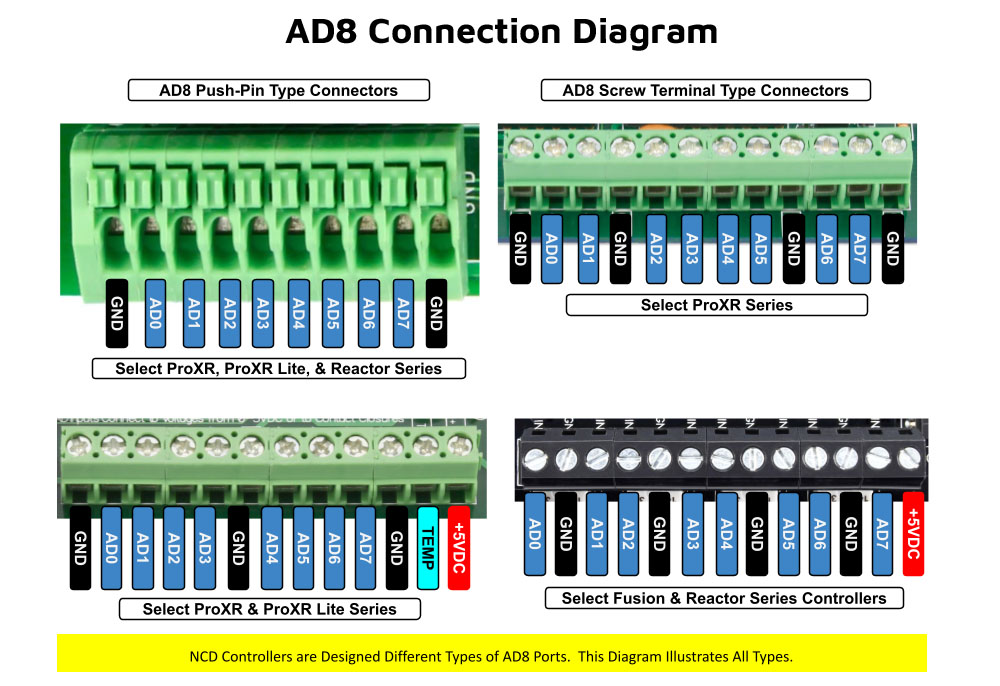
As shown in the graphic, ProXR AD8 controllers are available with multiple analog input connector options. One of the connector styles shown corresponds to the specific board you are viewing, allowing you to quickly identify how sensors will physically connect. All analog inputs share a common ground, simplifying wiring and making it easy to connect multiple sensors to a single controller.
Once connected, A/D input values can be used consistently across N-Button and Base Station software for automation, relay control, monitoring, and diagnostics. This unified approach ensures predictable behavior from hardware to software, whether you are building a simple monitoring system or a fully automated control solution.
Analog Inputs Controlling Relays
ProXR AD8 relay controllers allow analog inputs to directly control onboard relays using the same A/D input data used by N-Button and Base Station software (see Relay Activator section below). This makes it easy to monitor sensor values, automate relay behavior, and visualize input data across all supported software tools.Analog to Digital Connections
AD8 controllers are designed for stable sensor and switch monitoring. A/D inputs should never be left floating - each input must connect to a voltage or ground.A built-in 10K pull-up/pull-down resistor (jumper-selectable) ties each input to +5V or ground to prevent floating conditions. While this resistor adds slight loading, the improved stability far outweighs any minor interference.
AD8 Command Set
The AD8 Command Set reads analog voltages using the controller's 8-channel 8/10-bit ADC.- 8-bit mode: Converts 0 - 5V to values from 0 to 255
- 10-bit mode: Converts 0 - 5V to values from 0 to 1023
What a Command Looks Like
At its simplest, an AD8 command is only two bytes:254 150 - Read Input 1
0xFE 0x96 - If you require Hex
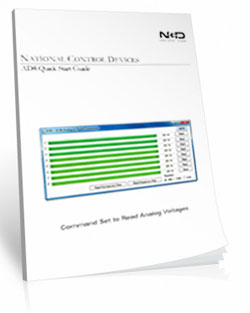
The controller processes the command and returns a value byte Decimal: 0-255, Hex: 0x00-0xFF when the operation completes. For the complete list of commands, download the AD Quick Start Guide.
View A/D Input Data in Real Time
Base Station software allows you to read all analog inputs in real time while clearly displaying the exact command data being sent to and from the controller. In the example shown, all eight A/D input channels are read simultaneously and displayed as live numeric values along with a real-time graph, making it easy to visualize how each input changes over time.
Because Base Station shows the actual commands used to read the A/D inputs, it becomes an invaluable learning and diagnostic tool. You can see precisely how input values are requested, returned, and interpreted by the controller, then copy those commands directly into your own applications or custom software. This dramatically simplifies development, testing, and troubleshooting when integrating A/D inputs into larger systems.
Whether you are validating sensor behavior, monitoring multiple inputs at once, or building your own custom control software, Base Station gives you clear visibility into both the data and the communication behind it.
💡 Relay Pros ProTip:
Base Station can show you the exact command used to read the analog inputs. Click the More button in the upper-right corner of the Base Station window to expand the interface and display the command data being sent to and from the controller.
As you read inputs or monitor channels in real time, the software displays the precise commands used to request the A/D values and the data returned by the controller. This makes Base Station an excellent learning tool for developers - you can watch the commands being generated and then use the same decimal or hexadecimal values directly in your own software.
AD8 Relay Activator
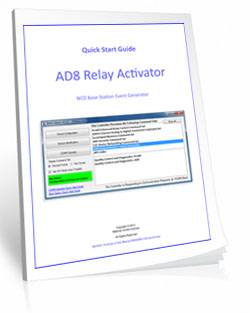
Control relays with a switch or button connected directly to the board for manual control. For full details download the AD8 Relay Activator Quick Start Guide.
Relay Activator
Relay Activator and Analog Inputs
Base Station Software's Relay Activator is ideal for applications that primarily rely on computer control but still require occasional manual operation. By connecting external buttons or switches, you can take direct, hands-on control of any relay without giving up software-based control.This creates true bi-directional control. For example, a relay can be turned ON through the computer interface and later turned OFF using a physical switch - or vice versa. Whether you're testing, troubleshooting, or building a hybrid manual/software-controlled system, Relay Activator keeps everything synchronized and predictable.
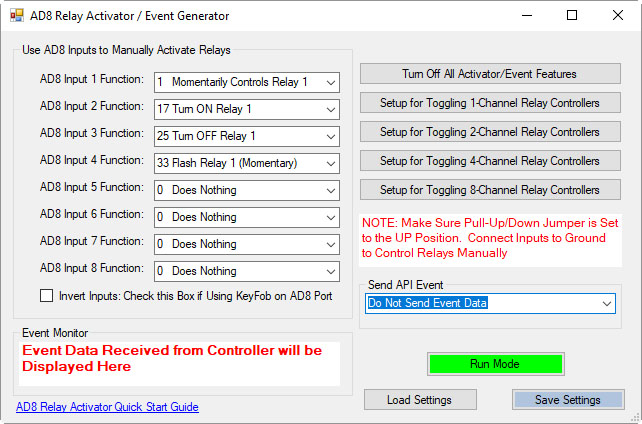 As shown in the example, each input includes a pull-down menu that allows you to select exactly how that input will control a relay. This makes configuration fast and intuitive - simply choose the desired action for each input without writing any code.
Each of the 8 input channels can be configured to control relays 1 through 8, with multiple action types available. This flexibility allows every input to perform exactly the function your application requires.
This level of control makes Relay Activator perfect for operator panels, test benches, safety overrides, and any application where manual interaction and software automation need to work together seamlessly.
AD8 Relay Activator Quick Start Guide.
Available Relay Actions per Input
Each input can be assigned one of the following actions:
- Momentary Control - Activates the relay only while the input is engaged
- Toggle Relay State - Alternates the relay between ON and OFF
- Turn Relay ON - Forces the relay into the ON state
- Turn Relay OFF - Forces the relay into the OFF state
- Flash Relay (Momentary) - Pulses the relay while the input is active
- Flash Relay (Toggle) - Toggles flashing behavior ON and OFF
💡 Relay Pros ProTip
Use the Turn Relay OFF action as a panic-stop or fail-safe control. A single button, switch, or sensor input can immediately force one relay - or multiple relays - into the OFF state. This is ideal for emergency stops on machinery, instantly disabling door locks, or overriding automation logic when a quick shutdown is required.AD8 with N-Button
Using N-Button software, you can control relays, build desktop meters that show real-time readings from the AD8 inputs. You can also create automatic push notifications messages triggered by those sensor values.
N-Button Software
Using A/D Inputs with N-Button
N-Button Lite and Pro support powerful A/D Input Automation rules that allow you to automatically control relays based on analog input levels. Simply define a voltage threshold or range, and N-Button will energize or de-energize relays as conditions change.N-Button also supports Send Email and Text Message actions (Push Notifications), enabling automatic alerts when an A/D input reaches a specific level or falls within a defined range. Relay control and notifications can work together seamlessly, all driven by live A/D input data.
Works Seamlessly with N-Button Software
 Each A/D channel supports industry-standard 0-5V inputs, making it simple to integrate a wide range of sensors without extra hardware. Using N-Button, you can:
- Build desktop meters that show real-time sensor data
- Create dashboards with multiple sensor feeds
- Trigger Push Notification alerts from A/D thresholds
- Control relays based on sensor conditions - no programming required
Using the Input Information
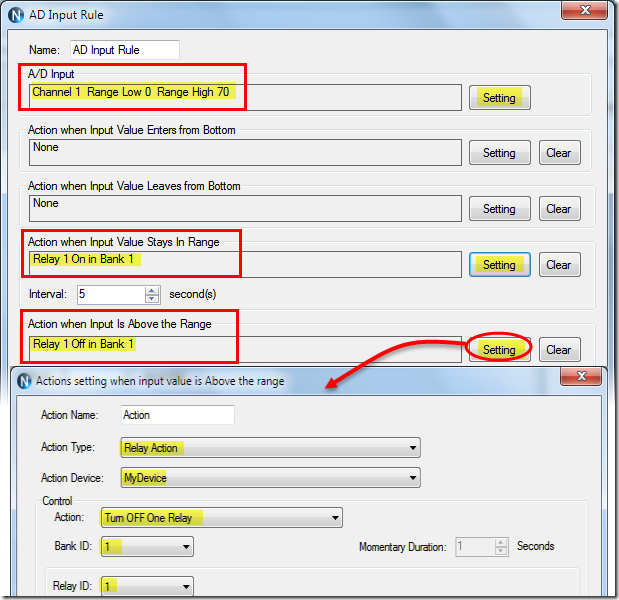 N-Button allows you to use A/D input values in multiple ways without writing code. Numeric values or value ranges can be used to:
- Trigger text or email alerts when thresholds are exceeded
- Control individual relays or banks of relays
- Display live readings on customizable desktop meters
Control Relays with A/D Inputs
N-Button Lite/Pro software makes it incredibly easy to automate relay control using A/D input levels from this board. Simply create an Automation rule that links any A/D input channel to any relay channel. When the input voltage reaches the threshold you define, the relay energizes (turns on). When the input drops below that threshold, the relay de-energizes (turns off). No programming required.Precision + Performance
High-resolution readings ensure accurate measurements, even in demanding environments. Stream live data or automate actions based on your input thresholds.Create Desktop Meters
 N-Button software lets you build live desktop meters that display real-time readings from the AD8 inputs, giving you constant visibility of your sensor data right on your screen. In the example shown, a "Live Soil Moisture Reading" meter provides instant feedback on soil conditions. Right below the meter, Relay 1 and Relay 2 buttons allow you to manually control relays directly from your desktop, or see their current status at a glance - the buttons change color to indicate whether a relay is on or off, giving you a complete view of your system in real time.
Each meter can be individually labeled, like the "Soil Moisture" label shown, making it easy to identify each sensor at a glance. Meter increments are fully customizable - the "Customizable Increments" callout shows how you can adjust the scale to match your application, whether you need fine-grained precision or a broader overview.
N-Button also allows you to arrange multiple meters on your desktop, creating a personalized dashboard that updates in real time. This makes it simple to compare different sensors side by side, spot trends, and react quickly if readings go outside expected ranges (unless you have the relays set automatically). Whether you're monitoring a single sensor or a full set of eight, N-Button makes live data monitoring intuitive and actionable.
Push Notification
N-Button software also includes a powerful point-and-click messaging system that sends alerts to the recipients you choose. Because N-Button runs on your PC, it can automatically deliver text messages and/or emails directly from your computer.Send SMS and email alerts when voltage levels are reached. Customize the subject and message to identify exactly what triggered the alert. You can even set repeat notifications at a defined interval until the input level returns to normal.
Visit our N-Button Page
Power Supply Available
 The PWR12 is regulated power supply providing clean power necessary for
the performance of these boards. The PWR12 US power supply is a 120VAC to 12VDC 1.25A 60Hz regulated
power supply and it plugs into the barrel connector on the board. The output connector is a 2.1mm I.D. x 5.5mm
O.D. x 9.5mm R/A barrel connector.
The PWR12 is regulated power supply providing clean power necessary for
the performance of these boards. The PWR12 US power supply is a 120VAC to 12VDC 1.25A 60Hz regulated
power supply and it plugs into the barrel connector on the board. The output connector is a 2.1mm I.D. x 5.5mm
O.D. x 9.5mm R/A barrel connector.
Click Here for More
Induction Suppression
Controlling
an inductive load using our relay controllers requires the use of induction suppression capacitors. The purpose of this capacitor
is to absorb the high voltages generated by inductive loads, blocking them from the contacts of the relay. Without this capacitor,
the lifespan of the relay will be greatly reduced. Induction can be so severe that it electrically interferes with the microprocessor
logic of our controllers, causing relay banks to shut themselves down unexpectedly.
Click Here for More
N-Button Pro
 N-Button
Lite software allows you to create buttons to control relays and show the status without programming. Create buttons to quickly control
the relay. Create meters for reading the variable input sensors connected to the AD inputs of this board in real time! Enter the COM
port of the board and you are communicating through the USB port the board is plugged into!
Click Here for More
N-Button
Lite software allows you to create buttons to control relays and show the status without programming. Create buttons to quickly control
the relay. Create meters for reading the variable input sensors connected to the AD inputs of this board in real time! Enter the COM
port of the board and you are communicating through the USB port the board is plugged into!
Click Here for More
Software Options


 Not a programmer and these boards look intimidating? Don't worry. Powerful software tools make it easy to get connected, discover attached devices, monitor inputs in real time, and control relays without writing a single line of code. Create on-screen buttons, desktop meters, timed events, and automated actions that respond to inputs, schedules, or system conditions - all from an intuitive graphical interface.
Base Station
Base Station software supports every feature on any ProXR board - no other controller manufacturer even comes close to offering this type of software. Download Base Station.
Base Station Software
Compatible with ALL Boards on This Site
Base Station is a free software download that works by talking directly to your controller to identify the model, then automatically loads the correct graphical interface for controlling and testing that device. It's a great way to learn how any NCD controller works and doubles as a powerful diagnostic tool to verify your device is operating as designed.Base Station exercises every supported feature on every supported device. For learning, testing, and troubleshooting NCD boards, this is the ultimate reference tool.
User Interface
Base Station gives you a list of command sets supported by your controller. Just click any item once to open the custom graphical interface that was created alongside the firmware. Each command set corresponds with a module installed inside your device."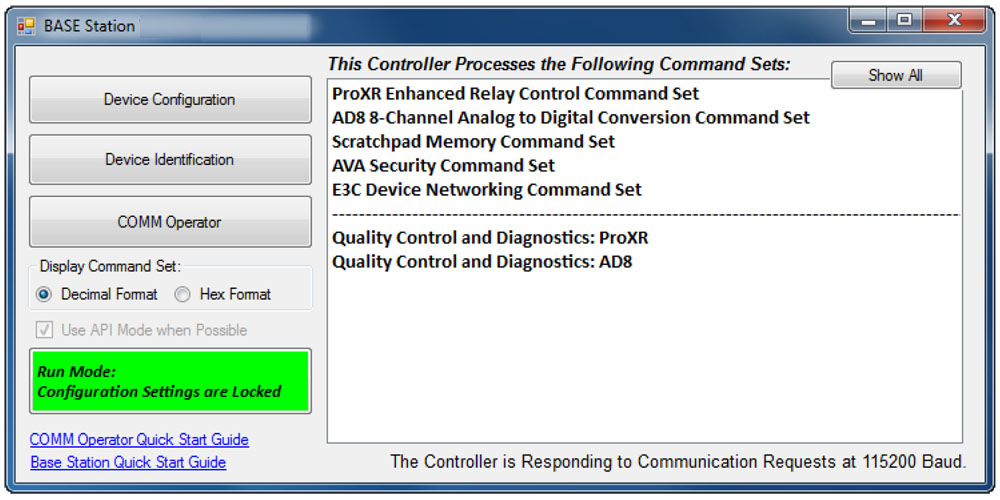
Device Identification
Click the Device Identification window to view important read-only info about your controller.Watch for the field labeled "Documentation Related to this Controller" - it's a complete list of articles connected to your device. Click any entry to open it. (Internet required.)
All devices released in 2012 and later support Device Identification.
Device Command Sets
Base Station asks the controller which command sets it supports, then displays them when the software launches. Some devices show more command sets, others fewer - it's always based on the board.
ProXR users can access the entire ProXR Command Set to turn relays on/off and run every available function.
Control All ProXR Functions
Turn relays on or off, read relay status, monitor inputs - Base Station gives full ProXR control through a clean point-and-click interface.For programmers, Base Station also shows every command being sent to the board, making it a great tool for learning and development.
Useful Features
There are some useful features to look for when using Base Station Software to control, test, or configure your device:- Links to Quick Start Guides and documentation
- Discovery of network devices with IP address display
- Command Set Window for viewing raw commands (especially helpful for ProXR users)
- Relay Activator with Analog Inputs
Configure Buttons
N-Button Lite lets you create on-screen buttons to control relays and view their status - no programming needed. You can also build real-time meters to monitor variable input sensors connected to your board.
N-Button Lite - Full Relay Control
Relay Software
N-Button Lite is third-party software (sold separately) that gives you full relay control and real-time A/D input monitoring without writing a single line of code. It may look simple at first glance, but don't let that fool you - this is a surprisingly powerful tool with a wide range of real-world applications.Create desktop buttons and meters, monitor live input values, and control relays instantly - all from an intuitive point-and-click interface.
Create Buttons & Widgets
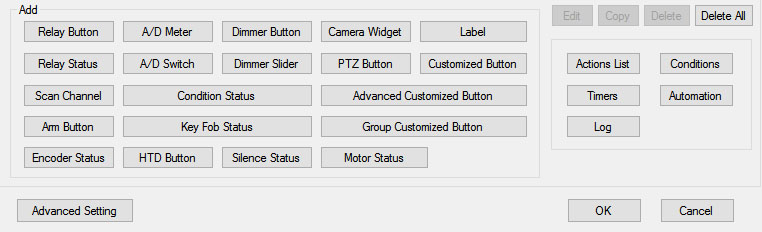 N-Button Lite/Pro lets you build floating desktop widgets that can:
- Control relays and read inputss
- Create buttons to control relays
- Read A/D inputs
- Create live meters from inputs
- Launch applications
N-Button also includes special widgets designed specifically for the boards on this site.
Lite vs. Pro
N-Button Lite includes the same buttons and widgets as the Pro version, but is limited to 16 total widgets. It's ideal for maller projects or cost-conscious applications where you still want full functionality. If your project grows, N-Button Pro removes the limit and supports up to 255 widgets.USB and Network Compatible
N-Button Lite works over Serial/USB or Network connections between your computer and the relay board. Add or modify widgets easily using N-Button Lite Manager to create the exact look and behavior you want. N-Button Lite supports this relay board and any ProXR Relay board with up to 16-widgets.Control Multiple Boards
N-Button Lite software can control multiple devices connected to the same computer or network, allowing you to manage relays, inputs, meters, and automation across several boards from a single interface. Use the built-in Device Manager to easily add, remove, or modify boards and maintain a clear list of all connected devices. Each device is handled independently, making it easy to build scalable systems without adding complexity.For example, a single PC can monitor A/D inputs on one board while controlling relays on multiple network-connected boards.
Time Control Software

 We offer two timer software options to support different types of automation needs: Relay Timer and Quick Timer. Relay Timer is designed for time-of-day scheduling, allowing relays to turn on and off automatically based on the computer's clock - ideal for daily routines and long-term automation. Quick Timer focuses on duration-based control, running relay sequences for a defined length of time that you manually start, making it well suited for test cycles, timed processes, and repeatable sequences.
 Choose the timer that best matches whether your application depends on when an action occurs or how long it runs.
Time Schedule Relay Control
Relay Timer software makes it easy to turn relays on and off automatically at times you choose. Create repeating schedules - daily, weekly, monthly, or on specific days - and connect using USB, serial, or your network.
Relay Timer
Time Schedule Control
Relay Timer is third-party software (sold separately) that works with all ProXR and ProXR Lite relay controllers and supports every available interface - USB, wired, wireless, and network. No matter how your board is connected, Relay Timer communicates seamlessly to deliver reliable, scheduled relay control.Precision Scheduling Using Your Computer's Clock
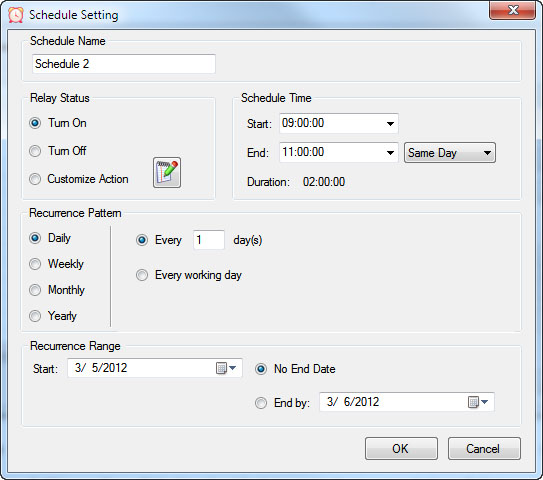 Relay Timer uses the computer's system clock to maintain accurate, drift-free timing. This ensures relay actions stay perfectly synchronized with other applications running on the same machine, such as time clocks or automation software.
A high-resolution timing engine - similar to those used in multimedia applications - provides timing accuracy down to 5 - 10 milliseconds, making Relay Timer well suited for real-time and precision-based control tasks.
High-Speed, Multi-Relay Control
Relay Timer can update up to eight relays simultaneously using the ProXR and ProXR Lite communication protocol. When speed matters, all eight relays can be updated in approximately 30 milliseconds.In multi-relay applications, Relay Timer calculates the state of all relays together, even though each relay operates independently. This ensures fast, coordinated, and predictable behavior across complex schedules.
Take Manual Control
At any time, you can manually take control of a relay to interrupt the active schedule. Resume automatic operation instantly or set a specific time for the software to return to scheduled control - ideal for maintenance, testing, or temporary overrides such as school bells for assemblies.Duration-Based Relay Control
QuickTimer lets you turn relays on or off for a set amount of time - just like setting a timer on an oven or microwave. Once the timer starts, the software handles everything automatically.
Quick Timer
Compatible with ProXR & ProXR Lite Boards
Quick Timer is third-party software (sold separately) that works with all ProXR and ProXR Lite relay controllers and supports every available interface, including USB, wired, wireless, and network connections. The software automatically communicates with your board regardless of how it's connected, making setup quick and straightforward. Designed for responsive, duration-based control, Quick Timer delivers fast, reliable relay operation for timed sequences, test cycles, and repeatable automation tasks.Duration-Based Relay Control (Not Time-of-Day Scheduling)
Quick Timer is designed for applications where how long a relay is energized matters more than what time of day it activates. Instead of using the computer's clock, Quick Timer runs sequences based on a defined time duration.
A sequence is manually started and can:
- Run once and stop automatically, or
- Loop continuously until manually stopped
Flexible Time Sequences Within a Single Duration
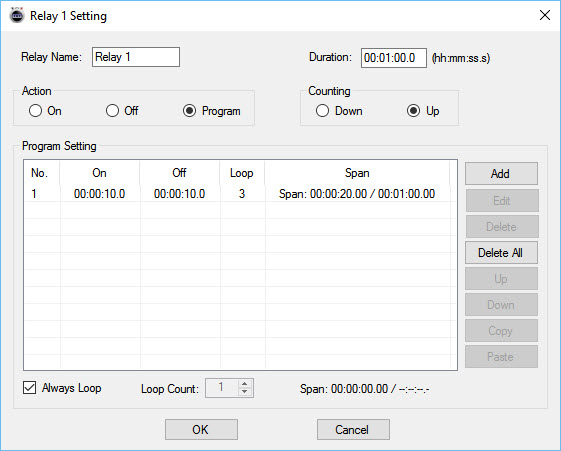 Quick Timer allows you to define a total run duration first. Within that duration, each relay can follow its own independent on/off timing pattern.
Example: 30-Second Sequence
- Relay 1 turns on for 5 seconds, then off for 5 seconds
- Relay 2 turns off for 5 seconds, then on for 5 seconds
- Relay 3 turns on for the first 10 seconds, then off for 20 seconds
- Relay 4 remains off for 10 seconds, then turns on for 20 seconds
Independent Control Per Relay
Each relay can be configured with its own timing behavior while remaining synchronized within the overall sequence duration. This allows complex, coordinated relay patterns without requiring scripting or programming.Manual Override at Any Time
Manual control is always available. Interrupt the active sequence to toggle any relay as needed, then return to automatic operation immediately or at a user-defined time.Built for Real-World Reliability
Quick Timer is designed to handle real-world operating conditions, including communication interruptions, power loss, and system instability. Rather than assuming perfect conditions, the software focuses on predictable behavior and clear user control when issues occur.Confirm Relay Timing in Seconds
Why wait hours - or days - to see if your automation works? Time Travel lets you fast-forward your computer's clock to instantly test Relay Timer schedules and Quick Timer sequences. Jump ahead in time, watch relays trigger exactly when they should, fix issues fast, and get your setup right the first time - no DeLorean required.
Time Travel
Fast-Forward Time for Testing & Automation
Time Travel software answers the age-old question of time travel - at least for your PC. This free utility lets you override and accelerate your computer's clock, making it easy to test time-based automation without waiting in real time. Time Travel is included with Relay Timer, Quick Timer, and N-Button software and is also available as a free standalone download.Instead of waiting hours or days to verify schedules, you can fast-forward time and confirm relay behavior in seconds - saving time, frustration, and repeated test cycles.
Make Time Run Faster
Time Travel can temporarily override your computer's system clock and adjust how fast time runs. Increase the clock speed to simulate long periods instantly - for example, at 3600x speed, a full day passes in just 24 seconds.This makes it easy to validate schedules, sequences, and automation logic without waiting for real-world time to pass.
Ideal for Bench Testing & Development
Time Travel is especially useful for testing any software that relies on the computer's clock, including:
- Relay Timer
- Quick Timer
- N-Button
- Other scheduling or automation applications
Presets & Automatic Time Recovery
Time Travel includes preset configurations that allow you to load saved time and speed settings quickly. Users can create, save, and export presets for future use, and the software remembers the last configuration when restarted.To protect your system, Time Travel automatically restores the computer's clock to the correct local time when the program exits. The system time is only affected while the software is running.
Simple to Use
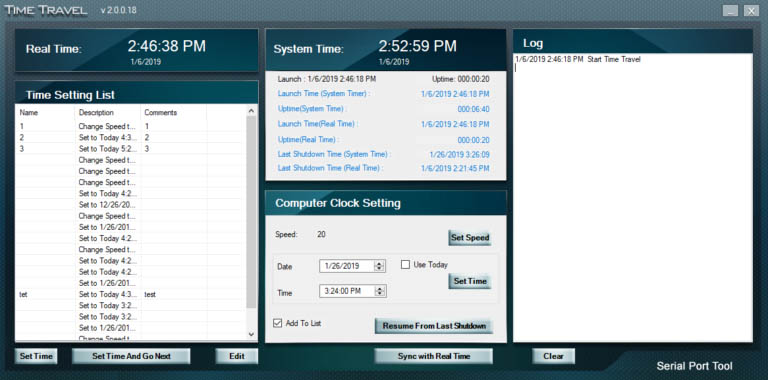 Using ime Travel is straightforward:
- Download and unzip the software
- Run TimeTravel.exe as Administrator
- Current Running Speed - Adjusts how fast the computer clock runs
- Set Time - Changes the computer clock to a specific date and time
- Resume From Last Shutdown Time - Restarts from the last simulated computer time if the system shut down unexpectedly
- Sync with Real Time - Returns the clock to real-time operation (when speed is set to 1x)
Component Library
Visual Studio Samples
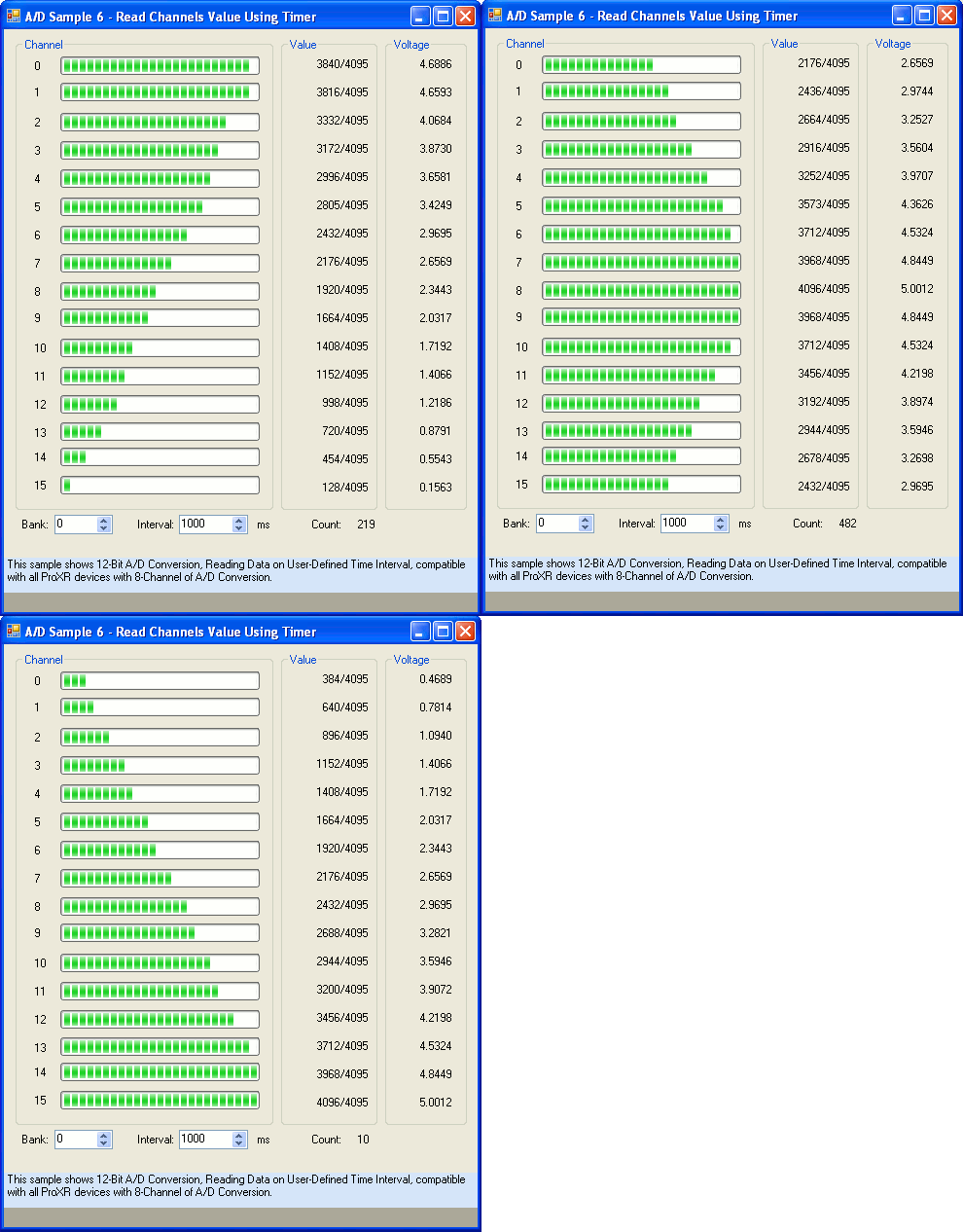 The NCD Component Library is a plug-in for the Visual Studio 2005/2008 that greatly simplifies the communications to the NCD product line. The samples can be run in Visual Studio and fully customizable to your needs. Over 40 fully functional fully working samples are included in this free download.
 Visit our Component Library Page to view all the samples available.