Relay Control Software
N-Button_Lite
Control & Real-Time Status
N-Button Lite is software that allows you to configure buttons to control relays and read the status of those relays without programming. You can also create meters for reading variable input sensors connected to the board in real time!
- OVERVIEW
- N-Button Software
- Multiple Boards
- Action List
- Scheduling
- A/D Input Rule
- Key Fob Automation
- N-Button Lite
- Data Sheets
N-Button Lite at a Glance
- Create Desktop Buttons and Widgets
- Supports 16 Widgets
- Button Widgets Control Relays
- Scan Channel Widgets Display Relay Status
- Meter Widgets Show A/D Input Value - Connects to Any ProXR or ProXR Lite Board
- Any Wired, Wireless or Network Interfaces - Scheduling
- Create Time Schedules
- Uses Computer's Clock
- Use Sensor to Turn on and Specific Time to Turn Off - Push Notifications
- Connectes to Push Notification Boards
- Send Text and or Emails
Scales from Simple to Full Automation
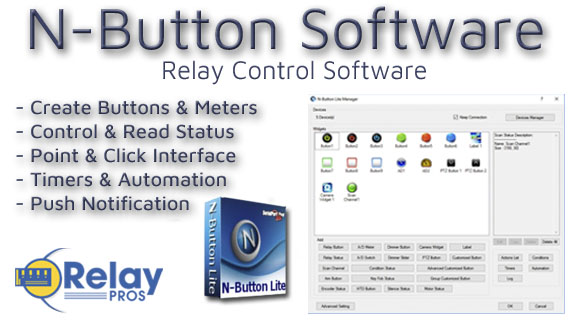
N-Button Lite turns your PC into a powerful relay and sensor control system - no programming required. Create desktop buttons, live meters, and automation rules that control relays, monitor A/D inputs, and send alerts in real time. It's point-and-click control that scales from simple manual operation to full automation across multiple boards.
N-Button Lite - Full Relay Control
Relay Software
N-Button Lite is third-party software (sold separately) that gives you full relay control and real-time A/D input monitoring without writing a single line of code. It may look simple at first glance, but don't let that fool you - this is a surprisingly powerful tool with a wide range of real-world applications.Create desktop buttons and meters, monitor live input values, and control relays instantly - all from an intuitive point-and-click interface.
Create Buttons & Widgets
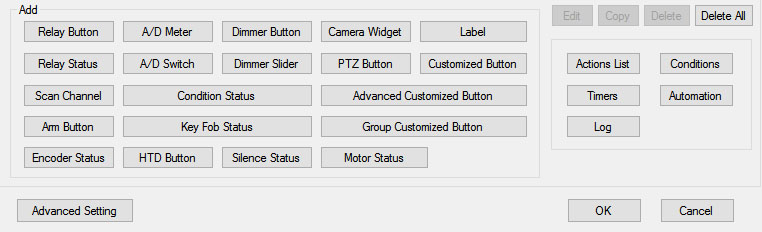 N-Button Lite/Pro lets you build floating desktop widgets that can:
- Control relays and read inputss
- Create buttons to control relays
- Read A/D inputs
- Create live meters from inputs
- Launch applications
N-Button also includes special widgets designed specifically for the boards on this site.
💡 Relay Pro Tip:
Start with simple manual buttons in N-Button Lite, then layer in automation rules once you're comfortable. You don't have to build everything at once.
Supports Up To 16 Widgets
N-Button Lite offers the same widget types as the Pro version but is limited to 16 total widgets - perfect for smaller setups or budget-friendly applications.Need more? You can upgrade to N-Button Pro at any time.
USB and Network Compatible
N-Button Lite works over Serial/USB or Network connections between your computer and the relay board. Add or modify widgets easily using N-Button Lite Manager to create the exact look and behavior you want. N-Button Lite supports this relay board and any ProXR Relay board with up to 16-widgets.Control Multiple Boards
N-Button Lite software can control multiple devices connected to the same computer or network, allowing you to manage relays, inputs, meters, and automation across several boards from a single interface. Use the built-in Device Manager to easily add, remove, or modify boards and maintain a clear list of all connected devices. Each device is handled independently, making it easy to build scalable systems without adding complexity.For example, a single PC can monitor A/D inputs on one board while controlling relays on multiple network-connected boards.
Relay Control with N-Button
Create buttons on your computer's desktop that can control relys and show their status in real time. Buttons can be configured to control each relay on the board.
Relay Control
Create Relay Buttons
Relay Button Widgets are the heart of N-Button. They let you turn relays ON or OFF instantly from your desktop - no programming, no scripting, and no setup headaches. Using an intuitive point-and-click interface, you can create exactly the type of control you need in seconds.Create:
- A simple ON button
- A simple OFF button A toggle button (one click ON, next click OFF)
 |
 |
 |
 |
Create Buttons That Show Status
Relay Status Widgets automatically reflect the live state of each relay. As shown in the example, buttons can change color based on whether a relay is ON or OFF, so a quick glance at your screen tells you exactly what's happening in real time.This visual feedback reduces guesswork and makes it easy to monitor multiple relays at once - especially in systems where knowing the current state is just as important as controlling it.
Create Custom Buttons
Custom Buttons give advanced users access to the full power of the ProXR Command Set, one of the most advanced relay command systems in the industry. With N-Button Lite, you can send any supported ProXR command with a single button press - all without needing to write or compile code.Each button can be fully customized to match your workflow. Change the button color, shape, and label, and configure colors to automatically update based on relay status. In the example shown, different colors clearly indicate ON and OFF states, making relay control both intuitive and visually unmistakable.
Whether you need simple control, live status feedback, or advanced command execution, N-Button buttons give you fast, flexible, and reliable control right from your desktop.
AD8 with N-Button
Using N-Button software, you can control relays, build desktop meters that show real-time readings from the AD8 inputs. You can also create automatic push notifications messages triggered by those sensor values.
Using A/D Inputs with N-Button
A/D Inputs
All ProXR Lite boards and ProXR boards that begin with ZADR or ZADSR include an onboard 8-channel Analog-to-Digital converter in addition to relay control. Each channel accepts a 0-5V DC input and converts it into a numeric value for processing.Using the AD8 Command Set, analog voltages are translated into digital values (8- or 10-bit resolution, depending on configuration), making it easy to monitor and act on sensor data from a wide range of devices.
Control Relays Based on Analog Input Levels
N-Button Lite and Pro support powerful A/D Input Automation rules that allow you to automatically control relays based on analog input levels. Simply define a voltage threshold or range, and N-Button will energize or de-energize relays as conditions change.N-Button also supports Send Email and Text Message actions (Push Notifications), enabling automatic alerts when an A/D input reaches a specific level or falls within a defined range. Relay control and notifications can work together seamlessly, all driven by live A/D input data.
Works Seamlessly with N-Button Software
Each A/D channel supports industry-standard 0-5V inputs, making it simple to integrate a wide range of sensors without extra hardware. Using N-Button, you can:- Build desktop meters that show real-time sensor data
- Create dashboards with multiple sensor feeds
- Trigger Push Notification alerts from A/D thresholds
- Control relays based on sensor conditions - no programming required
Using the Input Information
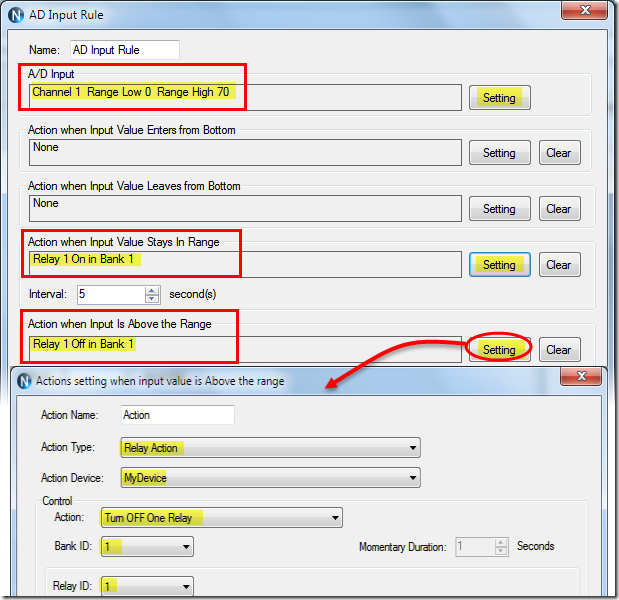 N-Button allows you to use A/D input values in multiple ways without writing code. Numeric values or value ranges can be used to:
- Trigger text or email alerts when thresholds are exceeded
- Control individual relays or banks of relays
- Display live readings on customizable desktop meters
Control Relays with A/D Inputs
N-Button Lite/Pro software makes it incredibly easy to automate relay control using A/D input levels from this board. Simply create an Automation rule that links any A/D input channel to any relay channel. When the input voltage reaches the threshold you define, the relay energizes (turns on). When the input drops below that threshold, the relay de-energizes (turns off). No programming required.Precision + Performance
High-resolution readings ensure accurate measurements, even in demanding environments. Stream live data or automate actions based on your input thresholds.Create Desktop Meters
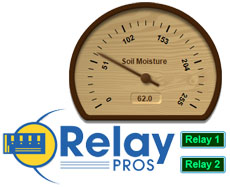 N-Button software lets you build live desktop meters that display real-time readings from the AD8 inputs, giving you constant visibility of your sensor data right on your screen. In the example shown, a "Live Soil Moisture Reading" meter provides instant feedback on soil conditions. Right below the meter, Relay 1 and Relay 2 buttons allow you to manually control relays directly from your desktop, or see their current status at a glance - the buttons change color to indicate whether a relay is on or off, giving you a complete view of your system in real time.
Each meter can be individually labeled, like the "Soil Moisture" label shown, making it easy to identify each sensor at a glance. Meter increments are fully customizable - the "Customizable Increments" callout shows how you can adjust the scale to match your application, whether you need fine-grained precision or a broader overview.
N-Button also allows you to arrange multiple meters on your desktop, creating a personalized dashboard that updates in real time. This makes it simple to compare different sensors side by side, spot trends, and react quickly if readings go outside expected ranges (unless you have the relays set automatically). Whether you're monitoring a single sensor or a full set of eight, N-Button makes live data monitoring intuitive and actionable.
Push Notification
N-Button software also includes a powerful point-and-click messaging system that sends alerts to the recipients you choose. Because N-Button runs on your PC, it can automatically deliver text messages and/or emails directly from your computer.Send SMS and email alerts when voltage levels are reached. Customize the subject and message to identify exactly what triggered the alert. You can even set repeat notifications at a defined interval until the input level returns to normal.
Control More Than Just Relay Boards
 Your widgets aren't limited to relay boards. You can configure buttons to:
- Send custom serial/IP data
- Open files, folders, or programs
- Launch applications
- Send HTTP requests
- Trigger data lists
N-Button Videos
Configuring the Software
Setting up Push Notification with N-Button:
1-Once you've established communication with the board
2-Create a Scan Channel in N-Button Software to monitor the board inputs.
3-Configure text and/or email notifications for each input you want to monitor.
Push Notification with N-Button
"Turn equipment status signals into notifications with N-Button."
N-Button Software
N-Button Pro/Lite Software is the monitoring and notification platform used with Push Notification boards.Using a simple point-and-click interface, N-Button allows you to monitor dry contact inputs, configure text and email notifications, create visual status indicators and automate actions based on equipment status changes.
Each monitored input can have its own custom notification message, recipient list, visual indicator and automation rules, making the software ideal for equipment alarms, security monitoring, process alerts and unattended systems.
There are no monthly subscription fees for N-Button Software. Notification limits are based only on the email or SMS provider being used.
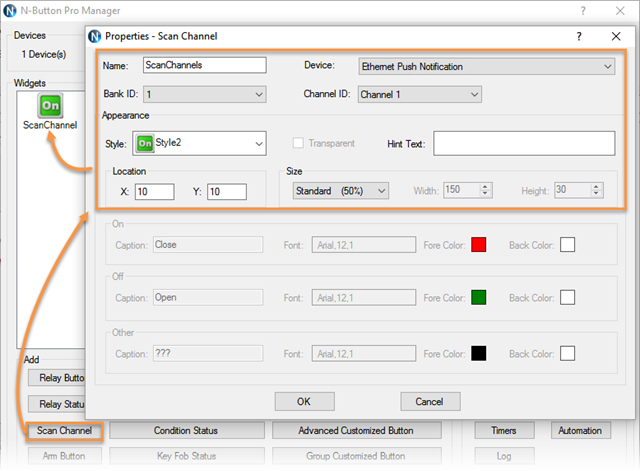
Scan Channels
Scan Channels are the core of the Push Notification monitoring system.A Scan Channel continuously monitors an input on the Push Notification board and determines whether the dry contact circuit is open or closed.
When the input changes state, the Scan Channel processes the event and can trigger text notifications, email alerts, visual indicators and automation actions within N-Button Software.
A separate Scan Channel is typically created for each input on the board, allowing every monitored device or alarm condition to have its own notification settings and visual status indicator.
Monitor Inputs From Your Desktop
 When a Scan Channel is created, N-Button will place place a visual status widget directly on the desktop of your computer. The widget continuously reflects the current state of the monitored dry contact input using user-defined colors for both the open and closed conditions.
 This provides a simple real-time visual indication for monitoring doors, gates, alarm contacts, equipment status signals, tank levels and other connected sensors.
Desktop monitoring can be used by itself for visual status indication or combined with text and email notifications for complete alarm monitoring and response.
Gmail & Email Setup
N-Button Software sends notifications using standard email accounts such as Gmail and other SMTP-compatible providers.Email notifications are sent directly to the recipient's email address. SMS notifications are typically sent using an Email-to-SMS Gateway Address provided by the recipient's mobile carrier.
Instead of entering only a phone number, SMS recipients are configured using the carrier's Email-to-SMS Gateway Address, which converts the email into a text message delivered to the mobile device.
A single notification can be sent to multiple email addresses, SMS recipients or a combination of both.
For Gmail accounts, Google App Passwords are required when 2-Step Verification is enabled. Step-by-step setup information is included in the detailed setup guides below.
SMS notifications are typically delivered using your mobile carrier's Email-to-SMS Gateway service. Simply enter the gateway address provided by the carrier and N-Button will send the notification as a text message.
Send SMS, Email or Both
N-Button Software can send text notifications, email alerts or both simultaneously when a monitored input changes state.Custom subjects and messages may be configured for each input so recipients know exactly which alarm, sensor or piece of equipment triggered the notification.
💡 Relay Pros ProTip:
Notifications can be configured to repeat at specific intervals until the alarm condition clears. For example, if a freezer temperature alarm triggers a dry contact output, text and email alerts can continue being sent to maintenance personnel until the temperature returns to normal.
Automation & Relay Control
Control Actions from Inputs
N-Button Software can also trigger actions based on input status changes.Using Automation Rules, Push Notification board inputs can control relays on compatible relay boards to activate warning lights, buzzers, sirens, fans or other connected equipment automatically.
For example, when an alarm contact closes, N-Button can simultaneously:
- Send text and email notifications
- Display a visual alarm on-screen
- Activate a warning light or buzzer
- Control relays on additional boards
💡 Relay Pros ProTip:
If your application also requires relay control, ProXR Lite relay boards can provide an all-in-one solution. ProXR Lite boards include onboard relays along with A/D inputs capable of monitoring dry contact closures, allowing the same board to read inputs and control relays simultaneously.
Need More Information?
Detailed step-by-step information for each interface below.USB Push Notification Setup
Ethernet Push Notification Setup
Control Multiple Boards with N-Button
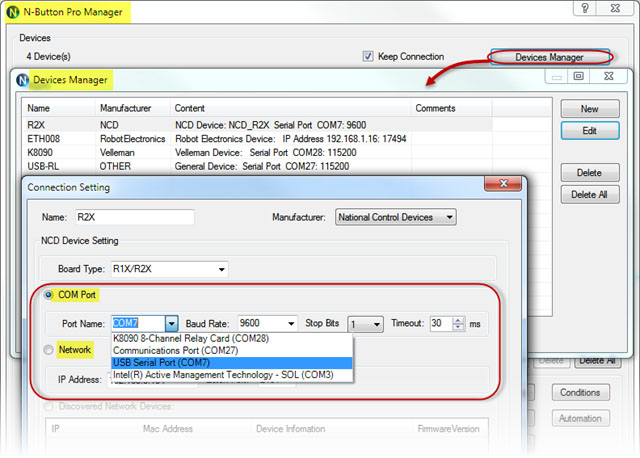 N-Button Pro/Lite software can control multiple boards, which are connected to the same computer or network. Most of our enquires are for mulitple Wi-Fi boards on the same network and this can be done! N-Button Pro/Lite allows you to enter multiple boards in the Device Manager and control them on one central computer!
Device Manager
Device Manager allows you to enter multiple boards with their IP addresses into the system. Once in Device Manager each individual relay on each board will be able to be independently controlled and you can instantly see the status of those relays. Controlling doors...you can see which is open or unlocked! Controlling irrigation...set a timer! Controlling Lighting...set a darkness paramiter!Creating Buttons
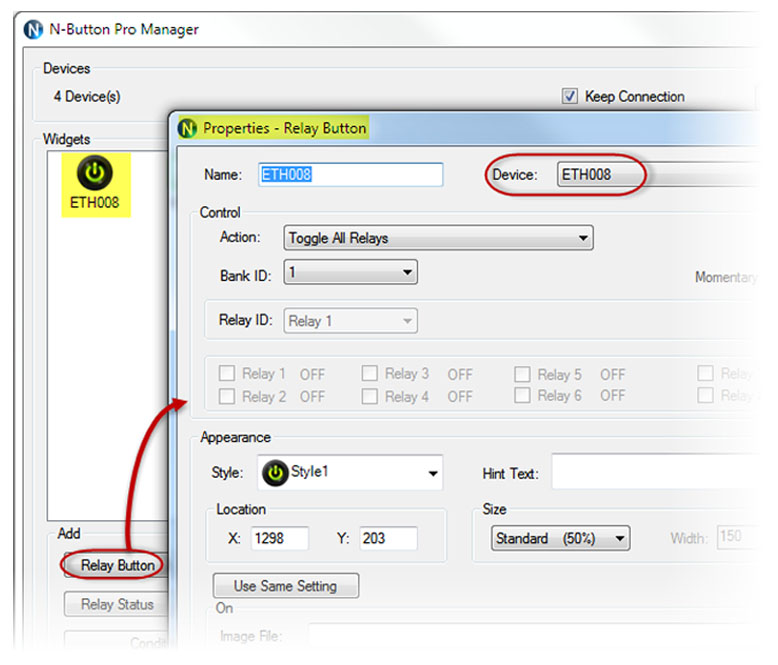 Each button on your desktop can be individually labeled so you know which button controls which relay. Front Door, Back Door, Outside Lights anything you want can be put on the labels!
What Can They Do?
You have the full ProXR Command set at you disposal. The ProXR Command set is the industry leading command set for controlling relays and the list of it's capabilities is extensive! Please note that you will need to have a ProXR or ProXR Lite board to use this command set. You can set delays, start a time sequence, turn on with one click and turn off with another! Have an outside door that you're controlling the lock? You can click the button and the relay will only energize for 15 seconds so the door will lock automatically! Put a 2-channel relay board at a location and have a light come on at the same time a door opens with the Toggle All Relays command.What's the Limit?
While without actually testing a large number of boards on a Wi-Fi network we don;t know of a limit at this time. That's not to say that there is an unlimited number that can be controlled. If you are interested in have a large number of board on a network controlled ny N-Button we reccommend reaching out to the developers of the software to give them your specifications. Modifications may need to be made to the N-Button Pro software as well as your network equipment. Call our office and we can discuss this.AD8 with N-Button
Using N-Button software, you can control relays, build desktop meters that show real-time readings from the AD8 inputs. You can also create automatic push notifications messages triggered by those sensor values.
N-Button Software
Using A/D Inputs with N-Button
N-Button Lite and Pro support powerful A/D Input Automation rules that allow you to automatically control relays based on analog input levels. Simply define a voltage threshold or range, and N-Button will energize or de-energize relays as conditions change.N-Button also supports Send Email and Text Message actions (Push Notifications), enabling automatic alerts when an A/D input reaches a specific level or falls within a defined range. Relay control and notifications can work together seamlessly, all driven by live A/D input data.
A/D Inputs
All ProXR Lite boards and ProXR boards that begin with ZADR or ZADSR include an onboard 8-channel Analog-to-Digital converter in addition to relay control. Each channel accepts a 0-5V DC input and converts it into a numeric value for processing.Using the AD8 Command Set, analog voltages are translated into digital values (8- or 10-bit resolution, depending on configuration), making it easy to monitor and act on sensor data from a wide range of devices.
Works Seamlessly with N-Button Software
Each A/D channel supports industry-standard 0-5V inputs, making it simple to integrate a wide range of sensors without extra hardware. Using N-Button, you can:- Build desktop meters that show real-time sensor data
- Create dashboards with multiple sensor feeds
- Trigger Push Notification alerts from A/D thresholds
- Control relays based on sensor conditions - no programming required
Using the Input Information
N-Button allows you to use A/D input values in multiple ways without writing code. Numeric values or value ranges can be used to:- Trigger text or email alerts when thresholds are exceeded
- Control individual relays or banks of relays
- Display live readings on customizable desktop meters
Control Relays with A/D Inputs
N-Button Lite/Pro software makes it incredibly easy to automate relay control using A/D input levels from this board. Simply create an Automation rule that links any A/D input channel to any relay channel. When the input voltage reaches the threshold you define, the relay energizes (turns on). When the input drops below that threshold, the relay de-energizes (turns off). No programming required.Precision + Performance
High-resolution readings ensure accurate measurements, even in demanding environments. Stream live data or automate actions based on your input thresholds.Create Desktop Meters
N-Button software lets you build live desktop meters that display real-time readings from the AD8 inputs, giving you constant visibility of your sensor data right on your screen. In the example shown, a "Live Soil Moisture Reading" meter provides instant feedback on soil conditions. Right below the meter, Relay 1 and Relay 2 buttons allow you to manually control relays directly from your desktop, or see their current status at a glance - the buttons change color to indicate whether a relay is on or off, giving you a complete view of your system in real time.
Each meter can be individually labeled, like the "Soil Moisture" label shown, making it easy to identify each sensor at a glance. Meter increments are fully customizable - the "Customizable Increments" callout shows how you can adjust the scale to match your application, whether you need fine-grained precision or a broader overview.
N-Button also allows you to arrange multiple meters on your desktop, creating a personalized dashboard that updates in real time. This makes it simple to compare different sensors side by side, spot trends, and react quickly if readings go outside expected ranges (unless you have the relays set automatically). Whether you're monitoring a single sensor or a full set of eight, N-Button makes live data monitoring intuitive and actionable.
Push Notification
N-Button software also includes a powerful point-and-click messaging system that sends alerts to the recipients you choose. Because N-Button runs on your PC, it can automatically deliver text messages and/or emails directly from your computer.Send SMS and email alerts when voltage levels are reached. Customize the subject and message to identify exactly what triggered the alert. You can even set repeat notifications at a defined interval until the input level returns to normal.
Visit our N-Button Page
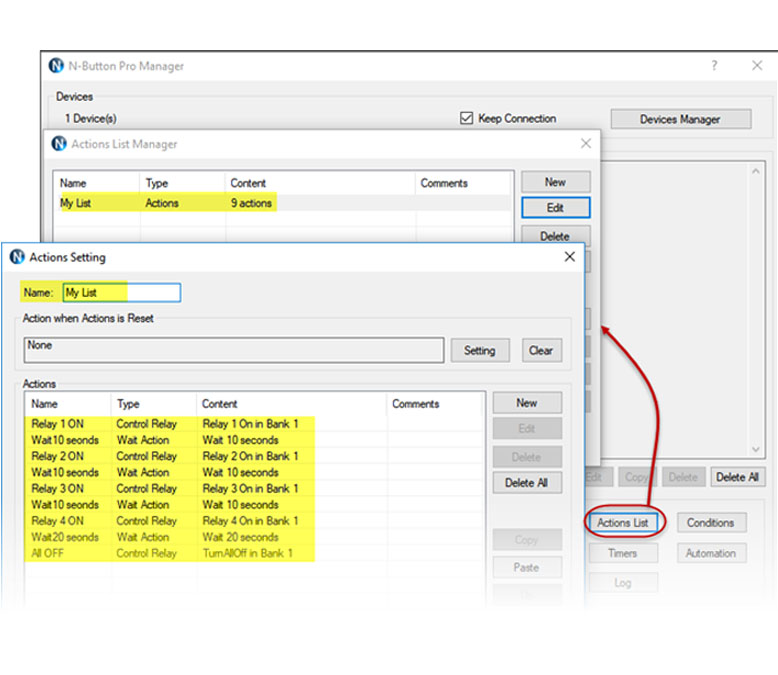 N-Button Pro/Lite has the ability to create an Action List. The Action List is just as it sounds, a list of actions tha that you would like to have done when a button is pushed. It allows you to add several actions to a list such as truning on a specific relay and turning on another one at a later time. The actions can be executed easily and in order by creating a Customized Button or having a sensor input trigger the action.
Action List Example
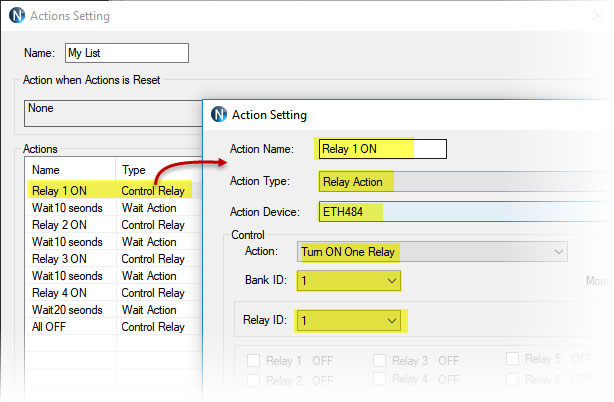 In the Examples on this tab there is a 4-channel board and each relay turns on independently of each other. A button push starts the sequence and relay 1 turns on, 10 seconds later relay 2 turns on then relay 3 and 4 with a 10 second delay between. After relay-4 truns on there is a 20 second delay and all relays turn on at the same time. This sequence can be started by creating a Custom Button or you can set it to start with a sensor of some kind.
Unlimited Applications
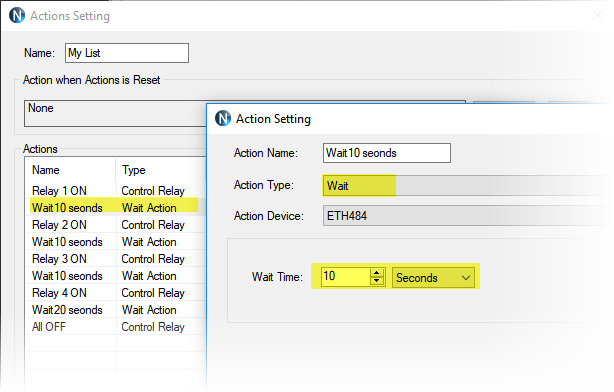 The applications for this are almost unlimited! Turning on relays in a sequence or using an Action List for a time delay with just one or two relays can create an automated way to turn off the relays. Bench testing a product where you need to have relays activated in a sequence is as easy as a button push. A lighting feature in a display that needs to be displayed in a sequence can be done with a button push.
 Automation Schedule Rule
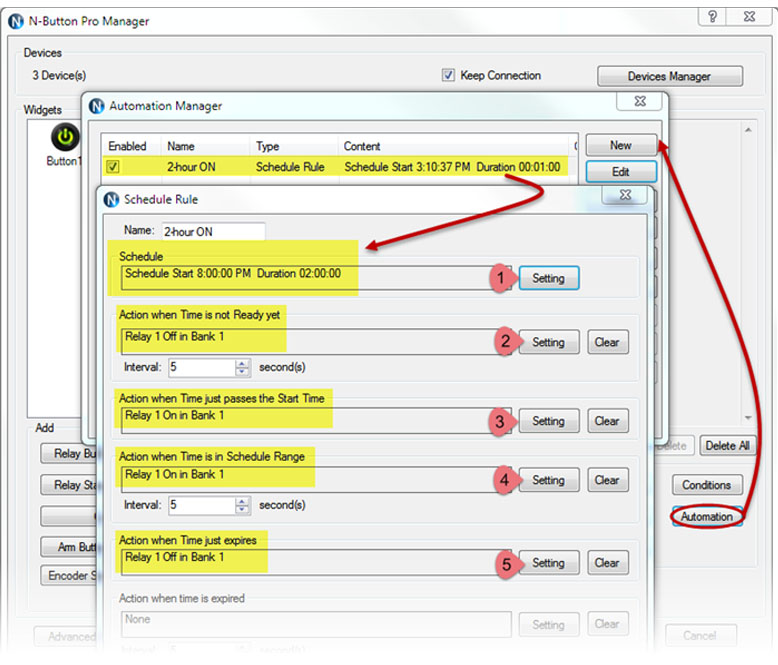 N-Button Pro/Lite Automation feature allows you to control relays or other devices automatically according to different rules such as time. Scheduling allows you to set a specific time to activate a relay. Scheduling also allows you to to set a duration for the relay to be activated. You can set what you want to happen before, during and after the schedule range.
Schedule Example
If you want to have a particular device activated only for a certain time say while your office is open you can set a time duration where it will turn on automattically at 9:00 AM and run for 8 hours. Outside demonstration equipment for example couldn't be used outside of work hours because there is no power to the unit.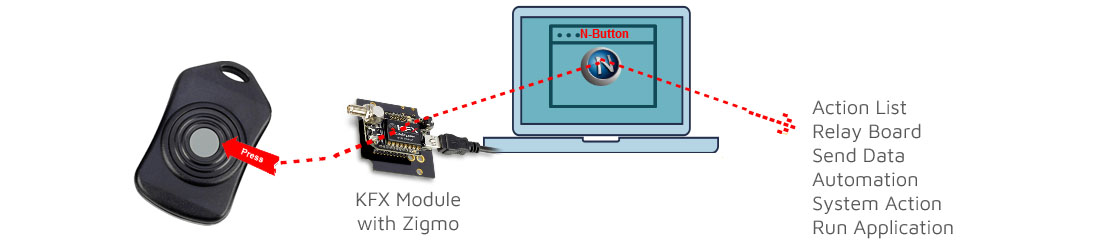
Action List
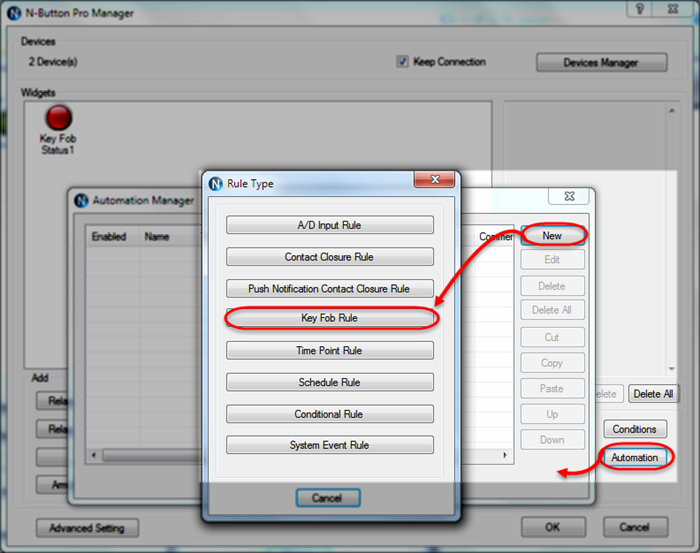 N-Button Pro/Lite has Automation feature, which allows you to control relays or other devices automatically according to selected rules. One of the rules can be reading a key fob button press and complete an action such as controling a relay, sending data, or an action list you have created!
 N-Button Key Fob Support
Each Key Fob should be paired with a KFX Receiver Module (sold seperatly). The KFX Receiver Module must be plugged into the ZIGMO, which acts as an interface between your computer and the KFX Receiver. The Zigmo will moount as a COM port on your PC. N-Button will then communicate to the KFX Module through that COM port and read the kay fob button pushes! Using Base Station you can configure the button to toggle, momentary or even set delays. Based on what your action will be will deturmine what type of button action you will require.Here's What's Needed
- Key FoB
- KFX Module
- Zigmo
- N-Button Software
Key Fob Status
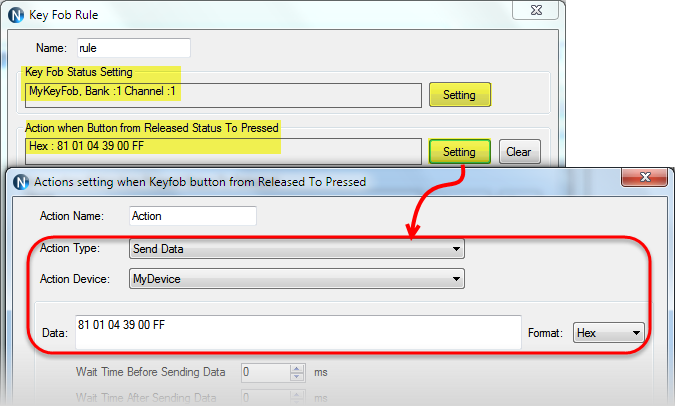 By setting a Key Fob Status widget you can then configure N-Button to do a task based on the status. You can send data, control a relay or any task from the Action List.
Send Data
N-Button gives you the ability to send data to a device by a simply button push! A question that we get alot is being able to send data with a key fob and it can be done using N-Button.Actions List
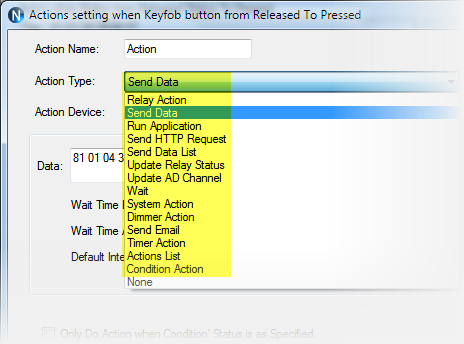 You can set the key fob buttons to do different actions supported by N-Button. That means you can execute the entire list actions N-Button offers just by pressing simply pressing a key fob button!